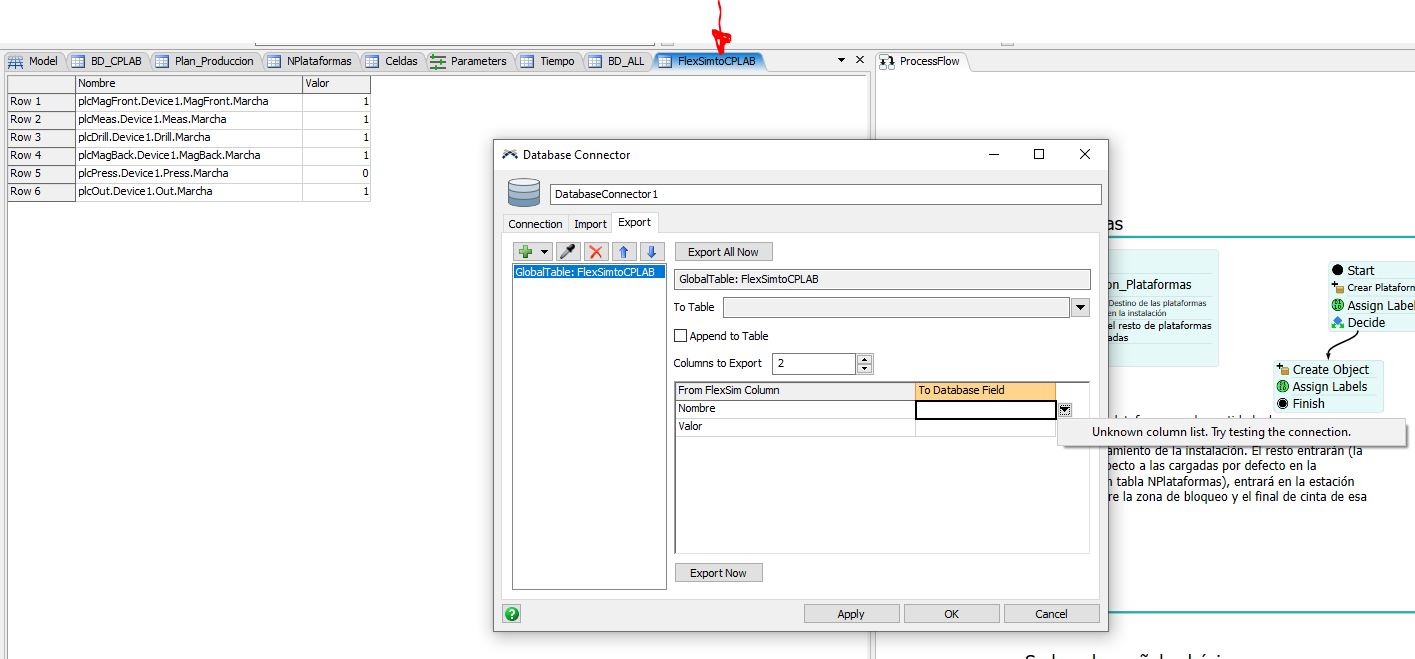
Export a Global Table from FlexSim to BaseDate MySQL

Export a Global Table from FlexSim to BaseDate MySQL

borja_lorenzo
Advocate Advocate
4,239 Views
8 Replies
Message 1 of 9

Export a Global Table from FlexSim to BaseDate MySQL

borja_lorenzo
Advocate
Advocate

[ FlexSim 24.1.1 ]

Hello,

I am trying to export a Global Table “FlexSimtoCPLAB” from FlexSim to a MySQL Database. I have tested the connection with the database and I use HeidiSQL for managing this database. Previously, I imported data into this same database and it worked perfectly.


conectividad-flexsim.jpg


The DatabaseConnector tree appears as follows:

1728070648955.png

Where it can be seen that the exporters node does not have the subnodes that it should have. It can be seen that in the tableList node, two subnodes appear corresponding to the two tables I have in my database, but the names do not appear.

In the following image, I have observed in a model that I downloaded from this forum that the export node does expand and has subnodes and the tableList has name
1728070782574.png

When I want to make the export to DB, but it does not show this table created in the database, and therefore, I cannot map the columns.

export-from-flexsim-2.jpgexport-from-flexsim.jpg

What am I doing wrong? How is it done?

I had to configure the root user with the authentication plugin:

mysql_native_password.

because the "caching_sha2_password" was giving me an error.
The version of MySQL I am using is 8.0.26.

0 Likes
Accepted solutions (1)
4,240 Views
8 Replies
Replies (8)
Message 2 of 9

borja_lorenzo
Advocate
Advocate

Hello @Matthew Gillespie,

Sorry to mention you directly, but I have reviewed your response to this question "Connection Failed with Error: libmySQL.dll - FlexSim Community" and it aligns very well with certain problems I am encountering with MySQL and FlexSim. Could you help me with the question I have posted? Thanks in advance.

0 Likes
Message 3 of 9

borja_lorenzo
Advocate
Advocate

I am adding an update to this question for anyone interested. According to the recent comment by Jordan Johson, it could be a bug. They will look into it

https://answers.flexsim.com/comments/171503/view.html

0 Likes
Message 4 of 9

Jeanette_Fullmer
Community Manager
Community Manager

Hi @Borja Lorenzo,

Were you able to solve your problem? If so, please add and accept an answer to let others know the solution. Or please respond to the previous comment so that we can continue to help you.

If we don't hear back in the next 3 business days, we'll assume you were able to solve your problem and we'll close this case in our tracker. You can always comment back at any time to reopen your question, or you can contact your local FlexSim distributor for phone or email help.

0 Likes
Message 5 of 9

borja_lorenzo
Advocate
Advocate

Hello Janette, thanks for your comments.
I didn’t quite understand. Do I need to respond to one of my own comments? Has no one given me an answer about this yet? I have posted this question or commented on this same topic from different points in the forum without success. Below, I am pasting the same response that I am giving you from other published points.

The export function of the DataBase Connector is still not working. To perform the export, I had to do it through the code, using this part of the manual. However, I would like to know if I have a configuration problem or if it is a software bug.

Thanks in adance for your feedback.

0 Likes
Message 6 of 9

logan_gold
Community Manager
Community Manager

Hey @Borja Lorenzo, I do see the issue on the dev list, so we'll just have to wait until a developer can look into it more. We'll try to update this post if we get any more information, but I don't know when that might be.

Message 7 of 9

Jeanette_Fullmer
Community Manager
Community Manager
Accepted solution

Hello @Borja Lorenzo,

The Development team has been notified of this.

The following is a workaround to be able to write the table name in the database connector. Since the UI will not allow you to select the table you can write the table name in the tree. The following is an example path to the node.

MODEL:/Tools/DatabaseConnectors/DatabaseConnector1>variables/exporters/1/tableName

1730907831881.png

I did not have the UI open when writing the table name. This will prevent the UI from overwriting what you wrote in the tree node. You can open the UI after you have added the table name.

Message 8 of 9

borja_lorenzo
Advocate
Advocate

Hello Jeanette,

Thank you for your input.

It works.

bdc-exp-1.png

In the TableFlexSim node, I wrote the name of my table. To map the columns, I also had to add the names of the columns ("name" and "valor") that I pointed out with a red arrow and that belong to the destination table (TableFlexSim)


I noticed that when adding the second column, the names of the nodes From FlexSim Column and To Database Field do not appear, this is right?

I understand that this is a manual solution that only allows interaction with one table and that the BaseDate Connector selector does not work well. For a second table, would I need to create another purple node like the one I circled in the image?
bdc-exp-2.png

Thank you in advance for your comments.

0 Likes
Message 9 of 9

Jeanette_Fullmer
Community Manager
Community Manager
Hello @Borja Lorenzo,

For the second collum names the nodes do not seem to be named but if you select the nodes you will see the values filled in that you have in the table in the UI.

If you need another table, in the UI select the green plus sign in the upper left and create another export. You will see another purple node created like the first.