Part is moving off 0 when finish is clicked

Part is moving off 0 when finish is clicked

Anonymous
Not applicable
1,101 Views
11 Replies
Message 1 of 12

Part is moving off 0 when finish is clicked

Anonymous
Not applicable

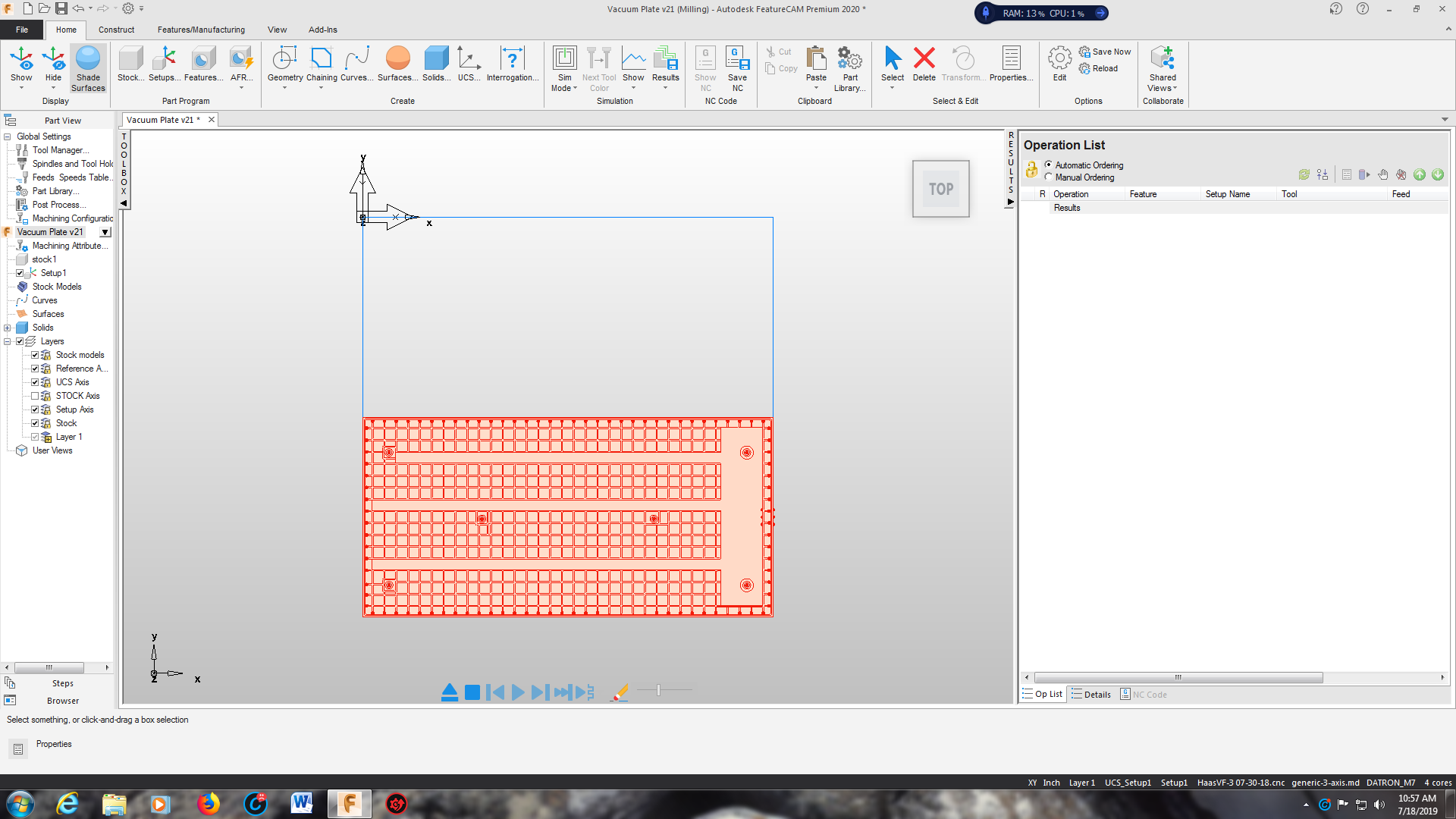
This one has me about as frustrated as I can get. I am trying to import a step file but when I do the part magically moves off the material. The part appears to open fine and going through the wizard everything looks correct until you click finish. I have added screen shots below to show what is going on. Any guesses as to what is going on or how to fix this problem.

0 Likes
Accepted solutions (1)
1,102 Views
11 Replies
Replies (11)
Message 2 of 12

Muppett1
Advocate
Advocate

Kev, could it have something to do within the setup properties "zero" tab?  During regular setup creations I started noticing my datum was shifting, and I had to physically reset my setup "zero" to align with my existing UCS, as opposed to aligning with Stock Face or Geometry.  It didn't do this before 2019 that I can recall, but I now have to change it to STAY aligned with my CURENT UCS or it'll align with either the stock face or geometry.   This example is within an existing file when adding a setup btw.

0 Likes
Message 3 of 12

bhorstTGM48
Collaborator
Collaborator

I have had this happen before, there is some tiny POS that you cannot see. Hide your solid model. Do a Ctrl A to select ALL and hit hour delete key. Now resize your stock and see if it works correctly? 

0 Likes
Message 4 of 12

Anonymous
Not applicable

I don't believe it is a tiny POS I have had them before and it will make the material oversized not shifted off of the part. Especially when it clearly shows the material sized and positioned correctly just before I click the finish button. I will try the UCS alignment but I don't know if that will work either. I am using the wizard XY AND Z are unchanged from the way it imports. My stock size to my is computed from the part with no additional stock on XY or Z. I used the upper left and the lower left positions for my UCS position. Both do the same thing.

0 Likes
Message 5 of 12

bhorstTGM48
Collaborator
Collaborator

Can you upload your model so I can try it?

0 Likes
Message 6 of 12

Anonymous
Not applicable

Okay I went in and tried physically  changing the setup to align with the UCS and no luck.

0 Likes
Message 7 of 12

Anonymous
Not applicable

Guess not it doesn't seem to want to let me upload a step file for some reason.

0 Likes
Message 8 of 12

Muppett1
Advocate
Advocate
Accepted solution

Kev, can you try double clicking the stock and resizing from there? Select center after clicking the resize button and see what that does?

Message 9 of 12

Anonymous
Not applicable

awesome that did the trick I double clicked the material clicked resize clicked enter specific stock dimensions then clicked center. It centered the material then I had to go to the UCS and relocate it to the proper position. This was just a weird one. Ive never seen anything like it in my 20+ yrs of using FC.

0 Likes
Message 10 of 12

kelbie.ockey
Alumni
Alumni

Good work @Muppett1 


@Anonymous Would you mind uploading the file so that I can take a look still? You may need to zip the file to get it to upload.


Thanks!


Kelbie Ockey
Sr. Implementation Consultant
0 Likes
Message 11 of 12

Anonymous
Not applicable

Okay I'll try a zip file here you go

0 Likes
Message 12 of 12

Muppett1
Advocate
Advocate

Good deal Kev, I usually don't use the wizard anymore, so this is usually how I import and resize my stock anyway these days.  😉

0 Likes