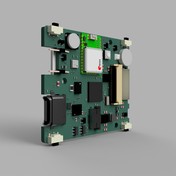
Correct method to define parts without 3D-package

Correct method to define parts without 3D-package

Andreas.Schimke
Advocate Advocate
3,881 Views
16 Replies
Message 1 of 17

Correct method to define parts without 3D-package

Andreas.Schimke
Advocate
Advocate

Hello all,


what is the correct way to define parts with "no 3D-package", like pcb marks, test points and so one?

In a other thread was the suggestion given to hide the not needed components in Fusion.

But, hiding a few (20-100 components) in Fusion isn't fun at all, especially if you redoing this by placing your pcb in a new Fusion model...


Also in the sync menu will show you everytime the notice "!" that no 3D model is defined.

Push-to-Fusion.jpg

Therefore my question what is the intend way we as user should define our parts in Eagle, so that push to fusion show no alert and no package is visible in Fusion?


Regards,

Andreas

Reply
Reply
0 Likes
Accepted solutions (1)
3,882 Views
16 Replies
Replies (16)
Message 2 of 17

jorge_garcia
Autodesk
Autodesk
Accepted solution
Hello Andreas,

Welcome to our forum! Our devs are going to implement a way to tell Fusion that a specific component doesn't need a 3D model. For now the way some users are working around it is by uploading an empty step file. It's a hack but for now it's probably the best way around this issue until we have a more permanent solution.

Please let me know if there's anything else I can do for you.

Best Regards,


Jorge Garcia
​Product Support Specialist for Fusion 360 and EAGLE

Kudos are much appreciated if the information I have shared is helpful to you and/or others.

Did this resolve your issue? Please accept it "As a Solution" so others may benefit from it.
Reply
Reply
0 Likes
Message 3 of 17

Anonymous
Not applicable

Hello -


Curious to see if there has been any update to this request, as we are facing the same issue (we have a moderate number of items such as conditionally installed components, surface test points, JTAG header pads etc.) that do not have physical models associated with them. I tried the trick of uploading an empty step file, but when I export a step file from an empty file in Fusion 360, and then try to upload this step file as a model when editing a component's package in the managed library at circuits.io, this results in an error message of "Failed to convert model file". So at the moment I can't figure out a method to get rid of the default box models other than hiding them after the translation from Eagle to Fusion 360.


Thanks,

Darrin

Reply
Reply
0 Likes
Message 4 of 17

jorge_garcia
Autodesk
Autodesk
Hello Darrin,

I hope you're doing well. For now the solution you are using , is the best we have at the moment but we are going to improve this.

Please let me know if there's anything else I can do for you.

Best Regards,


Jorge Garcia
​Product Support Specialist for Fusion 360 and EAGLE

Kudos are much appreciated if the information I have shared is helpful to you and/or others.

Did this resolve your issue? Please accept it "As a Solution" so others may benefit from it.
Reply
Reply
0 Likes
Message 5 of 17

Anonymous
Not applicable

Thanks Jorge.  Unfortunately, it does not appear that the library.io component editor allows the upload of an empty step file (or at least an empty step file created by Fusion 360).  Do you have any suggestions that could get around this?


Thanks,

Darrin

Reply
Reply
0 Likes
Message 6 of 17

eric.n.tech
Enthusiast
Enthusiast

+1 to this issue. When uploading a completely blank step file, it fails. I have had to make a super tiny fake file that is unnoticeable and upload that. It is quite frustrating, hope this gets fixed soon.

Reply
Reply
Message 7 of 17

jorge_garcia
Autodesk
Autodesk
Hi Guys,

Just an update, there is one other option for this. When you go to assign a 3D model, you have a grey cube which is the default representation of the component. If you don't want to assign a 3D model, set the X, Y, and Z dimensions to be zero and save that.

You may find that option easier than trying to make a really small step file or and empty one.

Please let me know if there's anything else I can do for you.

Best Regards,


Jorge Garcia
​Product Support Specialist for Fusion 360 and EAGLE

Kudos are much appreciated if the information I have shared is helpful to you and/or others.

Did this resolve your issue? Please accept it "As a Solution" so others may benefit from it.
Reply
Reply
0 Likes
Message 8 of 17

rnunez4AQMR
Explorer
Explorer

Interesting.  I'll try that.  If it works, it will at least eliminate the need to manually hide all the boxes that come over to Fusion 360, but I'm not sure if the warnings would still show when pushed from Eagle?

Reply
Reply
0 Likes
Message 9 of 17

jorge_garcia
Autodesk
Autodesk
Hi @rnunez4AQMR,

Unfortunately, the warnings will still show if memory serves. We are still working to make this better.

Please let me know if there's anything else I can do for you.

Best Regards,


Jorge Garcia
​Product Support Specialist for Fusion 360 and EAGLE

Kudos are much appreciated if the information I have shared is helpful to you and/or others.

Did this resolve your issue? Please accept it "As a Solution" so others may benefit from it.
Reply
Reply
0 Likes
Message 10 of 17

pyroballpcs
Contributor
Contributor

Hello I'm wondering if this has had any progress?


Is the best method to still generate a model with 0x0x0 dimensions?

Reply
Reply
Message 11 of 17

Anonymous
Not applicable

Any progress on this?

Reply
Reply
Message 12 of 17

flZLV3C
Participant
Participant

any progress please?

Reply
Reply
0 Likes
Message 13 of 17

jorge_garcia
Autodesk
Autodesk

Hello everyone,


Unfortunately, no news on this front. The best option is still to do the 0x0x0 dimensions thing.


Let me know if there's anything else I can do for you.


Best Regards,


Jorge Garcia
​Product Support Specialist for Fusion 360 and EAGLE

Kudos are much appreciated if the information I have shared is helpful to you and/or others.

Did this resolve your issue? Please accept it "As a Solution" so others may benefit from it.
Reply
Reply
0 Likes
Message 14 of 17

Anonymous
Not applicable

Hello, Now the 0x0x0 dimension thing does not work. Would you have a way to not have the black box show up? 
Thank you

Reply
Reply
0 Likes
Message 15 of 17

0507787R
Observer
Observer

@jorge_garcia how is this still an issue more than 2 years after being reported??? Surely this cannot be a complicated matter we just want to have no model for a part? as mentioned previously there is currently as of today NO working workaround, I have tried 0x0x0 and empty step, but still get a black box on my Fusion model. 

Reply
Reply
0 Likes
Message 16 of 17

jorge_garcia
Autodesk
Autodesk

Hi @0507787R ,


Thanks for the bump. There's an improvement coming to Fusion 360 Electronics for this soon, but it will not be backported to EAGLE. For now the best option, is to hide the blackbox on your Fusion 360 model.


Let me know if there's anything else I can do for you.


Best Regards,


Jorge Garcia
​Product Support Specialist for Fusion 360 and EAGLE

Kudos are much appreciated if the information I have shared is helpful to you and/or others.

Did this resolve your issue? Please accept it "As a Solution" so others may benefit from it.
Reply
Reply
0 Likes
Message 17 of 17

khagenLFP7D
Explorer
Explorer

If anyone is looking for a solution here, it looks like there's now an option to "remove model" which works as expected and doesnt throw a warning when exporting to fusion. 

Reply
Reply
0 Likes