Dynamic block text flip

Dynamic block text flip

alxnds5
Enthusiast Enthusiast
10,476 Views
12 Replies
Message 1 of 13

Dynamic block text flip

alxnds5
Enthusiast
Enthusiast

Hi there,


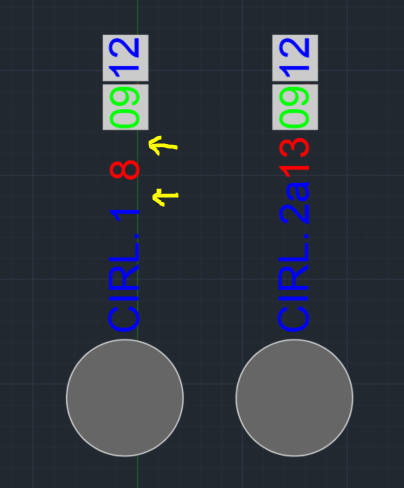
I'm currently working on a dynamic block that carries some text attributes (part hard coded and part linked fields). I need to be able to flip the text at the insertion point but maintain the text order and distance from the insertion point when flipping it from North to South. I attached an image to show what I mean as well as the dwg file. I want this to be a parameter/action instead of creating a different visibility. Does anyone know what the best approach would be for this?

block.PNG

0 Likes
Accepted solutions (2)
10,477 Views
12 Replies
Replies (12)
Message 2 of 13

j.palmeL29YX
Mentor
Mentor

@alxnds5 wrote:


I attached ... the dwg file. 


No dwg file here. 


But before: 

Is this 


(view in My Videos)


what you want?

Jürgen Palme
Did you find this post helpful? Feel free to Like this post.
Did your question get successfully answered? Then click on the ACCEPT SOLUTION button.

EESignature

Message 3 of 13

Libbya
Mentor
Mentor
Accepted solution

Add a point parameter at the midpoint of the text.  Set the point parameter's 'chained' property to YES.  Associate a move action with the point parameter.  Add the text to the move action's selection set.  Add the point parameter to the selection set of the flip action.  Remove the text from the flip action's selection set.  

Message 4 of 13

alxnds5
Enthusiast
Enthusiast

Apologies, here it is. I thought I had attached it. Yes that's the flip but it's not working for me - not sure if it makes a difference if the flip is vertical?

0 Likes
Message 5 of 13

Libbya
Mentor
Mentor

It took me several minutes to type up my last post.  Did you even bother to read it or try it out?  It describes step-by-step exactly how to do what you are asking for.    


0 Likes
Message 7 of 13

alxnds5
Enthusiast
Enthusiast
Hi Libbya,

Yes I tried but was having trouble with the last step or adding the point to the flip parameter. I didn't know the two could parameters could be associated. Thank you for showing the steps!
Message 8 of 13

alxnds5
Enthusiast
Enthusiast

is there a way the text of these attributes can be justified like in MTEXT format, meaning no gaps/spaces show when the attribute value is a single digit (see image). I tried creating an MTEXT in block editor but since I'm not in model space I can't pick the object to link the field with, wondering if this can be done a different way?

alxnds5_0-1676867430516.png


0 Likes
Message 9 of 13

Libbya
Mentor
Mentor

Use an attribute.  For the default value add whatever text you do not want to change and add fields for the text you do want to change (all within a single attribute value).  When the field values change, the length will automatically update.  

Message 10 of 13

alxnds5
Enthusiast
Enthusiast
Unfortunately I need multiple attributes for a data extraction, are there any other alternatives?
0 Likes
Message 11 of 13

Libbya
Mentor
Mentor

I don't see the problem.  Use a single attribute that has the necessary text and fields that reference the individual attribute values you need for data extraction.  In other words, make the attributes you need for data extraction so that they do not display.  Use the single attribute so that you can get the display the way you want it. 

0 Likes
Message 12 of 13

kkeefer_cie
Community Visitor
Community Visitor

This is exactly what I'm looking for! How is it done? I attempted how the rest of the forum explained, but it didn't seem to work the same way as yours.


0 Likes
Message 13 of 13

j.palmeL29YX
Mentor
Mentor

My first suggestion was way too complicated. I would recommend following the method Andrey (@Libbya)  explained in detail. 

At which point do you have problems ("it didn't seem to work")? 


Jürgen Palme
Did you find this post helpful? Feel free to Like this post.
Did your question get successfully answered? Then click on the ACCEPT SOLUTION button.

EESignature

0 Likes