
Weird Graphics

Weird Graphics

Todd_Rogers
Mentor Mentor
4,490 Views
28 Replies
Message 1 of 29

Weird Graphics

Todd_Rogers
Mentor
Mentor

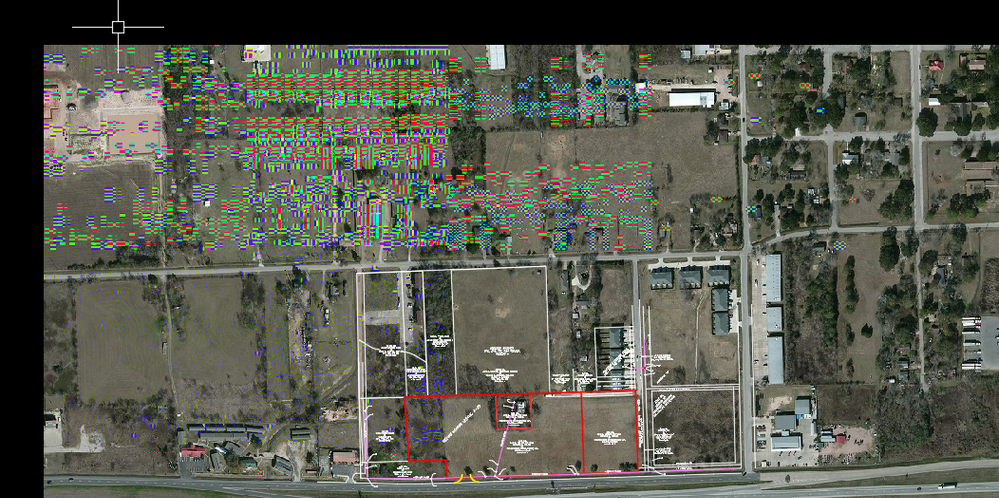
This is happening in 2016 and 2017. It happens in Civil 3D and AutoCAD. It only happens on images. It happens on attached images, and the built in Bing imagery. I have tried updating the graphics driver, turn on/off hardware acceleration, jacked with NVIDIA settings, etc. It only happens on this machine. Works fine on others. 
 

8-17-2016 8-35-13 AM.png

Todd Rogers
Civil Administration
Did you find this post helpful? Feel free to Like this post.
Did your question get successfully answered? Then click on the ACCEPT SOLUTION button.

EESignature

0 Likes
Accepted solutions (1)
4,491 Views
28 Replies
Replies (28)
Message 2 of 29

wfberry
Mentor
Mentor

I have something similar when one of my monitors has been on for several hours.  Try it with a "cool" monitor.


Before someone answers, use the monitor that has just started up.

0 Likes
Message 3 of 29

Todd_Rogers
Mentor
Mentor

This is freshly booted up this morning.

Todd Rogers
Civil Administration
Did you find this post helpful? Feel free to Like this post.
Did your question get successfully answered? Then click on the ACCEPT SOLUTION button.

EESignature

0 Likes
Message 4 of 29

AllenJessup
Mentor
Mentor

I'm with Bill. Swap out monitors and see if it persists. It might not be heat related but the monitor may be having problems when displaying a raster of that density.

Allen Jessup
CAD Manager - Designer
Did you find this post helpful? Feel free to Like this post.
Did your question get successfully answered? Then click on the ACCEPT SOLUTION button.

EESignature

0 Likes
Message 5 of 29

Todd_Rogers
Mentor
Mentor

I've swapped out docking station, swapped monitors, and opened it up on the laptop display and same thing happens.

Todd Rogers
Civil Administration
Did you find this post helpful? Feel free to Like this post.
Did your question get successfully answered? Then click on the ACCEPT SOLUTION button.

EESignature

0 Likes
Message 6 of 29

jmayo-EE
Mentor
Mentor

Did you try cycling off graphics options? I would first try turning off Advanced Material Effects.

John Mayo

EESignature

0 Likes
Message 7 of 29

jmayo-EE
Mentor
Mentor

Try smooth line display next.

John Mayo

EESignature

0 Likes
Message 8 of 29

Todd_Rogers
Mentor
Mentor

Tried ALL of them one by one.

Todd Rogers
Civil Administration
Did you find this post helpful? Feel free to Like this post.
Did your question get successfully answered? Then click on the ACCEPT SOLUTION button.

EESignature

0 Likes
Message 9 of 29

AllenJessup
Mentor
Mentor

I can't think of anything else other than there being an actual fault in the graphics card. I have seen some posts where people had to disable any onboard graphics in their computer. But I've never had that problem.

Allen Jessup
CAD Manager - Designer
Did you find this post helpful? Feel free to Like this post.
Did your question get successfully answered? Then click on the ACCEPT SOLUTION button.

EESignature

0 Likes
Message 10 of 29

Todd_Rogers
Mentor
Mentor

Yeah, I have the Intel graphics completely disabled and it runs entirely off the NVIDIA card. I also ran the built in Dell diagnostics and it passed. It looks fine in InfraWorks. You would think that InfraWorks would be the one that would tax it the hardest.

Todd Rogers
Civil Administration
Did you find this post helpful? Feel free to Like this post.
Did your question get successfully answered? Then click on the ACCEPT SOLUTION button.

EESignature

0 Likes
Message 11 of 29

jmayo-EE
Mentor
Mentor

I agree it seems like the card or system.


Can you swap the card? Perhaps disable the nvidea and try the intel?

John Mayo

EESignature

0 Likes
Message 12 of 29

Todd_Rogers
Mentor
Mentor

Let me try that. Stay tuned...

Todd Rogers
Civil Administration
Did you find this post helpful? Feel free to Like this post.
Did your question get successfully answered? Then click on the ACCEPT SOLUTION button.

EESignature

0 Likes
Message 13 of 29

AllenJessup
Mentor
Mentor

You're definitely right about the Weird part.

Allen Jessup
CAD Manager - Designer
Did you find this post helpful? Feel free to Like this post.
Did your question get successfully answered? Then click on the ACCEPT SOLUTION button.

EESignature

Message 14 of 29

Todd_Rogers
Mentor
Mentor

Disabled the NVIDIA card and used the Intel card, same thing is happening. I'm at a loss Smiley Sad

Todd Rogers
Civil Administration
Did you find this post helpful? Feel free to Like this post.
Did your question get successfully answered? Then click on the ACCEPT SOLUTION button.

EESignature

0 Likes
Message 15 of 29

jmayo-EE
Mentor
Mentor

How old is the PC? Odd that it is only C3D, all files on one machine...


I would want to do a clean istall but it may be a way of determining if it is the machine or the C3D install.


Does changing IMAGEQUALITY help?

John Mayo

EESignature

0 Likes
Message 16 of 29

Todd_Rogers
Mentor
Mentor

It's very odd. Machine is only a couple of years old. I tried IMAGEQUALITY earlier and that didn't do anything. I might try uninstalling the service packs to see if that has any affect. 

Todd Rogers
Civil Administration
Did you find this post helpful? Feel free to Like this post.
Did your question get successfully answered? Then click on the ACCEPT SOLUTION button.

EESignature

0 Likes
Message 17 of 29

Anonymous
Not applicable

Does the image have the 3D effect turned on?

0 Likes
Message 18 of 29

Todd_Rogers
Mentor
Mentor

@Anonymous This happens with the Bing imagery as well.

Todd Rogers
Civil Administration
Did you find this post helpful? Feel free to Like this post.
Did your question get successfully answered? Then click on the ACCEPT SOLUTION button.

EESignature

0 Likes
Message 19 of 29

Todd_Rogers
Mentor
Mentor
Accepted solution

Well, well, well. Uninstalled Autodesk AutoCAD 2017 SP1, and it now works flawlessly in 2016 and 2017. How weird is that?!?!?!?!?!

Todd Rogers
Civil Administration
Did you find this post helpful? Feel free to Like this post.
Did your question get successfully answered? Then click on the ACCEPT SOLUTION button.

EESignature

Message 20 of 29

AllenJessup
Mentor
Mentor

Weird enough. Weird enough. 


I just installed the SP. I'll keep my eyes out for any similar effect.

Allen Jessup
CAD Manager - Designer
Did you find this post helpful? Feel free to Like this post.
Did your question get successfully answered? Then click on the ACCEPT SOLUTION button.

EESignature

0 Likes


