Volume calculation

Volume calculation

petelien
Enthusiast Enthusiast
1,918 Views
7 Replies
Message 1 of 8

Volume calculation

petelien
Enthusiast
Enthusiast

Hi,


i have the area of the bottom of a stockpile, and i have the area of the top of the stockpile, and i have the elevation at the top and bottom. It is 2d geometry in autocad, how can i make this into a solid so i can find the volume of this stockpile. I also have auto cad Civil 3d, if it would be easier to do it in that. i am new to civil, but have worked with autocad quite a bit.


thanks for the help.

0 Likes
Accepted solutions (1)
1,919 Views
7 Replies
Replies (7)
Message 2 of 8

KirkNoonan
Collaborator
Collaborator

You need to set the lines representing the top and bottom areas of the stockpile at the proper elevations (Z-values). In Vanilla AutoCAD, you can generate a surface between the two polylines. In Civil 3D, it is similar. You create a surface and then add the lines into it as breaklines. Either method will yield a volume. The volume you get using only top and bottom areas and the elevation difference will be the roughly same as doing a quick hand-calculation of the volume using the average end method, which would be much quicker.

0 Likes
Message 3 of 8

petelien
Enthusiast
Enthusiast

which command would i use? i am sure this is looking me right in the face, sorry. Thanks for the help.

0 Likes
Message 4 of 8

KirkNoonan
Collaborator
Collaborator
Accepted solution
Use the properties window to change the elevations of your polylines and the Auotcad 'loft' command to create the surface
0 Likes
Message 5 of 8

petelien
Enthusiast
Enthusiast

how can i turn that into a solid?

0 Likes
Message 6 of 8

Pointdump
Consultant
Consultant

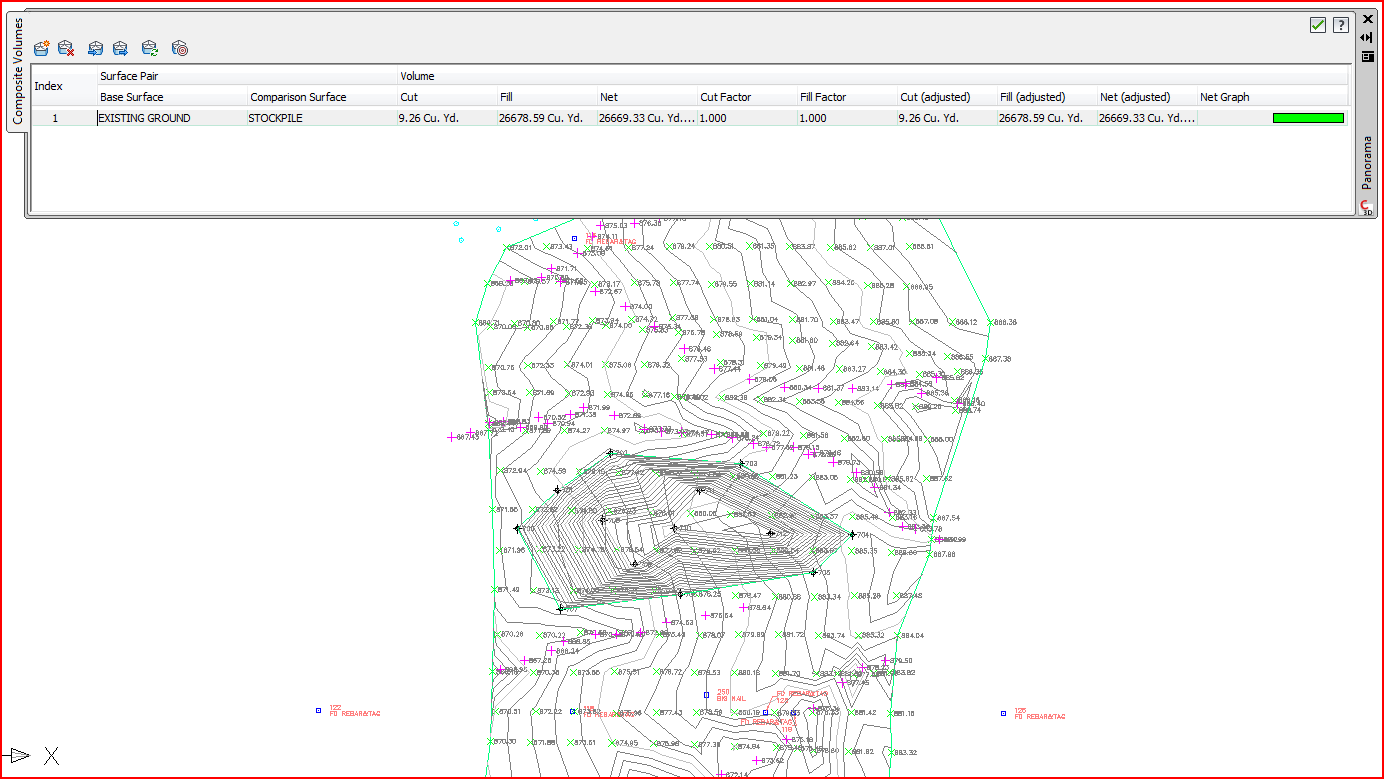
Volume calcs are super-simple on Civil 3d. You just make a base surface and a stockpile surface, then compare them on the Volumes Dashboard. Thusly:

Stockpile.PNG

Eric Colburn has a great video Here.


Dave

Dave Stoll
Las Vegas, Nevada

EESignature

64GB DDR4 2400MHz ECC SoDIMM / 1TB SSD
NVIDIA Quadro P5000 16GB
Windows 10 Pro 64 / Civil 3D 2027
0 Likes
Message 7 of 8

KirkNoonan
Collaborator
Collaborator
0 Likes
Message 8 of 8

petelien
Enthusiast
Enthusiast

Thanks for the Help!

0 Likes