PIPE NETWORK PROFILE LABELLING CONNECTED PIPE

PIPE NETWORK PROFILE LABELLING CONNECTED PIPE

Sinoj.Ravindran
Advocate Advocate
3,180 Views
13 Replies
Message 1 of 14

PIPE NETWORK PROFILE LABELLING CONNECTED PIPE

Sinoj.Ravindran
Advocate
Advocate

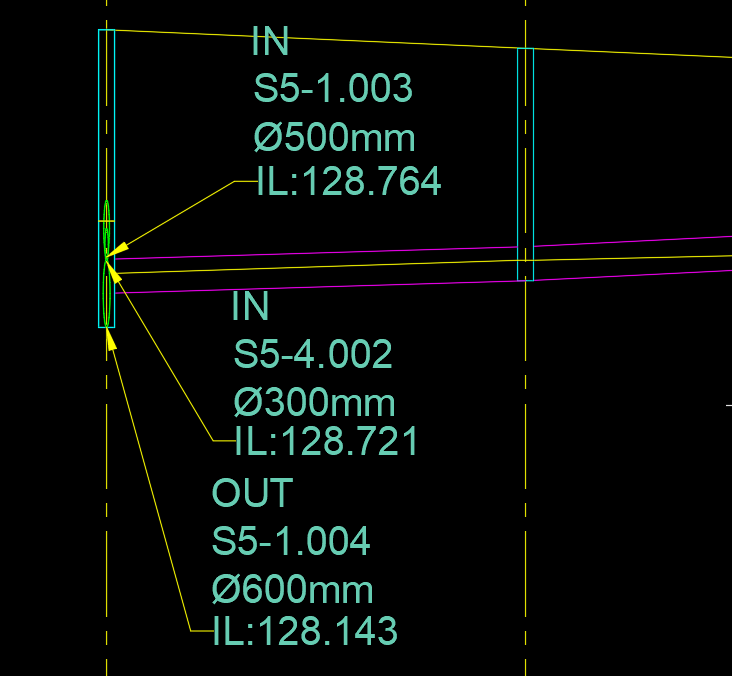
I am working with a sanitary pipe network.

While creating the profile, how to label the connected pipe name and invert level?

Please advise.

Attached screen photo.

Thank you

0 Likes
3,181 Views
13 Replies
Replies (13)
Message 2 of 14

samir_rezk
Advisor
Advisor

Hello,

You will need to add a Text-for-each component to you structure label. You can use It  in plan and profile structure labels.

here is two links that you might find helpful as a reference:

About text for each

Add Text for each


hope that helps,


Samir Rezk
Technical Support Specialist

Message 3 of 14

Sinoj.Ravindran
Advocate
Advocate

@samir_rezk

Actually, using text for each under structure will give in and out pipe details, but it wont pointing the arrow leader to that pipes exactly, instead it points to the structure..

Is there is a way to point also the leader to that pipe exactly?

0 Likes
Message 4 of 14

samir_rezk
Advisor
Advisor

Hi @Sinoj.Ravindran,

i may have misunderstood your initial question! If you need to label the pipe itself with pipe information such as inverts, then you need a pipe label rather than a structure label. A pipe label will create a label pointing to the pipe rather the structue! The workflow to create a pipe label is exactly the same as to how you create a structure label.

hope this helps, 


Samir Rezk
Technical Support Specialist

0 Likes
Message 5 of 14

Sinoj.Ravindran
Advocate
Advocate

Dear Samir,

Could you please explain that..?

I have tried with pipe label style, but there isn't any option for labelling the inside structure pipes, it may incoming or outgoing ones...

And, the pipe which shows inside the structure in a profile view itself is related to structure properties, rt?

Because, structure style controls the display of those pipes in profile view under structure pipe outlines name.


0 Likes
Message 6 of 14

samir_rezk
Advisor
Advisor

not sure if I understand what you're are trying to label, if you can sketch out what you want to see as your end result and post it it would help a lot!


Samir Rezk
Technical Support Specialist

0 Likes
Message 7 of 14

Sinoj.Ravindran
Advocate
Advocate

Hi Samir,

Please see attached the image as per your request..

Note that I have one pipe incoming ( excluded the main pipe which shows in the profile, but incoming pipe labels always label that also) and one outgoing. I have created two label style- one for incoming pipes and another for outgoing pipes. But, what happens is showed in the image attached. The arrow head leader always pointing towards the structure, not to the respective pipes in and out. So I need to manually explode the labels and move the arrow head to the respective pipes each time. This wont update automatically when a revision happens to the pipe network, I need to do the same procedure again as I exploded the labels, loses dynamic nature.

Hope you get what I am looking for..


0 Likes
Message 8 of 14

samir_rezk
Advisor
Advisor

Hi @Sinoj.Ravindran 

I recorded a quick screencast for you to demonstrate how you can use a couple of pipe labels to label the start and end of pipes in your profile view. note that once you configure the labels and add them, you will need to adjust the location of the label along the pipe using the diamond grip to place it appropriately in the desired location, but there will be no need to explode the label.

Hope this helps,


Samir Rezk
Technical Support Specialist

0 Likes
Message 9 of 14

Sinoj.Ravindran
Advocate
Advocate

Hi Samir... Thank you so much for your time and I have watched the video.

I am searching for something not to label the main pipe which shows in the profile.

It is the incoming and out going pipe from manhole which need label with Pipe name and invert levels.

If we use text for each it works, but the leader arrow head doesn't point towards that particular pipe in / out, instead it points towards the manhole only. 

I need to explode the label and then point the leader head towards that in/out pipe. Which wont update dynamically next time revision is done, as dynamic ability is lost while exploding.

Please see attached picture, where I have clearly shown the pipe inside manhole.


0 Likes
Message 10 of 14

samir_rezk
Advisor
Advisor

Hi again,

I may not be understanding what you are trying to label exactly but I think if you circle back to the beginning posts where i explained the Text for Each component for a Structure Label that will accomplish what you need. As you can see from the screen capture below, pipe inverts in and out connected to the structure will automatically be listed no matter how many there are when you use the Text for Each component in your Structure Label

Hope this helps,


Capture.JPG


Samir Rezk
Technical Support Specialist

0 Likes
Message 11 of 14

Sinoj.Ravindran
Advocate
Advocate

Hi Sam..

I have learned with the help of you upto that point of labelling the structure in and out pipes..

Now, what need is to exactly point the in and out pipe as shown in the attached picture, which I have made by exploding the labels and then pointing the leader to the respective pipes.

Please have a look at it.


0 Likes
Message 12 of 14

grzegorz.cwiek
Alumni
Alumni

Hi @Sinoj.Ravindran 


Can you share the drawing in which you're trying to create the labels? I would then try to achieve the result you're looking for without exploding the labels and record it in a screencast


Grzegorz Cwiek
0 Likes
Message 13 of 14

Sinoj.Ravindran
Advocate
Advocate

hi grze,

Sorry for the late delay as actually now only noticed your comment..

Please see attached the profile as you requested.

Thanks

0 Likes
Message 14 of 14

Joe-Bouza
Mentor
Mentor

In our locale we label the connecting pipes directions 


8” dia- DR18-inv:100.00(s)


the directio is availble in the in out pipe of tge structure label

Joe Bouza
Did you find this post helpful? Feel free to Like this post.
Did your question get successfully answered? Then click on the ACCEPT SOLUTION button.

EESignature

0 Likes