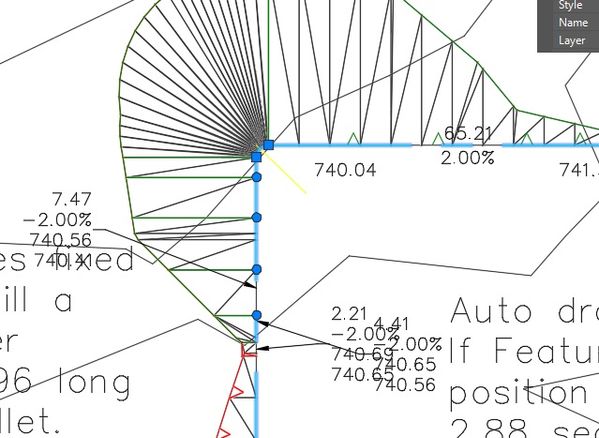
Odd grading triangles top left pad

Odd grading triangles top left pad

PeterKozub
Advocate Advocate
937 Views
5 Replies
Message 1 of 6

Odd grading triangles top left pad

PeterKozub
Advocate
Advocate

Hi


Notice odd triangles top left


labeling feature lines with grade dist and end points work well

with grading editor 


Any ideas on the triangulation 


Thanks Pete


Play attached Mp4


Xi Computer S/N: 037019
Intel Core i7-2600K CPU @ 3.40GHZ
Mem 24.0 GB
Win 7 64.0 Bit
12 Gig Video Card Nvidia K6000
2 4k Monitors


Autodesk C3D 2016 subscription Service pack 3


HP T120 Roll feed 24" plotter.

0 Likes
938 Views
5 Replies
Replies (5)
Message 2 of 6

wfberry
Mentor
Mentor

Not sure what caused that problem.  However, if you mark one corner where you have it, move it away and back again it FIXES itself.


Bill


0 Likes
Message 3 of 6

PeterKozub
Advocate
Advocate

Hi Bill


I did what you suggested and it worked sort of


Also note the text is auto dragged suggesting that there is

some sort of hidden edit history being applyed ?  this

drag edit was done many steps earlier and shows 

up like a 


note slope indicators are cleaned up also


I placed a yellow line at feature vertex and drag it away and then back in two separate steps

and the odd triangles and slope indicators reappeared...


The short 2.88 segment indicates a start point for some investigation by programmers 


Pete

0 Likes
Message 4 of 6

tcorey
Mentor
Mentor

Fillet the corner of the building pad.


Tim Corey
MicroCAD Training and Consulting, Inc.
Redding, CA
Autodesk Platinum Reseller

New knowledge is the most valuable commodity on earth. -- Kurt Vonnegut
Message 5 of 6

PeterKozub
Advocate
Advocate

Hi Tim 


Tried what your suggested and it did help the corner triangles


the top left short segments rogue triangles still linger please zoom in on attached DWG and

you can see them.


Also the slope indicators are still overlapping 


The best thing about this little DWG is that its small enough that programming types can 

hopefully find it.


Would not like to find this behavior in a large grading job hours could go lost...


see attached PNG and DWG


Pete

0 Likes
Message 6 of 6

tcorey
Mentor
Mentor

Peter, add some elevation points in that area. Select the feature line on the screen and then:


screenshot01.jpg


Does this look better?


Screenshot02.jpg


Tim Corey
MicroCAD Training and Consulting, Inc.
Redding, CA
Autodesk Platinum Reseller

New knowledge is the most valuable commodity on earth. -- Kurt Vonnegut
0 Likes