Nested Blocks

Nested Blocks

Anonymous
Not applicable
1,016 Views
11 Replies
Message 1 of 12

Nested Blocks

Anonymous
Not applicable

I want to check if I get it right!


Having attribute in a nested block does not mean that the user will be prompt to insert an value?

The attribute is not constant.

In that case how do I get around it? 

0 Likes
1,017 Views
11 Replies
Replies (11)
Message 2 of 12

Pointdump
Consultant
Consultant

Teflon,


Do you want to be prompted or not? You can turn that on or off.


Dave

Dave Stoll
Las Vegas, Nevada

EESignature

64GB DDR4 2400MHz ECC SoDIMM / 1TB SSD
NVIDIA Quadro P5000 16GB
Windows 10 Pro 64 / Civil 3D 2025
0 Likes
Message 3 of 12

Anonymous
Not applicable

Absolutly!


It should prompt the user for input!

My block A does it, but when I combine it with Block B and make a new one, prompting stop working!

0 Likes
Message 4 of 12

Pointdump
Consultant
Consultant

T,


Please post your drawing and indicated which is the nested "problem" block.


Dave

Dave Stoll
Las Vegas, Nevada

EESignature

64GB DDR4 2400MHz ECC SoDIMM / 1TB SSD
NVIDIA Quadro P5000 16GB
Windows 10 Pro 64 / Civil 3D 2025
0 Likes
Message 5 of 12

Anonymous
Not applicable

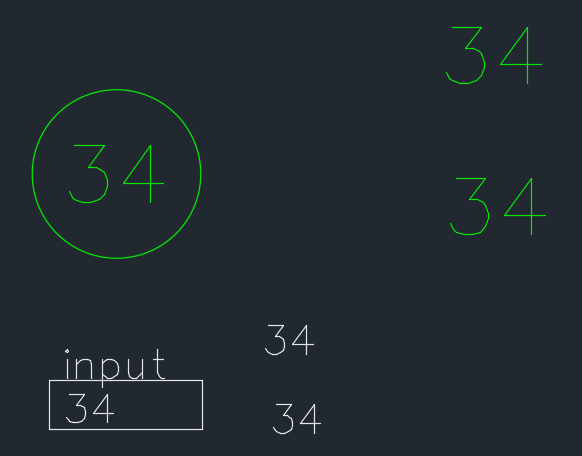
Block "input" prompts user for a input.

The fields on the rigth get thier value from the block.

Now I want to make a new block of "input"and the fields.

In this way when the user insert the new block, "Input" will prompt user for a value och fields will get that value too.


0 Likes
Message 6 of 12

Pointdump
Consultant
Consultant

T,


I'm not sure what you're trying to do. Try my block, called "CircleNumber".


CircleNumber.png


Dave

Dave Stoll
Las Vegas, Nevada

EESignature

64GB DDR4 2400MHz ECC SoDIMM / 1TB SSD
NVIDIA Quadro P5000 16GB
Windows 10 Pro 64 / Civil 3D 2025
0 Likes
Message 7 of 12

Anonymous
Not applicable

Please save as 2012?

0 Likes
Message 8 of 12

Pointdump
Consultant
Consultant

T,


OK, try this one.


Dave

Dave Stoll
Las Vegas, Nevada

EESignature

64GB DDR4 2400MHz ECC SoDIMM / 1TB SSD
NVIDIA Quadro P5000 16GB
Windows 10 Pro 64 / Civil 3D 2025
0 Likes
Message 9 of 12

Joe-Bouza
Mentor
Mentor
I'm sure Dave is heading this direction, but there is not need to nest the blocks. Simply add the attributes the the right that contain the fields defined to take the contents of input.

Joe Bouza
Did you find this post helpful? Feel free to Like this post.
Did your question get successfully answered? Then click on the ACCEPT SOLUTION button.

EESignature

Message 10 of 12

Pointdump
Consultant
Consultant

Joe,


That's exactly what I was thinking.


Dave

Dave Stoll
Las Vegas, Nevada

EESignature

64GB DDR4 2400MHz ECC SoDIMM / 1TB SSD
NVIDIA Quadro P5000 16GB
Windows 10 Pro 64 / Civil 3D 2025
Message 11 of 12

Anonymous
Not applicable

I am familiar with fields that inherit value from an attribute.

So obviously this was not a solution to my problem!

The question was if a nested block still is able to prompt the user for input.

Once you nest a block this ability is lost or is not?


0 Likes
Message 12 of 12

Pointdump
Consultant
Consultant

T,


"My block A does it, but when I combine it with Block B and make a new one, prompting stops working!"


So obviously you already had the answer. What Joe is trying to steer you to is to just make a block that does what you want. If nesting doesn't work, then don't do it.


Dave

Dave Stoll
Las Vegas, Nevada

EESignature

64GB DDR4 2400MHz ECC SoDIMM / 1TB SSD
NVIDIA Quadro P5000 16GB
Windows 10 Pro 64 / Civil 3D 2025
0 Likes