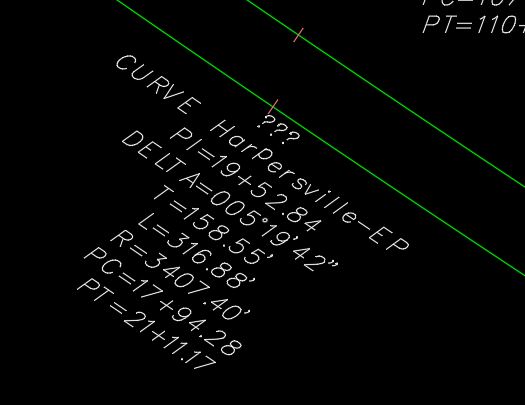
List Alignment curve data

List Alignment curve data

farzad.deldjoui
Enthusiast Enthusiast
1,499 Views
8 Replies
Message 1 of 9

List Alignment curve data

farzad.deldjoui
Enthusiast
Enthusiast

Our local DOT requires to list alignment curve data in a non table format, Could you please advise how I can generate a report as shown in attachment. Thank you so much

0 Likes
Accepted solutions (1)
1,500 Views
8 Replies
Replies (8)
Message 2 of 9

rl_jackson
Mentor
Mentor
Accepted solution

This can be accomplished with a standard label where the drag state arrow is turned off. You just need to set up the style to reflect how you want it to appear in the drawing.


Rick Jackson
Survey CAD Technician VI

Did you find this post helpful? Feel free to Like this post.
Did your question get successfully answered? Then click on the ACCEPT SOLUTION button.

EESignature

Message 3 of 9

jroot
Advisor
Advisor

This would be an Alignment Label Style for a Curve.

Below is ours that would get you close to what you need (if you can read it)

jroot_0-1693934839123.png


Message 4 of 9

farzad.deldjoui
Enthusiast
Enthusiast

Thank you so much for clarification and your response. 

0 Likes
Message 5 of 9

farzad.deldjoui
Enthusiast
Enthusiast

Thanks Rick.

0 Likes
Message 6 of 9

farzad.deldjoui
Enthusiast
Enthusiast

I was able to generate the Curve listing, thank you for that, but there is one question I am getting "???" on top line which we intend to assign a tag for the curve, would you mind please advise how to address this issue, thank you so much, please see attached.

0 Likes
Message 7 of 9

rl_jackson
Mentor
Mentor

Check your style for the following.


On the layout tab under the Table Tag component verify that Visibility = True.


I believe that if you want to show the data along the line or arc and show both simultaneously you will need to set the Used in just below it to Tag and Label Mode as this will show both the label and tag #.


Rick Jackson
Survey CAD Technician VI

Did you find this post helpful? Feel free to Like this post.
Did your question get successfully answered? Then click on the ACCEPT SOLUTION button.

EESignature

0 Likes
Message 8 of 9

farzad.deldjoui
Enthusiast
Enthusiast

Visibility is set to True, also I have attached the curve components in the text format which I have for the label

0 Likes
Message 9 of 9

rl_jackson
Mentor
Mentor

Yes but to get both you need to have set the Component - Table Tage so that it5 is USED IN Label & Tag Modes,REMOVE and the Tag Component from the Distance & Radius Component. This makes both labels appear. 


Rick Jackson
Survey CAD Technician VI

Did you find this post helpful? Feel free to Like this post.
Did your question get successfully answered? Then click on the ACCEPT SOLUTION button.

EESignature

0 Likes