Geotechnical Module Error

Geotechnical Module Error

Anonymous
Not applicable
2,966 Views
8 Replies
Message 1 of 9

Geotechnical Module Error

Anonymous
Not applicable

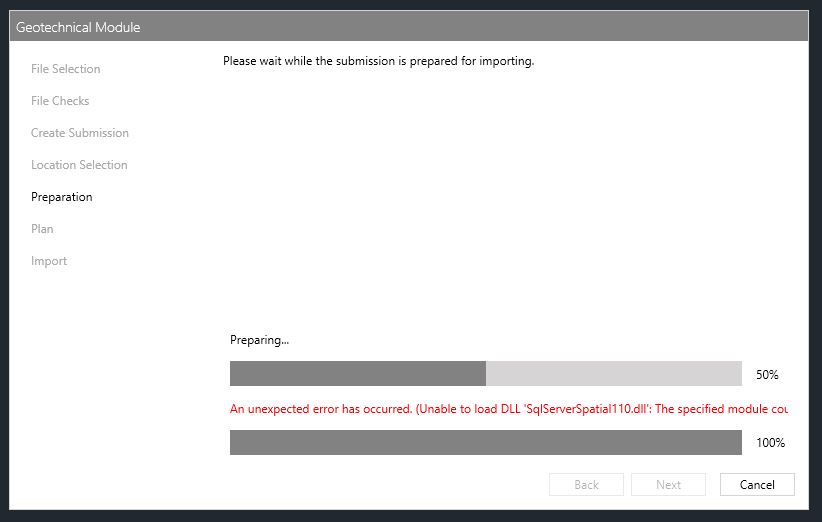
I have a problem when importing AGS files in Geotech Module. It loads the file data and gets as far as electing the boreholes and importing the data and then fails (refer to attached).


I have had this problem in the past with 2018. After working for many months it suddenly stopped working and gave the same error when trying to import data. The only fix that worked was to completely uninstall C3D 2018 and all modules and reinstall.


I am currently using 2019 and this module has been used many times, though not for a few months. I went to import some data today only to find the same error I had before. Assuming the same fix would work I uninstalled the module and C3D 2019, then reinstalled the core software installed all updates and then the module. This time no joy. The error persists. Is it possible that C3D updates have broken the module? I cannot upgrade to 2020 as my current projects require 2019, and I really need to use this Geotechnical module right now. To be honest I'm quite desperate as this portion of work needs to be in by end of week.


Any and all ideas welcome, especially Autodesk experts and users who have had this problem before.


Regards,

Peter

0 Likes
Accepted solutions (2)
2,967 Views
8 Replies
Replies (8)
Message 2 of 9

Anonymous
Not applicable

Update.

Just to satisfy my curiosity I installed C3D 2020 and the 2020 Geotechnical Module and....... I still get the same error on the new install of 2020. So what is this missing file? It's obviously not part of the core 2020 installation else I would not be getting an error.

0 Likes
Message 3 of 9

Anonymous
Not applicable

@neilyj666can you help me with this one?

0 Likes
Message 4 of 9

neilyj666
Mentor
Mentor

@Anonymous I don't use the Geotech module as it was lacking functionality so we upgraded to Holebase SI (the paid for big brother of the Geotech module) 


@Anonymous is the Geotech module expert and may be able to give some assistance

neilyj (No connection with Autodesk other than using the products in the real world)
Did you find this post helpful? Feel free to Like this post.
Did your question get successfully answered? Then click on the ACCEPT SOLUTION button.

EESignature


AEC Collection 2026 UKIE (mainly Civil 3D UKIE and IW)
Win 11 Pro x64, 1Tb Primary SSD, 1Tb Secondary SSD
64Gb RAM Intel(R) Xeon(R) W-11855M CPU @ 3.2GHz
NVIDIA RTX A5000 16Gb, Dual 27" Monitor, Dell Inspiron 7760
0 Likes
Message 5 of 9

ChicagoLooper
Mentor
Mentor

If you’re using ags, read <this>. 


Alternatively, try to input a different file type such as csv. 

Chicagolooper

EESignature

0 Likes
Message 6 of 9

Anonymous
Not applicable

Thanks for the response @ChicagoLooper.

My issue is not with the AGS file itself. The same problem happens with the template csv files for the module. The module seems to open and read the AGS4 file with no issue (I even tried loading as AGS3 but it correctly identified that the file type was incorrect). I can get as far as getting the list of boreholes from the file and selecting the boreholes to be imported. It is the next step where it imports the data into the drawing where this error occurs.

0 Likes
Message 7 of 9

Karsten.Saenger
Autodesk Support
Autodesk Support
Accepted solution

Hi @Anonymous ,


the Geotechnical Module uses the Microsoft SQL Server on the local computer.
The error message shows an issue with the "sqlserverspatial110.dll" which seems to be part of the Microsoft SQL Server installation. It would explain also why a new installation of Civil 3D and the Geotechnical Module doesn't help.

So, my suggestion is to note what SQL Server versions you have installed. You can see this in the Windows System -> Programs and Features:
2019-10-04 08_57_01-Window.png

Uninstall all Microsoft SQL Server installations and re-install from Microsoft or from the installation folder of Civil 3D: ..\Autodesk_Civil3D_2019_German_Win_64bit_dlm\3rdParty\x86 and ..\x64

Note: The Geotechnical Module places all data into a local database in your Windows Profile:
%AppData%\Local\Microsoft\Microsoft SQL Server Local DB\Instances
It might be a good idea to backup these folders before you un-install.

Hope that helps...

Regards,
Karsten.


Karsten Saenger
0 Likes
Message 8 of 9

Anonymous
Not applicable
Accepted solution

@Karsten.Saengeryour timing is curious. I too had twigged that it was an sql issue, so with a little help from one of the lads in the office I was led down the path of completely uninstalling all my versions of sql server and installing a new copy of Microsoft SQL Server 2014 express. The LocalDB installation was also required.

Late last night it was finally fixed. It was working properly only a few months ago so I can only guess that an update to Windows or the SQL Server installation must have broken something.


Regards,

Peter

0 Likes
Message 9 of 9

Karsten.Saenger
Autodesk Support
Autodesk Support

Hi @Anonymous ,

good to hear it is working again, hope it stays like that.

Regards,
Karsten.


Karsten Saenger
0 Likes