Control Display Order of Code Set Styles in Properties Tab...

Control Display Order of Code Set Styles in Properties Tab...

RDunkley
Advocate Advocate
3,062 Views
20 Replies
Message 1 of 21

Control Display Order of Code Set Styles in Properties Tab...

RDunkley
Advocate
Advocate

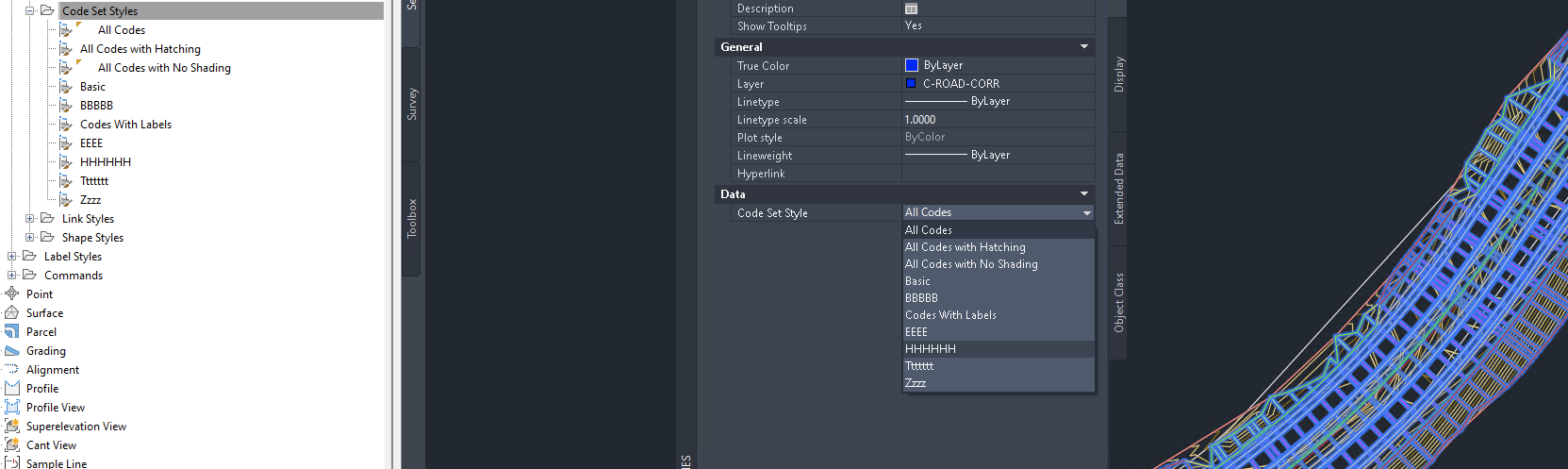
I am able to control the Display Order of the Code Set Styles in the Toolspace, but when viewing the Code Set Styles in the Properties Tab the list appears random and I cannot find anywhere to edit this list... This makes it quite difficult to find the required Code Set Style. Does anyone have any ideas on how to edit the list?


Regards.

Ross.

Currently using Civil 3D 2024 & AutoCAD 2025
0 Likes
Accepted solutions (1)
3,063 Views
20 Replies
Replies (20)
Message 2 of 21

tcorey
Mentor
Mentor

I tried deleting all codes from a drawing and then dragging and dropping them from a different drawing in the order I want them on Properties. No luck. It not only doesn't alphabetize, it seems to order them randomly. I thought for sure it would sort them in the order I drag-n-dropped.


I'll be watching this to see if anyone has a solution....


Tim Corey
MicroCAD Training and Consulting, Inc.
Redding, CA
Autodesk Platinum Reseller

New knowledge is the most valuable commodity on earth. -- Kurt Vonnegut
0 Likes
Message 3 of 21

Jeff_M
Consultant
Consultant
CodeSets & UDPs seem to have a mind of their own. They behave the same way when accessing via code, can never count on them being in any specific order.
Jeff_M, also a frequent Swamper
EESignature
0 Likes
Message 4 of 21

neilyj666
Mentor
Mentor
no doubt will be fixed in 2016 though....;)

neilyj (No connection with Autodesk other than using the products in the real world)
Did you find this post helpful? Feel free to Like this post.
Did your question get successfully answered? Then click on the ACCEPT SOLUTION button.

EESignature


AEC Collection 2026 UKIE (mainly Civil 3D UKIE and IW)
Win 11 Pro x64, 1Tb Primary SSD, 1Tb Secondary SSD
64Gb RAM Intel(R) Xeon(R) W-11855M CPU @ 3.2GHz
NVIDIA RTX A5000 16Gb, Dual 27" Monitor, Dell Inspiron 7760
Message 5 of 21

tcorey
Mentor
Mentor

I like your sense of humor.


Tim Corey
MicroCAD Training and Consulting, Inc.
Redding, CA
Autodesk Platinum Reseller

New knowledge is the most valuable commodity on earth. -- Kurt Vonnegut
0 Likes
Message 6 of 21

RDunkley
Advocate
Advocate

Just revisiting this one... I'm still having the same problem in Civil 3D 2021...

Any suggestions @lim.wendy..?

Currently using Civil 3D 2024 & AutoCAD 2025
0 Likes
Message 7 of 21

rl_jackson
Mentor
Mentor

I read here that they fixed UDP order in 22, not sure that's going to help your Code Set issue.


Rick Jackson
Survey CAD Technician VI

Did you find this post helpful? Feel free to Like this post.
Did your question get successfully answered? Then click on the ACCEPT SOLUTION button.

EESignature

0 Likes
Message 8 of 21

lim.wendy
Alumni
Alumni

Checking on this one. Thanks for letting me know. 


Wendy Lim

Data Nerd | Community Advocate | AEC Industry


facebook twitter twitter blogs pm


Join the new online Rail Community


Rails Summit


0 Likes
Message 9 of 21

RDunkley
Advocate
Advocate

Hi @lim.wendy, Any update on this one?

Regards.

Currently using Civil 3D 2024 & AutoCAD 2025
0 Likes
Message 10 of 21

RDunkley
Advocate
Advocate
Hi Wendy, any news on this? Regards.
Currently using Civil 3D 2024 & AutoCAD 2025
0 Likes
Message 11 of 21

lim.wendy
Alumni
Alumni

Hi @RDunkley ,


Apologies for not responding sooner. I've submitted a case on your behalf as I believe this needs to be checked by the support team. They have some of the tools that I might not have at the moment and they can track this issue as well. I remember this is logged.


Wendy Lim

Data Nerd | Community Advocate | AEC Industry


facebook twitter twitter blogs pm


Join the new online Rail Community


Rails Summit


0 Likes
Message 12 of 21

RDunkley
Advocate
Advocate

Hi @lim.wendy, If possible, could you please advise if this is still being looked into?

Regards.

Currently using Civil 3D 2024 & AutoCAD 2025
0 Likes
Message 13 of 21

neilyj666
Mentor
Mentor

I think we all know the answer to this 7 year old issue; the wheels of the Autodesk machine turn very slowly (unless it's a Cloud based issue)

neilyj (No connection with Autodesk other than using the products in the real world)
Did you find this post helpful? Feel free to Like this post.
Did your question get successfully answered? Then click on the ACCEPT SOLUTION button.

EESignature


AEC Collection 2026 UKIE (mainly Civil 3D UKIE and IW)
Win 11 Pro x64, 1Tb Primary SSD, 1Tb Secondary SSD
64Gb RAM Intel(R) Xeon(R) W-11855M CPU @ 3.2GHz
NVIDIA RTX A5000 16Gb, Dual 27" Monitor, Dell Inspiron 7760
0 Likes
Message 14 of 21

lim.wendy
Alumni
Alumni

Hi Ross,


I've taken the time to look into the case that was submitted internally. It appears that the issue you mentioned is now being approached as an enhancement. It has been posted on our Idea Station, where users can contribute their thoughts and vote on suggestions.

Your input is valuable to us, and we believe that involving the community in these discussions will help us prioritize enhancements that matter the most to our users. I encourage you and others who are interested in this enhancement to visit the Idea Station and cast your vote. Your votes will play a significant role in influencing our development priorities.

Once again, thank you for your engagement and patience.


Wendy Lim

Data Nerd | Community Advocate | AEC Industry


facebook twitter twitter blogs pm


Join the new online Rail Community


Rails Summit


0 Likes
Message 15 of 21

neilyj666
Mentor
Mentor

@lim.wendy @RDunkley come on Autodesk this has a direct impact on the User experience when using the software and it should be addressed as a matter of course not buried in the Ideas station.

neilyj (No connection with Autodesk other than using the products in the real world)
Did you find this post helpful? Feel free to Like this post.
Did your question get successfully answered? Then click on the ACCEPT SOLUTION button.

EESignature


AEC Collection 2026 UKIE (mainly Civil 3D UKIE and IW)
Win 11 Pro x64, 1Tb Primary SSD, 1Tb Secondary SSD
64Gb RAM Intel(R) Xeon(R) W-11855M CPU @ 3.2GHz
NVIDIA RTX A5000 16Gb, Dual 27" Monitor, Dell Inspiron 7760
Message 16 of 21

RDunkley
Advocate
Advocate

Hi @lim.wendy,

Thankyou for looking into this issue.

I agree with @neilyj666 that this should not buried in the ideas station. Anyone trying to navigate to the required Code Set Style or browse for options is impacted every time, which is often. This translates to a less than ideal user experience and quite frankly makes Autodesk look as though they dropped the ball on this one. The additional time taken to browse through the menu adds up and can be quite frustrating. It would be appreciated if you can please reconsider the priority on this one and update us when you know more.

Regards.
 

Currently using Civil 3D 2024 & AutoCAD 2025
0 Likes
Message 17 of 21

lim.wendy
Alumni
Alumni

Hi Ross,


I truly appreciate your feedback. Your input is invaluable in helping us enhance the user experience. Rest assured, I will convey your message to the product team and ensure that your concerns regarding the accessibility of the Code Set Style are well-understood.

Thank you for taking the time to provide this valuable feedback. We are committed to continuously improving our products and your insights play a crucial role in guiding our efforts. Please feel free to reach out if you have any further suggestions or concerns.


Wendy Lim

Data Nerd | Community Advocate | AEC Industry


facebook twitter twitter blogs pm


Join the new online Rail Community


Rails Summit


Message 18 of 21

RDunkley
Advocate
Advocate

Hi @lim.wendy Can you please provide an update on this one? Has it been implemented in the latest versions of Civil3D? Regards.

Currently using Civil 3D 2024 & AutoCAD 2025
0 Likes
Message 19 of 21

lim.wendy
Alumni
Alumni
Accepted solution

Hi Ross,


Great news! The issue you've raised regarding the control of Display Order for Code Set Styles in the Properties Tab has been addressed and enhanced in the latest versions of Civil 3D.

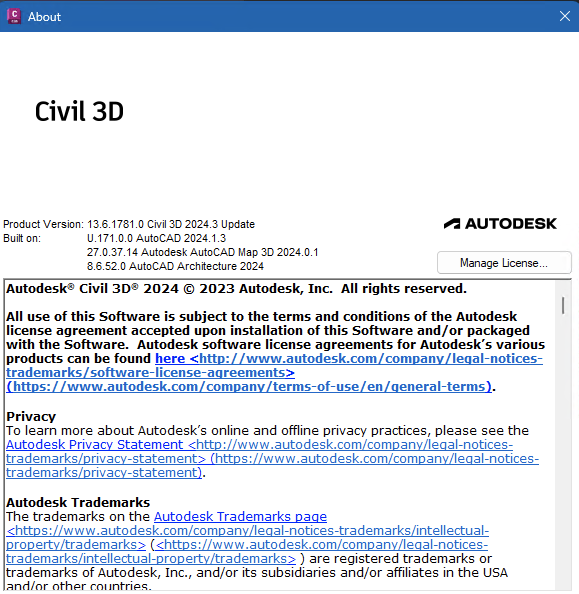
I can confirm that this functionality has been improved for C3D 2024.4 and will also be available in the upcoming C3D 2025 version. I personally tested it on the 2024.3 Update, and it's now working as requested.


If you encounter any further questions or need assistance with anything else, don't hesitate to reach out.


Wendy Lim

Data Nerd | Community Advocate | AEC Industry


facebook twitter twitter blogs pm


Join the new online Rail Community


Rails Summit


Message 20 of 21

neilyj666
Mentor
Mentor

@lim.wendy I created a corridor in 2024.3 yesterday and thought there was something odd looking about the Code Set Style listing...it was alphabetical...😊.

Whilst this is welcome, I suppose the downside is that it is has taken just over 9 years to implement...!!!!!!

neilyj (No connection with Autodesk other than using the products in the real world)
Did you find this post helpful? Feel free to Like this post.
Did your question get successfully answered? Then click on the ACCEPT SOLUTION button.

EESignature


AEC Collection 2026 UKIE (mainly Civil 3D UKIE and IW)
Win 11 Pro x64, 1Tb Primary SSD, 1Tb Secondary SSD
64Gb RAM Intel(R) Xeon(R) W-11855M CPU @ 3.2GHz
NVIDIA RTX A5000 16Gb, Dual 27" Monitor, Dell Inspiron 7760