Assign coordinate system

Assign coordinate system

Anonymous
Not applicable
5,782 Views
26 Replies
Message 1 of 27

Assign coordinate system

Anonymous
Not applicable

Hi
I am trying to create a new coordinate system for my country R. Macedonia with the following parameters:
The data on the geodetic date in which the topographic maps are made are:
- Spatial Reference System: State Macedonian Coordinate System,
- reference ellipsoid: Bessel 1841,
- equatorial radius (a): 6377397.155 m.,

-polar radius (b): 6356078.963 m.,

- inverse flattening f : 299.1528128156, 1 / f =0.003342773154
- cartographic projection: Gauss Krüger,
- Reflection zone: 7,
- the initial meridian: Greenwich,
- centered meridian: 21º 00'00 ",
- Beginner trainer: Equator,
- Size factor along the central meridian: 0.9999,
- value of Y along the central meridian: 7500000 m,
- the value of X along the initial compartment: 0 m,
- Unit: meter,
- Horizontal date: Hermannskogel, and
- vertical date: middle sea level.
-a way of transformation (WGS1984 -> Bessel) Versa-wolf
- Transformation parameters
dx = -521.7476m,
 
dy = -229.4892m,
dz = -590.9207m
rx = 4.02878 ",
 
ry = 4.48836 ",
rz = -15.52067 "
s = 9.7803 ppm
- the width of the meridian zone 3 °


Please help with instructions of total process.
 R
egards

0 Likes
5,783 Views
26 Replies
Replies (26)
Message 2 of 27

Todd_Rogers
Mentor
Mentor

This may help you. A colleague of mine wrote this workflow for creating a ground coordinate system. I assume it would be the same process to create what you are trying to do...


https://totalcad.wordpress.com/2013/09/04/creating-a-ground-coordinate-system/


Todd Rogers
Civil Administration
Did you find this post helpful? Feel free to Like this post.
Did your question get successfully answered? Then click on the ACCEPT SOLUTION button.

Message 3 of 27

CivilFlow
Advisor
Advisor

Cool stuff thanks Todd!


Michael M. Carlson
Senior Civil Designer
CADD Manager
AutoCAD Civil 3D Infrastructure Design Professional
AutoCAD Design Professional

EESignature

Message 4 of 27

CivilFlow
Advisor
Advisor

This video shows a slightly different approach for the same end:


Michael M. Carlson
Senior Civil Designer
CADD Manager
AutoCAD Civil 3D Infrastructure Design Professional
AutoCAD Design Professional

EESignature

Message 5 of 27

WarrenGeissler
Advisor
Advisor

@CivilFlow, the Affine Post Processing wasn't working years ago and I gave up on it. I'm SO glad it's working now!! Smiley Very Happy


Warren Geissler
Drafting Manager Denver Water
_____________________________________________

Please ACCEPT AS SOLUTON if this works
(...and doesn't melt your computer or cause Armageddon)

Message 6 of 27

Pointdump
Consultant
Consultant

Dejan,


Here's how to add that Bursa-Wolf Transformation to your Map Library:
Use <<<_MAPSCREATE DATUM>>> to name your new Datum and select the Bessel 1841 Ellipsoid.
Use <<<_MAPSCREATE GEO>>> to start the assistant to define the Bursa-Wolf Geodetic Transformation. (I don't know what the difference is between "Coordinate Frame" and "Position Vector")


From there, Duplicate and Edit the MACED-7M-S9 Coordinate System to include your new Geodetic Transformation. (Note: In the description of that CS, it says it uses a Scale of 0.9999, but it doesn't, so you'll have to make sure to use a 0.9999 Scale.)


Macedonia-1.png


Macedonia-2.png


Macedonia-3.png


Macedonia-4.png


Macedonia-5.png


Macedonia-6.png


Macedonia-7.png


Dave

Dave Stoll
Las Vegas, Nevada

EESignature

64GB DDR4 2400MHz ECC SoDIMM / 1TB SSD
NVIDIA Quadro P5000 16GB
Windows 10 Pro 64 / Civil 3D 2025
Message 7 of 27

Pointdump
Consultant
Consultant

Oopsie! Under "Specify Useful Range" in "Create Geodetic Transformation" I screwed up. I grabbed some numbers off the Internet and reversed the Lats and Longs. Here's some better numbers for Useful Range:


WGS84 bounds:
Min Long:20.25, Min Lat:40.5
Max Long:23.25, Max Lat:43.0


Macedonia-8.png


Dave

Dave Stoll
Las Vegas, Nevada

EESignature

64GB DDR4 2400MHz ECC SoDIMM / 1TB SSD
NVIDIA Quadro P5000 16GB
Windows 10 Pro 64 / Civil 3D 2025
Message 8 of 27

Pointdump
Consultant
Consultant

I didn't know the difference between "Coordinate Frame" and "Position Vector" so I nosed around a bit.(Yes, only a true Geo-Geek would care.) From <<<This Site>>> I read:


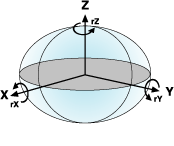
Illustration of positive direction of rotation parameters

The previous equation is how the United States and Australia define the equations and is called the Coordinate Frame rotation transformation. The rotations are positive counterclockwise. Europe uses a different convention called the Position Vector transformation. Both methods are sometimes referred to as the Bursa–Wolf method. In the Projection Engine, the Coordinate Frame and Bursa–Wolf methods are the same. Both Coordinate Frame and Position Vector methods are supported, and it is easy to convert transformation values from one method to the other simply by changing the signs of the three rotation values. For example, the parameters to convert from the WGS 1972 datum to the WGS 1984 datum with the Coordinate Frame method are (in the order dx,dy,dz,rx,ry,rz,s):

(0.0, 0.0, 4.5, 0.0, 0.0, -0.554, 0.227)

To use the same parameters with the Position Vector method, change the sign of the rotation so these are the new parameters:

(0.0, 0.0, 4.5, 0.0, 0.0, +0.554, 0.227)

It's impossible to tell from the parameters alone which convention is being used. If you use the wrong method, your results can return inaccurate coordinates. The only way to determine how the parameters are defined is by checking a control point whose coordinates are known in the two systems.

Dave Stoll
Las Vegas, Nevada

EESignature

64GB DDR4 2400MHz ECC SoDIMM / 1TB SSD
NVIDIA Quadro P5000 16GB
Windows 10 Pro 64 / Civil 3D 2025
Message 9 of 27

erkanca
Explorer
Explorer

Hi @Pointdump;

I applied all steps in your post. I produced a Geodetic Transformations like MGI-Hermannskogel_to_WGS84 in your post. However i cant apply to my project. I dont know how its usage. Tu run this transformation what should i do?. I read your another post: https://forums.autodesk.com/t5/civil-3d-forum/add-coordinates-system-with-geodetic-transformation/td... 

However i couldn't achieve. How can use Geodetic Transformation?

here my example exist: ScreenShot - 2023-03-30 123231_.png

0 Likes
Message 10 of 27

Pointdump
Consultant
Consultant

Hi Erkan,
Welcome to the Autodesk Forums.
Map 3D is always adding coordinate systems to MAPCSLIBRARY, so check there first to see if it might already be available.
What coordinate system do you need? Do you have an EPSG or Spatial Reference number?
Dave

Dave Stoll
Las Vegas, Nevada

EESignature

64GB DDR4 2400MHz ECC SoDIMM / 1TB SSD
NVIDIA Quadro P5000 16GB
Windows 10 Pro 64 / Civil 3D 2025
0 Likes
Message 11 of 27

erkanca
Explorer
Explorer

Thank you @Pointdump;

Thank you for your welcome. Infact you helped me many times thanks again. I am not new. I entered company computer and account. So i seem new.

I want to make transformation from ERP50 to WGS84. As you explain in other post i created a copy of ERP50 as shown in the photo: However there is no EPSG code is available. Is it possible to add that manually

ERP50toWGS84.png

0 Likes
Message 12 of 27

Pointdump
Consultant
Consultant

Erkan,
ERP50 comes in several different "flavors":


ERP50-CY: European 1950, Cypress
ERP50-EG: European 1950, Egypt
ERP50-GB: European 1950, Great Britain Only
ERP50-IR: European 1950, Iran
ERP50-UK: European 1950, Great Britain & Ireland
ERP50-W: European 1950, Western Europe


Each is an entirely different Datum, which needs a different Geodetic Transformation to say, WGS84 or ETRF89. There are many methods of Geodetic Transformation. Some use an analytical formula, like 7-parameter, and some use GSB files. Every Datum has a definition in the EPSG registry.

What Coordinate System are you wanting to use? In the EPSG coordinate system definition will also be a Datum definition.
Dave

Dave Stoll
Las Vegas, Nevada

EESignature

64GB DDR4 2400MHz ECC SoDIMM / 1TB SSD
NVIDIA Quadro P5000 16GB
Windows 10 Pro 64 / Civil 3D 2025
0 Likes
Message 13 of 27

erkanca
Explorer
Explorer

Thank you @Pointdump;

I want to use "ERP50-TK" (European 1950, Turkey (7 Parameter Transform)) however there is no EPSG code exist for it.

Other datum is WGS84 and its EPSG code is 6326.


Thank you.


0 Likes
Message 14 of 27

Pointdump
Consultant
Consultant

Erkan,
A Datum is a starting point for a coordinate system. So I guess what I'm asking is what coordinate system you're using. Like UTM84-36N, etc. You might not even need a geodetic transformation. And if you do need a geodetic transformation, there will exist somewhere an official definition to transform, like Bursa-Wolf, 7-Parameter, GSB files, etc.
What sort of data are you using where you need this transformation? Shapefiles, drawings, Point Clouds, etc?
Dave

Dave Stoll
Las Vegas, Nevada

EESignature

64GB DDR4 2400MHz ECC SoDIMM / 1TB SSD
NVIDIA Quadro P5000 16GB
Windows 10 Pro 64 / Civil 3D 2025
0 Likes
Message 15 of 27

erkanca
Explorer
Explorer

Thanks @Pointdump;

I need all civil objects's transformations. Actual coordinate system ITRF96. Projection is Transverse Mercator. Central Meridian is 27. Its WKT code is: 

PROJCS["EC-27d",GEOGCS["",DATUM["",SPHEROID["WGS84",6378137.000,298.25722356]],PRIMEM["Greenwich",0],UNIT["Degree",0.017453292519943295]],PROJECTION["Transverse_Mercator"],PARAMETER["false_easting",500000.000],PARAMETER["false_northing",0.000],PARAMETER["scale_factor",1.000000000000],PARAMETER["central_meridian",27.00000000000000],PARAMETER["latitude_of_origin",0.00000000000000],UNIT["Meter",1.00000000000000]]

Can i transform all civil 3d objects (including cogo points, alignments, Tin Surfaces etc.) from IRF96 to ED50 (European Datum 50)?


Thank you.

0 Likes
Message 16 of 27

Pointdump
Consultant
Consultant

Erkan,
Thanks for posting the WKT.
I can't find EC-27d coordinate system on either EPSG site or Spatial Reference site.
In MAPCSLIBRARY I found TURK-TM27 coordinate system. It matches almost all of the parameters in your WKT.
To transform Civil 3D Objects you can use the >>>Coordinate System Transformation Tool<<<.
Dave


TM27_1.png


Dave Stoll
Las Vegas, Nevada

EESignature

64GB DDR4 2400MHz ECC SoDIMM / 1TB SSD
NVIDIA Quadro P5000 16GB
Windows 10 Pro 64 / Civil 3D 2025
0 Likes
Message 17 of 27

erkanca
Explorer
Explorer

Thank you @Pointdump;


I ll try your advice.

I wonder usage of ERP50-TK_to_WGS84 (Red underlined at the bottom of the photo that you shared). How it can be used.. When we apply a coordinate system we use assign button. How i can run ERP50-TK_to_WGS84 transformation?

0 Likes
Message 18 of 27

Pointdump
Consultant
Consultant

Erkan,
ERP50-TK_to_WGS84 works in the background without you needing to do anything. Just use MAPCSASSIGN to assign TURK-TM27 to your drawing and that's it.
Dave

Dave Stoll
Las Vegas, Nevada

EESignature

64GB DDR4 2400MHz ECC SoDIMM / 1TB SSD
NVIDIA Quadro P5000 16GB
Windows 10 Pro 64 / Civil 3D 2025
0 Likes
Message 19 of 27

erkanca
Explorer
Explorer

Thank You @Pointdump;

I assigned TURK-TM27 and i used Map Aerial. Plan maching with bing map closely. However i confused a bit. I assigned TURK-TM27. Also i have same project for ITRF96 and i assigned ITRF96 Coordinate system. After i assigning all projects are located truely on the Bing Map. However coordinates of a same point in two projects are different. Although coordinate values are different they located truely on the Bing map. That means assigning coordinate systems not converting objects.. it matches the bing map to my project as if moving map behind the project objects. Also i try another things. In the same project and same coordinate system i edit only central meridian. Each time same point located on the different place on the Bing map. However its coordinates not changed. I understand that Civil 3d coordinate system assigning not converting objects. Am i true?


0 Likes
Message 20 of 27

Pointdump
Consultant
Consultant

Erkan,
"Also i have same project for ITRF96 and i assigned ITRF96 Coordinate system."
I don't see ITRF96 in MAPCSLIBRARY.
"...coordinates of a same point in two projects are different."
Do the Latitudes and Longitudes match?
"In the same project and same coordinate system i edit only central meridian."
Details please on what you're doing here.
Can you post both of your drawings?
Dave

Dave Stoll
Las Vegas, Nevada

EESignature

64GB DDR4 2400MHz ECC SoDIMM / 1TB SSD
NVIDIA Quadro P5000 16GB
Windows 10 Pro 64 / Civil 3D 2025
0 Likes