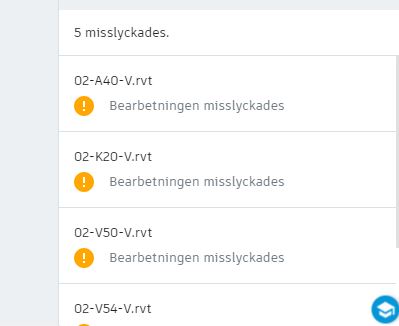
Revit model fail to upload properly

Revit model fail to upload properly

liza_neime
Explorer Explorer
953 Views
2 Replies
Message 1 of 3

Revit model fail to upload properly

liza_neime
Explorer
Explorer

Hello! 

When uploading some Revit models I get a message it failed to extract.

I can still see the model under Project files in Document Management but when i try to link the files into my worksharing model it doesn't show in the folder.. How do I solve this?


0 Likes
954 Views
2 Replies
Replies (2)
Message 2 of 3

anil_mistry
Autodesk Support
Autodesk Support

Hi @liza_neime,


Thank you for participating in our Community! Have you tried uploading this model again to BIM 360 Docs project?


Thank you and have a great day!


Anil Mistry
Technical Support Specialist
0 Likes
Message 3 of 3

anil_mistry
Autodesk Support
Autodesk Support

Hi @liza_neime,


I'm just checking in again to see if you need more help with this. Did the suggestion I provided yesterday work for you?

If so, please click Accept as Solution on the posts that helped you so others in the community can find them easily.


Thank you and have a great day!


Anil Mistry
Technical Support Specialist
0 Likes