LAP Joints - Wrong Isometric Representation

LAP Joints - Wrong Isometric Representation

Anonymous
Not applicable
3,381 Views
14 Replies
Message 1 of 15

LAP Joints - Wrong Isometric Representation

Anonymous
Not applicable

Hello,


We have this issue where stub-end ISO orientation of LAP joint connections is shown in wrong direction when two flanges are connected directly one to another (Face to Face) - In this case one of the stub-ends is flipped in wrong direction.


FLtoFL.png


 However, when LAP joints are used to connect i.e. Valve on a pipe, ISO representation (orientation) of both stub-ends are correct.
 

ValveLap.png


Another example is when pipe is left opened on one end and have LJ on another, LJ orientation is not the same if pipe i.e. have LJ added on both of its ends (examp. 2,3,4 in ZIP file).


Final1.png

We are using Plant 3D 2017 with Update 1.1 but for us same issue appears also in  Plant 3D 2018. 

Can someone please give constructive explanation about what could be a problem and how to solve it.

Any help would be appreciated very much since we are not able to trace the source of this behaviour.


Attached ZIP file contains Plant 3D Test spec, Test defaultconnectors.xml and Test drawing with DWG and PDF examples of created isometrics.


Thanks,


0 Likes
Accepted solutions (1)
3,382 Views
14 Replies
Replies (14)
Message 2 of 15

h_eger
Mentor
Mentor
Accepted solution

dear @Anonymous,


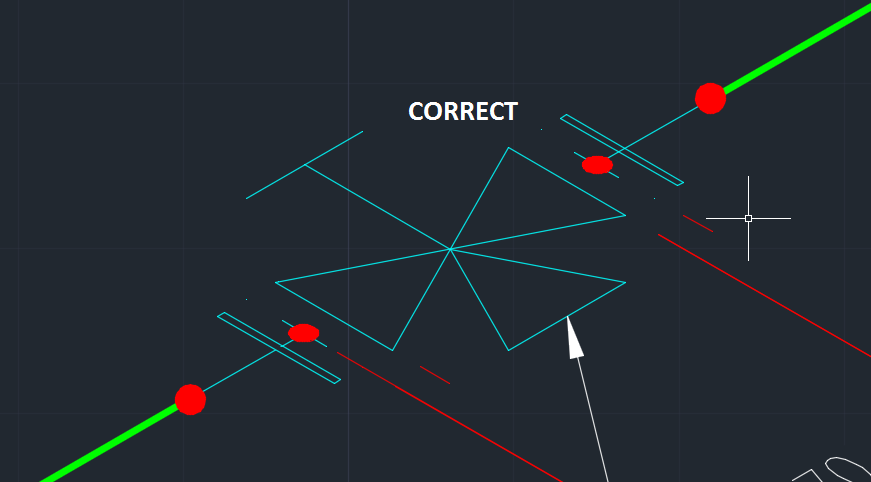
this problem is known to Autodesk and will be fixed with the next update to AutoCAD Plant 3D 2018.
see example:


2017-11-08_06-12-18.png

-

If my reply was helpful, please give a "Kudo" or click the "Accept as Solution" button below (or both).

Hartmut Eger
Senior Engineer
Anlagenplanung + Elektotechnik
XING | LinkedIn

EESignature


Message 3 of 15

Anonymous
Not applicable

Dear Eger,


Thank you very much for such fast reply. For us it would be important to continue use of Plant 3D 2017 version also. Do you have any info will update which can fix this issue also come to Plant 3D 2017?


Thanks!

0 Likes
Message 4 of 15

h_eger
Mentor
Mentor

Dear @Anonymous,


no I do not know that this is also fixed in Plant 3D 2017.

-

If my reply was helpful, please give a "Kudo" or click the "Accept as Solution" button below (or both).

Hartmut Eger
Senior Engineer
Anlagenplanung + Elektotechnik
XING | LinkedIn

EESignature


0 Likes
Message 5 of 15

Anonymous
Not applicable

Thanks for info.

0 Likes
Message 6 of 15

Anonymous
Not applicable

Hi,

I have the same problem with lapped joint to isometric. ,,Plant 2018,,

Is there a need for default connectors config?

Thank you for your Supports

0 Likes
Message 7 of 15

h_eger
Mentor
Mentor

Dear @Anonymous


Migrated project from 2017 or earlier?
New project with 2018?
default connectors config has no influence on this.


-

If my reply was helpful, please give a "Kudo" or click the "Accept as Solution" button below (or both).

Hartmut Eger
Senior Engineer
Anlagenplanung + Elektotechnik
XING | LinkedIn

EESignature


0 Likes
Message 8 of 15

Anonymous
Not applicable

Hi @h_eger,

New projekt in Plant3D 2018.

0 Likes
Message 9 of 15

Anonymous
Not applicable

I have default connection setup, and when I generated iso draw I was have wrong orientation Lamp symbol.

0 Likes
Message 10 of 15

Anonymous
Not applicable

I am running Plant 3D 2018 and am having this issue.BACKWARDS SYMBOLBACKWARDS SYMBOL

0 Likes
Message 11 of 15

mauro_spadaro
Enthusiast
Enthusiast

even using Plant2019 is the same issue.

any news?

thanks

0 Likes
Message 12 of 15

Anonymous
Not applicable

You need to use original DefaultConnectorsConfig.xml for work in plant3D and not change it from project setup. It's neccessary to edit it from bloc notes.

In 2019 release of Plant3D this connection work correctly until modify this file.

0 Likes
Message 13 of 15

jeibysi
Observer
Observer

LAPPJOINT FLANGE ISO SYMBOL 문제는 아직 해결되지 않았습니다.

동일한 문제가 Plant 3D 2024에서도 나타납니다...

해결책이 있습니까?

0810-1.png

0 Likes
Message 14 of 15

h_eger
Mentor
Mentor

Dear @jeibysi ,


Please answer in English this is an English-managed
Autodesk forum

-

If my reply was helpful, please give a "Kudo" or click the "Accept as Solution" button below (or both).

Hartmut Eger
Senior Engineer
Anlagenplanung + Elektotechnik
XING | LinkedIn

EESignature


0 Likes
Message 15 of 15

ai_chatgpt_log
Community Visitor
Community Visitor

I’ve been dealing with the stub-end not flipping correctly issue for a long time, and I’m wondering why it still hasn’t been fixed. After all this time, it seems unlikely that it’s a direct Plant 3D software problem — Autodesk would probably have addressed it by now.

What’s even more confusing is that sometimes it works, but sometimes it doesn’t, and I can’t determine under what conditions it works correctly. Currently, in Plant 3D 2024, I can’t seem to get it to work at all. Could this be related to PlantEndCodes or piping connection settings within the project? I’m not sure.

Maybe it’s more of a configuration or administrative issue. For example, the issue with non-symmetrical end connections that all point in the same direction on ISO drawings also persists and hasn’t been resolved. This makes me think the problem might be related to project setup or spec management rather than Plant 3D itself.

If that’s the case, can anyone explain where exactly this issue originates and what an administrator should do to fix it? I don’t have access to Autodesk Support, only this forum, so any clear, step-by-step guidance would be greatly appreciated.

If it is a Plant 3D issue, could someone clarify what the underlying problem is and when it might be fixed — or why it hasn’t been addressed yet?

Thanks in advance to anyone who can shed some light on this! 

0 Likes
