Instruments in BOM

Instruments in BOM

Anonymous
Not applicable
11,109 Views
23 Replies
Message 1 of 24

Instruments in BOM

Anonymous
Not applicable

Hi guys!


Does anyone know how to make include control valves tags or family description in BOM on isometrics. Thnaks in advance.

0 Likes
Accepted solutions (2)
11,110 Views
23 Replies
Replies (23)
Message 21 of 24

Anonymous
Not applicable

I just tried this and it needed some typo corrections, but worked in 2017. I simply do not know why there isn't a switch in Project manager for this????


I have added some pre and post text to help you find it in your own XML file, but the corrected code which works for me is in red. The older posts has spaces and some coding missing.


Hope this helps.


        <ComponentScheme Name="BendRadius" AnnotationStyle="Standard" Format="Bend Radius {0}" Enabled="false" Alignment="FlatHorizontal" LeaderStyle="Always" Filter="Bend" Fields="BEND-RADIUS" />
          <ComponentScheme Name="Instruments" AnnotationStyle="Circle" Tag="XX" Alignment="FlatHorizontal" LeaderStyle="Always" Components="Instrument" Filter="Instrument" Fields="PartNumber" />
<GroupScheme Name="FlangeGroup" AnnotationStyle="SCircle" Enabled="false" Tag="XX" Alignment="FlatHorizontal" LeaderStyle="AsNeeded" Components="Flange Bolt Gasket" Field="PartNumber" IncludeMate="true" MateComponent="Flange" MateTag="XX" MateAnnoStyle="Rectangle" MultipleBlocks="false">
 
         <Group Name="PIPE SUPPORTS">
            <RowFilter Filter="Support" />
            <Labels>
              <Label Name="pipe supports" />
            </Labels>
            <Columns>
              <Column Name="Category" />
              <Column Name="Code" />
            </Columns>
            <Sort SortBy="Type ASC,ConnectionSize ASC" />
            <Precisions />
          </Group>
<Group Name="Instrument">
            <Labels>
               <Label Name="instrument" />
            </Labels>
              <Columns>
              <Column Name="Category"/>
              <Column Name="Code"/>
            </Columns>
            <Sort SortBy="Type ASC,ConnectionSize ASC"/>
              <RowFilter Filter="Instrument"/>
          </Group>
        </Groups>
Message 22 of 24

cadVVUC8
Enthusiast
Enthusiast

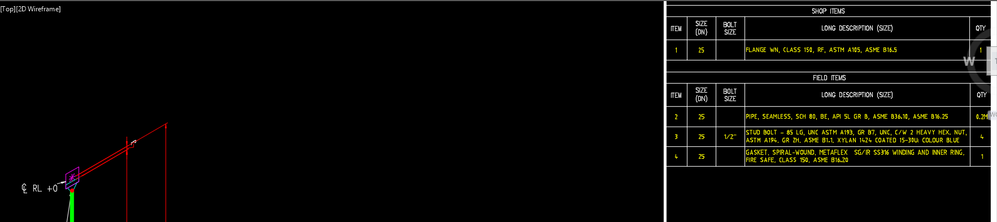
Has anyone figured out how to do this when using shop/field type material list, where you can't copy the 'valve' rows'?


Material List.png

0 Likes
Message 23 of 24

cadVVUC8
Enthusiast
Enthusiast

Doesn't matter, all sorted.


Place the same code in the next paragraphs.

0 Likes
Message 24 of 24

jw7018
Collaborator
Collaborator

How to get a custom part to show up in BOM or MTO.

This is only a quick fix:  I had to change the SKEY to an existing threaded component (like a union)


OPTION 1.

(recommended)

adds to BOM and places a square in the ISO model space

SKEY=SGSC,TYPE=MISC-COMPONENT


OPTION 2.

Made smart plant components

I have made PI, TW< & PITs

Gave them all union SKEYS

The part came into the BOM with my custom description


0 Likes