Instrument Symol Missing

Instrument Symol Missing

Ahmed1081975
Collaborator Collaborator
3,753 Views
8 Replies
Message 1 of 9

Instrument Symol Missing

Ahmed1081975
Collaborator
Collaborator

Hi Autodesk Support,

I have problem whine I generating the isometric, I had put the instrument in the model with tag no. after generated the isometric he give me missing symbol and also without tag no.

For more clarification refer the attached file

Regards,

Ahmed Helal

0 Likes
Accepted solutions (1)
3,754 Views
8 Replies
Replies (8)
Message 2 of 9

VinodBalasubramanian
Autodesk Support
Autodesk Support

Can i able to reproduce this in the project that you have sent to me earlier. If not, do send me your model for investigation.


Vinod Balasubramanian
AutoCAD Industry Support & Escalation Lead

0 Likes
Message 3 of 9

Ahmed1081975
Collaborator
Collaborator

Yes Please Same Project


Regards,


Ahmed Helal

0 Likes
Message 4 of 9

VinodBalasubramanian
Autodesk Support
Autodesk Support

Thanks Ahmed. I will take a look into this issue as well.


Vinod Balasubramanian
AutoCAD Industry Support & Escalation Lead

0 Likes
Message 5 of 9

VinodBalasubramanian
Autodesk Support
Autodesk Support

Can you also tell me the line number for which I need to extract the ISO to see the missing instrument symbol ?


Vinod Balasubramanian
AutoCAD Industry Support & Escalation Lead

0 Likes
Message 6 of 9

Ahmed1081975
Collaborator
Collaborator

The line No. is  (CP517-1-DWG-EMI-030)


Regards,


Ahmed Helal

0 Likes
Message 7 of 9

VinodBalasubramanian
Autodesk Support
Autodesk Support

Below is the correct workflow for getting your instrument symbol in isometric.


1] Open the isoAcadSkeyBlockmap.xml and add the line: <SkeyMap SKEY = "II??" AcadBlock ="Instrument-Dial"/>


 1.jpg


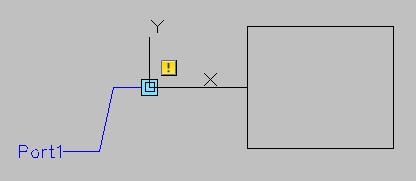
2] 2] Open the IsoSymbolStyles.dwg and create a symbol called Instrument-Dial that has a single port.


 2.jpg


3] Edit the part in the model to: SKEY=IIFL,TYPE=INSTRUMENT-DIAL


 3.jpg


Result (Instrument shown in magenta):


 4.jpg


Hope that helps.


Vinod Balasubramanian
AutoCAD Industry Support & Escalation Lead

Message 8 of 9

Ahmed1081975
Collaborator
Collaborator
Accepted solution

Thanks Very Much Vinod Finally it's working well


Regrdas,


Ahmed Helal

0 Likes
Message 9 of 9

Anonymous
Not applicable

Hi Vinod


I reviewed your replay below which is totally worked fine for me as well. But for some reason numbering the instrument which will appear in the ISO is missing.. Any idea how can I have tag number in the istrument. number show in BOM hewever. 

see attached


Thanks.


0 Likes