Custom made Spec Sheet and Catalog

Custom made Spec Sheet and Catalog

Anonymous
Not applicable
1,492 Views
6 Replies
Message 1 of 7

Custom made Spec Sheet and Catalog

Anonymous
Not applicable

Hello,


Firs I wold like to say that I'm a beginner in using Plant 3D. 

I'm working on an project that requires a custom made Spec Sheet and Catalog.

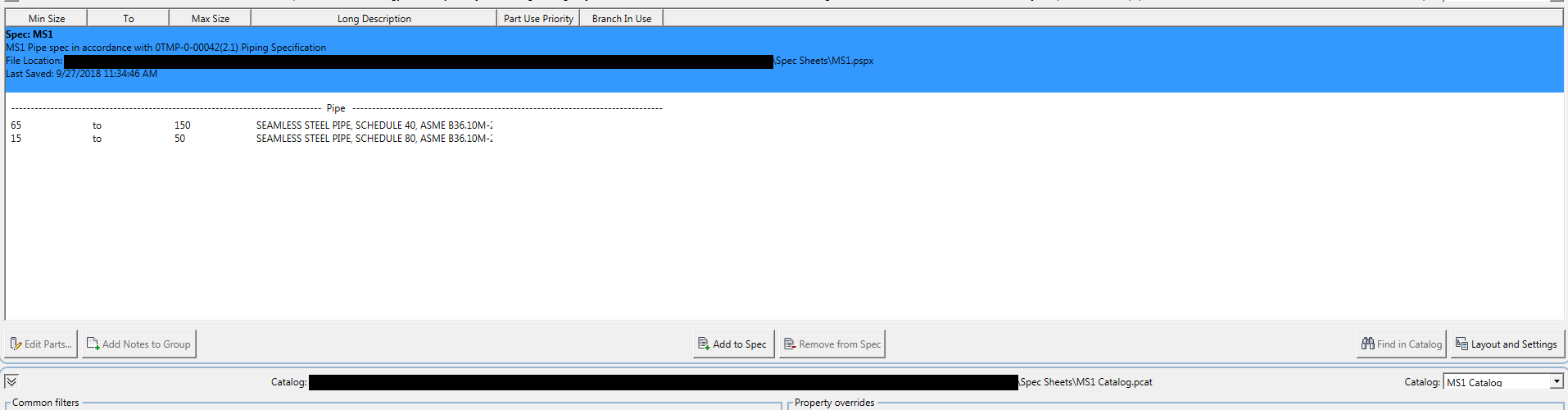
I have managed to create a new Catalog and using it I have created a new Spec Sheet.

Catalog and Spec Sheet are in the "Spec Sheet" folder for the project.

In the Project Setup under Plant 3D DWG Settings - Paths the Spec sheets directory is the one where my new Spec Sheet and Catalog are located.

When I create a new P&ID Drawing, place a new line to connect two equipment's, select the line, right click select Assign Tag, the wizard pups out and in the Spec drop down menu I should be able to find my new Spec but can not find it.

Any idea of what I'm doing wrong here?

0 Likes
1,493 Views
6 Replies
Replies (6)
Message 2 of 7

DGRL
Advisor
Advisor

Hi


Welcome and enjoy


What version are you using?
can you provide screenshots of what your doing and what is wrong?


If this was of any help please kudo and/or Accept as Solution
Kind Regards
0 Likes
Message 3 of 7

Anonymous
Not applicable

The version that I'm using is 2016.

In Plant 3D Spec Editor I created a catalog (MS1 Catalog) and a Spec sheet (MS1): attachment Untitled 1

When I go a P&ID dwg and try to assign a tag to a line I cannot see the new spec that I have created: attachment Untitled 2 and 3

In the spec drop down, attachment Untitled 3, I should be able to see my MS1 Spec.


0 Likes
Message 4 of 7

DGRL
Advisor
Advisor

Although you dont see a scrollbar, d id you tried to scroll down in popup menu where you select the spec?

It seems you did not removed all the Original specs so the list is kinda long


If this was of any help please kudo and/or Accept as Solution
Kind Regards
0 Likes
Message 5 of 7

Anonymous
Not applicable

Even if I delete all the specs that I don't need they still appear in the drop down and none of the new ones can be seen.

0 Likes
Message 6 of 7

DGRL
Advisor
Advisor

weird

have to think of this 


If you delete the specs from the project you shouldnt see them anymore 


If this was of any help please kudo and/or Accept as Solution
Kind Regards
0 Likes
Message 7 of 7

Dadspackard
Collaborator
Collaborator

@Anonymous,


I am not sure when version this became active but you need to add and delete specs from Project manager.

pm-specs.png

Tom
aka, Dadspackard, Packin31