Adding Custom "Piing and Equipment" class

Adding Custom "Piing and Equipment" class

JohnHolder
Collaborator Collaborator
4,000 Views
15 Replies
Message 1 of 16

Adding Custom "Piing and Equipment" class

JohnHolder
Collaborator
Collaborator

Anyone help direct me in adding a custom field in the <equipment> class settings?


inside <Plant 3D Class Definitions> inside <Piping and Equipment>


I wanted to add a few catagories for Aquaculture and the specific equipment that I use,

so I can have specific fields show up in the equipment reports.


An education isn't how much you have committed to memory, or even how much you know. It's being able to differentiate between what you know and what you don't.
-------------------------------------
"Do or do not... there is no try"
Master Yoda.
0 Likes
Accepted solutions (2)
4,001 Views
15 Replies
Replies (15)
Message 2 of 16

dave.wolfe
Advisor
Advisor

Select the Equipment class and at the far right you should see an Add button.  You can pick your property type in the following dialog.  If you choose selection list, you can create a new selection list in the next dialog.

Dave Wolfe
Isaiah 57:15

EESignature

Plant 3D Wish list

Piping Labs

0 Likes
Message 3 of 16

JohnHolder
Collaborator
Collaborator

That is just adding a <property>


I want to add <JLH Equipment> along side <filter> <furnace> <Global Equipment> etc


I use <Filter> < Tank> <Pump> and mostly <Misc Equipment> - but they are quite broad I want to add my own equipment catagory and for the specialized equipment then add my own properties.


John.


An education isn't how much you have committed to memory, or even how much you know. It's being able to differentiate between what you know and what you don't.
-------------------------------------
"Do or do not... there is no try"
Master Yoda.
0 Likes
Message 4 of 16

Rave.Tam
Advocate
Advocate
Accepted solution

There's no UI for this. Probably you can try editing the database to add a new class, but i'm not sure what is the repercussion. 

If my post answers your question, please click the "Accept as Solution" button.

Check out my blog http://lazcad.com
Message 5 of 16

AndyDavisArkance
Collaborator
Collaborator
Accepted solution

Hi,


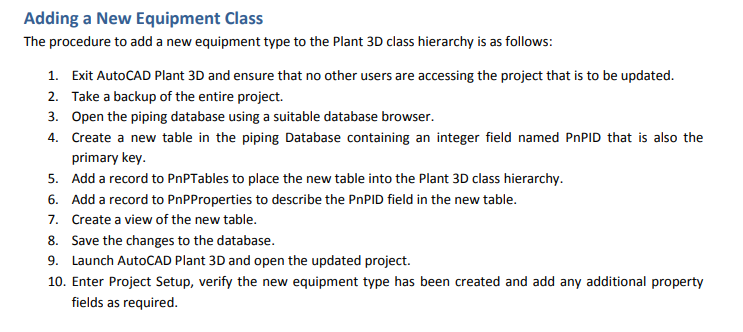
Although there is no UI to add new classes, it is really quite straightforward to add a new class directly to the database.


I have already documented the procedure here: http://www.cadlinecommunity.co.uk/WhitePapers/WhitePaper.aspx?ScoId=3663d1b1-7c60-4796-9e59-2c34f34c...


Please feel free to download a ccopy.


Regards,

Andy


Andy Davis

Industry Specialist
ARKANCE
Message 6 of 16

JohnHolder
Collaborator
Collaborator

Thanks!  I will go over this.


An education isn't how much you have committed to memory, or even how much you know. It's being able to differentiate between what you know and what you don't.
-------------------------------------
"Do or do not... there is no try"
Master Yoda.
0 Likes
Message 7 of 16

jhamilton
Advocate
Advocate

This proceedure works, but it is for SQL Lite.  What about SQL Express?

0 Likes
Message 8 of 16

Anonymous
Not applicable

Hi Andy,


As asked on the post below, what about the procedure for a project running on SQL Server ?

I tried to adapt your procedure but with no success.


Thank you in advance,

Alexandre Devos

0 Likes
Message 9 of 16

Anonymous
Not applicable

The link is break, please helpme

0 Likes
Message 10 of 16

AndyDavisArkance
Collaborator
Collaborator

Hi,


You can find the document you are looking for here: Add New Classes to AutoCAD Plant 3D 2013 


Please remember that I wrote this way back for the 2013 release - I have not checked it recently and cannot provide any guarantee that it will still work.


Regards,

Andy


Andy Davis

Industry Specialist
ARKANCE
0 Likes
Message 11 of 16

Anonymous
Not applicable

you will not have a step by step how to do it, since the procedure you show, is quite general, you may have one where you show how you use the "SQLite Database Browser", to create the tables, create the "record", create "new view of the new table ", etc, I would thank you infinitely.respuesta.png

0 Likes
Message 12 of 16

jhamilton
Advocate
Advocate

Very Cool, I am going to give it a try.

0 Likes
Message 13 of 16

Anonymous
Not applicable

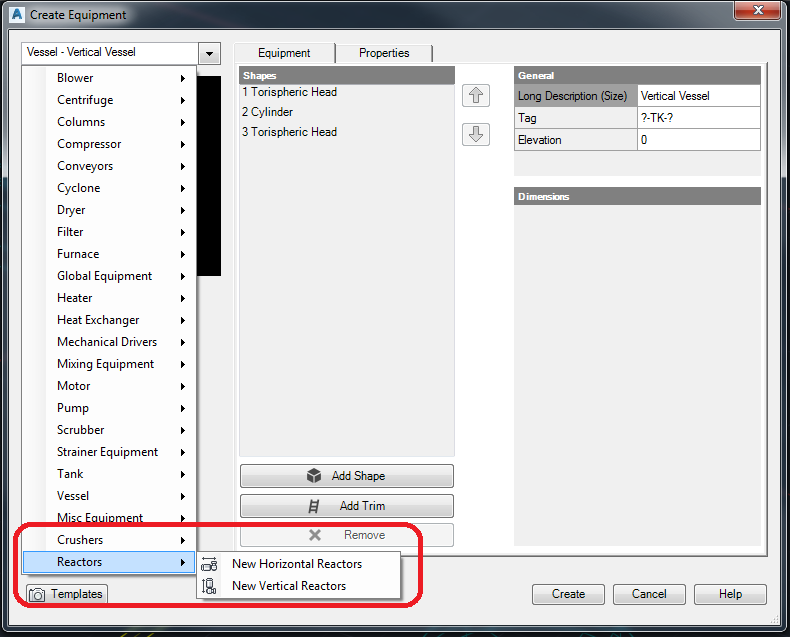
I was finally able to do it, I have done the procedure using the expert of SQLite Expert personnel as a database editor, and I have managed to insert new equipment classes for AutoCAD Plant 3D 2019, soon I will make a tutotial video of how to do it (step by step) on my YouTube channel, here are some screenshots.resp01.pngresp02.pngresp03.png


@jhamilton wrote:

Very Cool, I am going to give it a try.


Message 14 of 16

jhamilton
Advocate
Advocate

Sounds good.  I was going to try this in the next week or two.  The piping group is actually wanting sub-classes on supports to separate Hangers from Springs from Shoes.  They also want something to place field bolts for equipment.   That is something that is totally left out.

0 Likes
Message 15 of 16

Anderson-Brass
Observer
Observer

This whole process is even valid.

But the fact of just inserting a new class of equipment would be the solution, because the result is flawed!

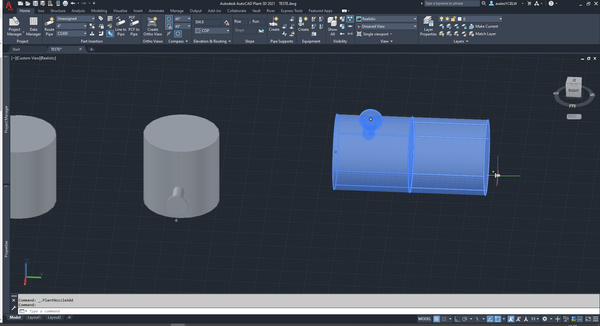
New equipment does not accept new nozzles or you cannot edit the nozzles.

Until the advances of my studies the process is still not ideal or functional.


I'm sorry about my English if you don't understand.

asalesYCBLW_0-1615502193865.png

asalesYCBLW_1-1615502252767.png

asalesYCBLW_2-1615502273360.png


0 Likes
Message 16 of 16

Rolly.Pagod
Contributor
Contributor

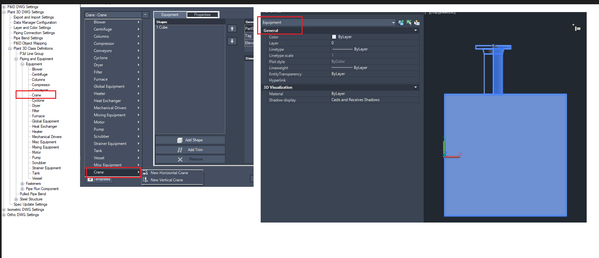
Agree @Anderson-Brass  I created also my new equipment (crane) but no properties show. for the item. Hopefully Autodesk can give us the rights to do this especially more clients wants to have everything in their plant to have asset information (which revit can handle)

RollyPagod_0-1662770066660.png


0 Likes