Multiple Object Ribbon

Multiple Object Ribbon

Anonymous
Not applicable
2,071 Views
2 Replies
Message 1 of 3

Multiple Object Ribbon

Anonymous
Not applicable

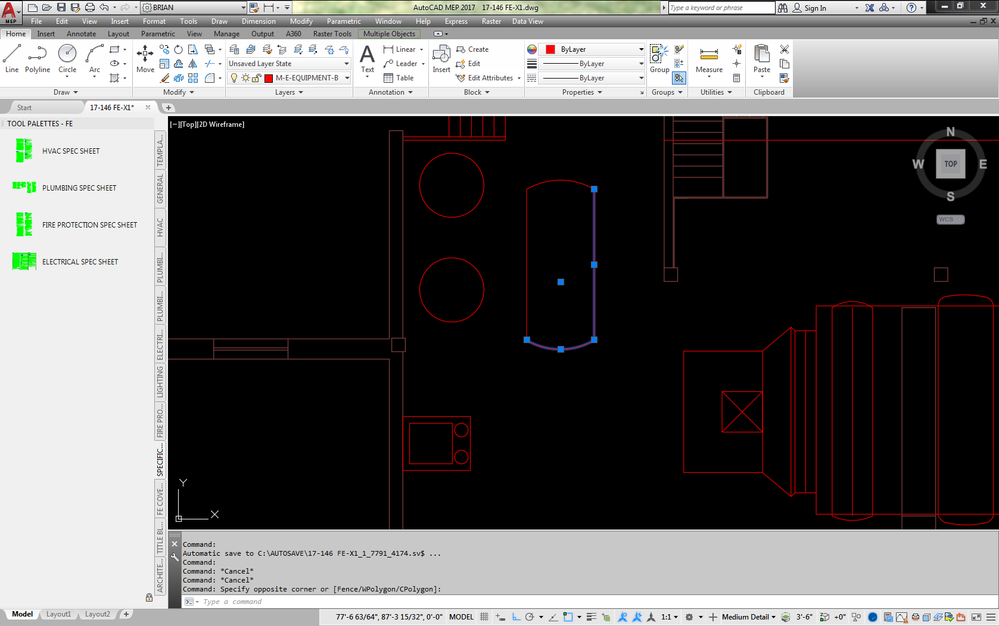
Does anyone know how to change the way AutoCad automatically toggles to the multiple object ribbon when selecting multiple objects. For example if I was to select two lines and change the layer, AutoCad automatically switches to a ribbon labeled multiple objects. I then have to click home and then modify my layer. In the previous versions this ribbon never popped up. See attached photos.


first.pngsecond.pngthree.png

0 Likes
Accepted solutions (1)
2,072 Views
2 Replies
Replies (2)
Message 2 of 3

Keith.Brown
Advisor
Advisor
Accepted solution

This article has the answers that you are looking for.


https://knowledge.autodesk.com/support/autocad/troubleshooting/caas/sfdcarticles/sfdcarticles/How-to...


In summary, open the OPTIONS panel and go to the Selection tab.  Then in the section called Ribbon Options click the Contextual Tab States button.  When the dialog pops up change the maxium value from whatever it is to 1.  This will stop the behavior that you are seeing.

Message 3 of 3

Anonymous
Not applicable

That seemed to have fixed it. Thanks!

0 Likes