Using standard components in 3D AutoCAD Mechanical

Using standard components in 3D AutoCAD Mechanical

rbarbosa8DQGJ
Advocate Advocate
3,774 Views
10 Replies
Message 1 of 11

Using standard components in 3D AutoCAD Mechanical

rbarbosa8DQGJ
Advocate
Advocate

Can I use all tools and standard components of Autocad Mechanical even when I modeling in 3d? Can I generate a 3d Model if I work with 2d model?


[The subject line of this post has been edited for clarity by cheryl.buck from: Re: No 3d tools in AutoCAD Mechanical]

0 Likes
Accepted solutions (1)
3,775 Views
10 Replies
Replies (10)
Message 2 of 11

cheryl.buck
Autodesk Support
Autodesk Support

Hi @rbarbosa8DQGJ,


If I understand correctly, the workspaces only change the ribbon environment for the specific tasks.  All standard commands and functions are available under the different workspaces though they may not show in the specific ribbon combinations. 


You can switch between workspaces for different ribbon options at any point while you are working. And it is possible to customize the ribbon. There are some great threads in the forums on customizing the ribbon. 


Please let me know if this answered your question. 


All the best, 


Cheryl Buck
Technical Support Specialist


Did a post answer your question or help resolve the issue? Please click the Accept Solution button.
If you find a response helpful, consider Liking the post.

0 Likes
Message 3 of 11

rbarbosa8DQGJ
Advocate
Advocate

In fact, what I want is modeling in 3d using Autocad Mechanical resources in my 3d model.

0 Likes
Message 4 of 11

cheryl.buck
Autodesk Support
Autodesk Support

Hi @rbarbosa8DQGJ,


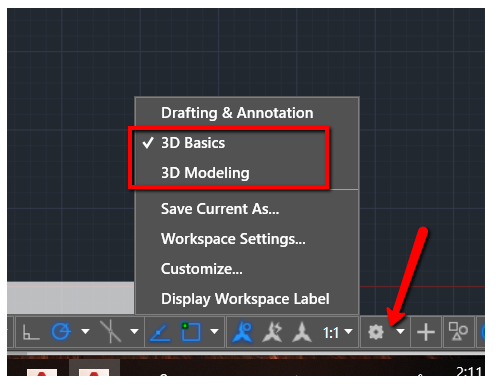
It sounds like you are looking for the 3D workspaces. They can be accessed from the Status bar in the lower right corner of the AutoCAD window. The icon looks like a gear (see To Work with Workspaces | AutoCAD). 


If you are trying to import a solid model from another program, see the following Autodesk Knowledge Network article:

To Import a Non-Autodesk 3D Model | AutoCAD

Please let me know if this helped. If not, can you give me more details?


All the best,

Cheryl Buck
Technical Support Specialist


Did a post answer your question or help resolve the issue? Please click the Accept Solution button.
If you find a response helpful, consider Liking the post.

0 Likes
Message 5 of 11

rbarbosa8DQGJ
Advocate
Advocate

will be possible to use parametric components in the 3d model? 3d menus I have already founded before...

0 Likes
Message 6 of 11

cheryl.buck
Autodesk Support
Autodesk Support
Accepted solution

Hi @rbarbosa8DQGJ,


Thank you, I think I understand now. It sounds like you would like to be able to use parametric 2D objects to create 3D objects and still retain the dynamic qualities of the 2D objects. 


The dynamic, or parametric, properties in an object are lost once the object is converted from 2D to 3D in AutoCAD. From what I understand, this can be done with solid models in Inventor.


I hope this helps.  


All the best,

Cheryl Buck
Technical Support Specialist


Did a post answer your question or help resolve the issue? Please click the Accept Solution button.
If you find a response helpful, consider Liking the post.

0 Likes
Message 7 of 11

cheryl.buck
Autodesk Support
Autodesk Support

Hi @rbarbosa8DQGJ,


I am checking back to see if you still need help with this issue. If you were able to resolve it, please post an update letting the community know your solution. 


All the best,


Cheryl Buck
Technical Support Specialist


Did a post answer your question or help resolve the issue? Please click the Accept Solution button.
If you find a response helpful, consider Liking the post.

0 Likes
Message 8 of 11

rbarbosa8DQGJ
Advocate
Advocate

I used an old version of autocad mechanical, with the same menus. It was possible to work in 3D. It seems that this was removed from the program that is now only for 2d models. Actually, the 3D version must have been discontinued for the benefit of Inventor. It shouldn't have updated ... I'm going back to the old version.

0 Likes
Message 9 of 11

cheryl.buck
Autodesk Support
Autodesk Support

Hi @rbarbosa8DQGJ,


All versions of AutoCAD Mechanical can do 3D. The 3D ribbon can be accessed from the 3D Modeling and 3D Basics workspace in the Status Bar.


2020-01-29_1412.png


If there is a specific command you are looking for, please let me know, I would be happy to help you find it in the new versions. 


All the best, 


Cheryl Buck
Technical Support Specialist


Did a post answer your question or help resolve the issue? Please click the Accept Solution button.
If you find a response helpful, consider Liking the post.

0 Likes
Message 10 of 11

rbarbosa8DQGJ
Advocate
Advocate

I need to use the tools (components, conections...) in 3d. Not in 2d only.

0 Likes
Message 11 of 11

tconnerJZ5UY
Participant
Participant

What the initiator of this post is asking is can you insert a 3D screw and make a 3D tapped hole in a solid 3D part in AutoCAD Mechanical.  Has nothing to do with 2D.  Has nothing to do with a 3D toolbar.  I have only found when inserting a screw you can only choose from front, top, side, or bottom view.  That is not 3D.  If you cannot insert 3D content in Mechanical, is there any other AutoCAD suite (other than Inventor) that can insert built-in intelligent 3D content from a toolbar?  Seems to me that the only useful 3D feature that Mechanical offers (and Vanilla AutoCAD doesn't offer) is it can import step files.