Start Mode is read-only

Start Mode is read-only

Anonymous
Not applicable
5,906 Views
14 Replies
Message 1 of 15

Start Mode is read-only

Anonymous
Not applicable

Trying to get my start tab back and it says to change start mode value to 1 instead of 0. However my start mode is set to read-only and neither myself or our AutoCAD guru can figure out how to fix that.

0 Likes
Accepted solutions (1)
5,907 Views
14 Replies
Replies (14)
Message 2 of 15

gaurav.satalkar
Autodesk
Autodesk

Hello,


You will have to make this change in your registry: Change the value to 1.

HKEY_LOCAL_MACHINE\SOFTWARE\Autodesk\AutoCAD\R21.0\ACAD-0005\Variables\*DISPLAYSTARTTAB


Follow this AKN article:

https://knowledge.autodesk.com/support/autocad/troubleshooting/caas/sfdcarticles/sfdcarticles/How-to...


Hope this solves your problem.


Please ACCEPT AS SOLUTON if this works

Thank You,


Gaurav Satalkar

QA Engineer

0 Likes
Message 3 of 15

Anonymous
Not applicable

That is the first thing I did however it did not resolve the issue. Also I only have R22.0 not R21.0, not sure if that makes a difference.


0 Likes
Message 4 of 15

gaurav.satalkar
Autodesk
Autodesk
Accepted solution
Then you need to make the change under R22. Also set the Startmode, after changing the registry key.
You can try that and restart your product.

Hope this works.

Thank you


Gaurav Satalkar

QA Engineer

0 Likes
Message 5 of 15

Anonymous
Not applicable

Had to restart my machine but it worked! Thank you much.

0 Likes
Message 6 of 15

VA7GCE
Advocate
Advocate

Hi @gaurav.satalkar , 


we are having this issue on our C3D 2019, the start-up page won't load, and the "StartMode" is set to "0" and readonly. Even if I change that to "1" in the registry, reboot computer, and relaunch C3D, it will revert it back to "0". any suggestion?


Thanks.

2019 Start Up Page1.PNG2019 Start Up Page2.PNG

0 Likes
Message 7 of 15

Anonymous
Not applicable

Make sure you are making this change from 0 to 1 in the HKEY registry (on your machine) AND in the command line (in autocad) type in STARTMODE and make the change there as well. Then power off and back on.

0 Likes
Message 8 of 15

Anonymous
Not applicable

Sorry, forgot to clarify getting to HKEY_LOCAL_MACHINE go to start bar and type in regedit.

0 Likes
Message 9 of 15

VA7GCE
Advocate
Advocate

Thanks @Anonymous  for your reply, however, I don't think that is going to work.

first, I changed "StartMode" from 0 to 1 in Registry, but as soon as I re-launch C3D 2019, that key will revert back to 0,

and there is no way in C3D to set "StartMode" to "1" as it's read-only, as you can see on that image.

0 Likes
Message 10 of 15

VA7GCE
Advocate
Advocate

is that key under local_machine?

I changed the one under "Computer\HKEY_CURRENT_USER\Software\Autodesk\AutoCAD\R23.0\ACAD-2000:409\Profiles\PROFILENAME\Variables"

0 Likes
Message 11 of 15

Anonymous
Not applicable

My exact path:

Computer\HKEY_LOCAL_MACHINE\SOFTWARE\Autodesk\AutoCAD\R22.0\ACAD-1005\Variables\*DISPLAYSTARTTAB

Set (default) to 1

0 Likes
Message 12 of 15

VA7GCE
Advocate
Advocate

thanks @Anonymous , the issue has been resolved, the registry does allow the "StartMode" to be writeable.

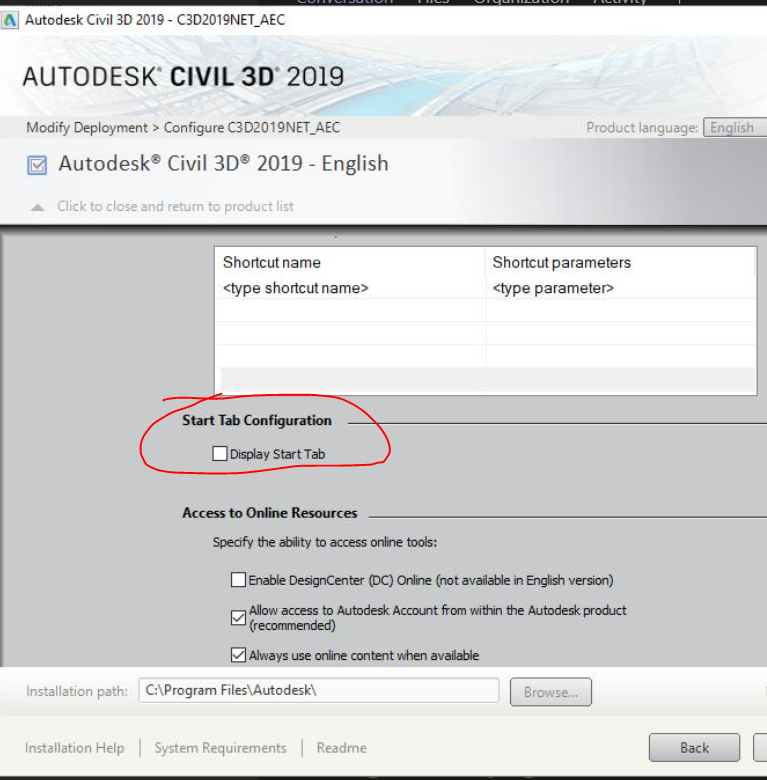
the issue was caused by the deployment package, IT didn't select the "Display start tab" when they created the deployment, mine was the first test machine and installed manually.


2019 Start Up Page3.PNG

0 Likes
Message 13 of 15

staghaus002
Community Visitor
Community Visitor

and where is that in autocad for mac? 🙂

Message 14 of 15

russellGCS4G
Participant
Participant

Looking for this for Mac too. No registry 🙂

Message 15 of 15

pendean
Community Legend
Community Legend

@russellGCS4G @staghaus002 That's not an option on the MAC interface of plain AutoCAD, never has been, still is not. Sorry. This forum is also for a specific variant of AutoCAD that you cannot run natively on a MAC either.


You both need to be asking and posting in the AutoCAD FOR MAC forum over here for your future Mac variant queries

https://forums.autodesk.com/t5/autocad-for-mac-forum/bd-p/autocad-mac-forum-en 


HTH

0 Likes