VBA 64 bit: ODRecord.AttachTo doesnt work

VBA 64 bit: ODRecord.AttachTo doesnt work

Anonymous
Not applicable
3,424 Views
9 Replies
Message 1 of 10

VBA 64 bit: ODRecord.AttachTo doesnt work

Anonymous
Not applicable

Hello,

on vba, ODRecord.AttachTo(plineobj.ObjectID32) doenst work. plineobj.ObjectID32 is i.e. 47, I think thats not correct. I think, the thisdrawing.Utility.ObjectId32ToObjectIdString gets the right ID. But how can I use this ID with AttachTo ?


Software:

AutoCad Map 3D 2013, Windows 7, both 64 bit

3,425 Views
9 Replies
Replies (9)
Message 2 of 10

Anonymous
Not applicable

Hi Huggy,


Could you try using ODRecord.AttachTo(plineobj.ObjectID) instead ?


Does it help ?

0 Likes
Message 3 of 10

Anonymous
Not applicable

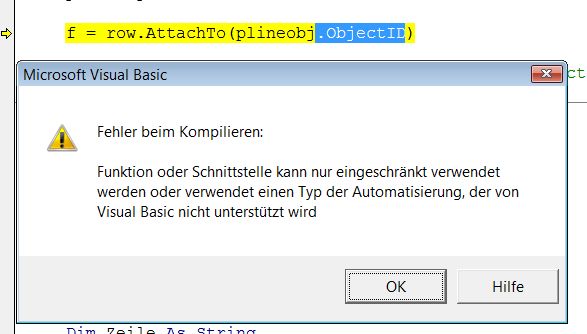
No, that doesnt works. Error on compiling.

objectid.jpg


VBA-Version is 6.5, is this the correct version for 64 bit?


0 Likes
Message 4 of 10

Anonymous
Not applicable

Hi,


I don't have VBA installed right now on my Map 3D 2013 64 bit version. You can download the correct version from the link below -


http://usa.autodesk.com/adsk/servlet/item?siteID=123112&id=12715668&linkID=9240618


In the past I have seen some issues in using VBA on 64 bit Map 3D running on 64 bit OS and at times you might see inconsistent behavior. If you have any chance to migrate to VB.NET instead, I would suggest you to consider the same.


And the following might be useful info to you :


http://usa.autodesk.com/adsk/servlet/index?siteID=123112&id=770215


Thanks,


0 Likes
Message 5 of 10

norman.yuan
Mentor
Mentor

I also tried with my Acad Map 2012 64-bit. No, it did not work. That means, for 64-bit Acad Map, the Map COM API (contained in AcMapVbApi.dll/tlb) is broken and useless, at least in terms of ObjectData related APIs (Has Autodesk ever mentioned that Acad Map COM API would be broken in 64-bit, other than generally claiming VBA would be problematic in 64-bit Acad?).

Norman Yuan

Drive CAD With Code

EESignature

0 Likes
Message 6 of 10

gluckett
Collaborator
Collaborator

Hi, having the same issue with the line:


oRecord1.AttachTo (ent.ObjectId)


vba_map2013_64bit.png


Can do everything else (read object data, attach databases, even digitize new blocks) but can't attach object data with VBA.


This is an old project and don't have the time to migrate to .NET yet, but may have to if this doesn't get sorted.


thanks all!


gordon


0 Likes
Message 7 of 10

norman.yuan
Mentor
Mentor

Well, with 64-bit VBA being built into AutoCAD 2014, we may be able to hold our breath to see if this will be back to work again when AutoCAD Map 2014 comes out in next a few days (or weeks)?

Norman Yuan

Drive CAD With Code

EESignature

0 Likes
Message 8 of 10

gluckett
Collaborator
Collaborator

This VBA Object Data connect bug was a bit of a show-stopper in my project.


I have already started moving over to .NET and the cumbersome  BlockTableRecord and DatabaseServices API that is found in there...yuck.


0 Likes
Message 9 of 10

Alfred.NESWADBA
Consultant
Consultant

Hi,


>> I don't have VBA installed right now on my Map 3D 2013 64 bit version

It's not a question of VBA, it's a defect signature in the AttachTo function (in COM-API) which wants a Integer as parameter for ObjectID.


Entity.ObjectID returns a LONG value

attachTo function needs a INTEGER value

...and you can't use the Entity.ObjectID32 workaround as this returns invalid numbers


All tested now with Map3D 2014 German 64bit


- alfred -

------------------------------------------------------------------------------------
Alfred NESWADBA
ISH-Solutions GmbH / Ingenieur Studio HOLLAUS
www.ish-solutions.at ... blog.ish-solutions.at ... LinkedIn ... CDay 2026
------------------------------------------------------------------------------------

(not an Autodesk consultant)
Message 10 of 10

Anonymous
Not applicable

If it helps anyone avoid rewriting their VBA code base due to this issue, here is how we worked around it. We wrote a Lisp command in .NET (C#) that will create a record in an object table and attach it to an object. The object table name and object handle are passed to the Lisp command. The Lisp command can be called from VBA to create the record and attach it to an object. You can then edit the object data record as usual from within VBA.


The .NET Lisp Command:

  public class Commands
    {
        [LispFunction("AttachObjectDataRecordToObject")]
        public Object AttachObjectDataRecordToObject(ResultBuffer resultBuffer)
        {
            Object ret = null;

            var editor = Autodesk.AutoCAD.ApplicationServices.Core.Application.DocumentManager.MdiActiveDocument.Editor;
            TypedValue[] tvArr = resultBuffer.AsArray();
            string tableName = tvArr[0].Value as String;
            string objectHandle = tvArr[1].Value as String;
            long handle = long.Parse(objectHandle, System.Globalization.NumberStyles.HexNumber);
            Tables tables = HostMapApplicationServices.Application.ActiveProject.ODTables;
            var objectId = HostApplicationServices.WorkingDatabase.GetObjectId(false, new Handle(handle), 0);

            var table = tables[tableName];
            using (var transaction = HostApplicationServices.WorkingDatabase.TransactionManager.StartTransaction())
            {
                //http://adndevblog.typepad.com/infrastructure/2012/05/adding-object-data-records-to-entity-using-map-...
                var dbObj = transaction.GetObject(objectId, Autodesk.AutoCAD.DatabaseServices.OpenMode.ForWrite);
                Record record = Record.Create();
                table.InitRecord(record);
                table.AddRecord(record, dbObj);
                transaction.Commit();
            }
            return ret;
        }

        
    }


The VBA function to call the Lisp Command:


Public Function CreateRecordCommand(ByVal tableName As String, ByVal lngObjId As Long) As Boolean

        Dim strCommand As String
        Dim odRecordHandle As String
        Dim objectHandle As String
        
        CreateRecordCommand = False
        objectHandle = GetHandle(lngObjId)
        CreateRecordCommand = False
        strCommand = "(ATTACHOBJECTDATARECORDTOOBJECT " & Chr(34) & tableName & Chr(34) & Chr(34) & objectHandle & Chr(34) & ") "
        ThisDrawing.SendCommand strCommand
        CreateRecordCommand = True
End Function

Public Function GetHandle(ByVal longObjId As Long)
    Dim object As AcadObject
    Set object = ThisDrawing.ObjectIdToObject32(longObjId)
    GetHandle = object.handle
End Function