Unable to trim around a circle, any help appreciated!

Unable to trim around a circle, any help appreciated!

orrco
Participant Participant
14,981 Views
27 Replies
Message 1 of 28

Unable to trim around a circle, any help appreciated!

orrco
Participant
Participant

Hello, 


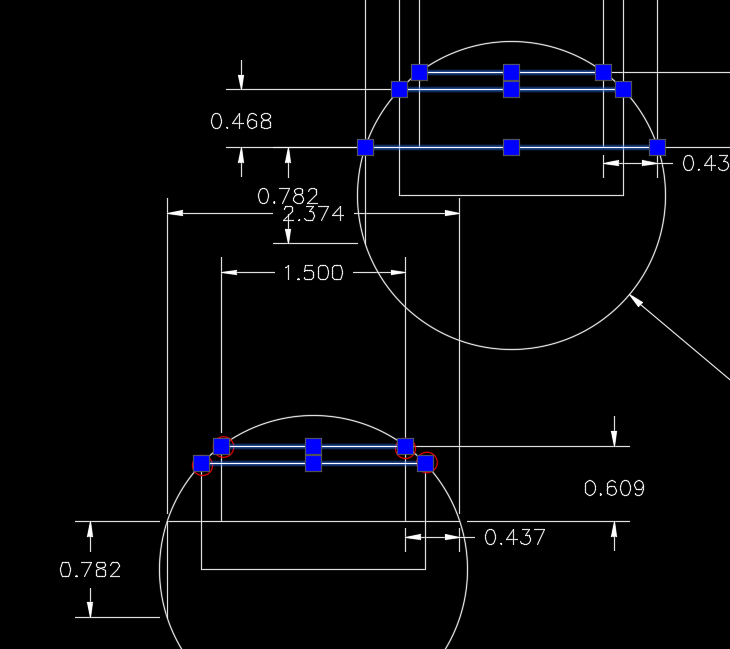
I have circled the spots that I am trying to trim. When I do the trim command it will trim the line, but not to the intersection of the circle. It keeps the line a little longer. This is very frustrating and seems like it should be something obvious.


Thanks for any help!  

0 Likes
Accepted solutions (1)
14,982 Views
27 Replies
Replies (27)
Message 2 of 28

JamesPowell7164
Collaborator
Collaborator

Could it be that your line smoothing is set too small? that is when you see the circle it is made up of a series of lines - not a smooth circle. Then when you see the line you see the true length but the circle seems to be behind your trimmed line.


Go to Options, look at the Display tab, and then look at "Display resolution". there is an "Arc and circle smoothness setting and a "segments in a polyline curve" setting. Play with the Arc and circle figure and see if it helps. Mine is set to 1000.

0 Likes
Message 3 of 28

pendean
Community Legend
Community Legend

Those lines are already cut at the circle: there is nothing to trim. Look at the blue dots 


Capture.PNG

0 Likes
Message 4 of 28

JamesPowell7164
Collaborator
Collaborator
Could it be a graphics card problem? Or his settings as above? It is more perceived rather than actual.
0 Likes
Message 5 of 28

pendean
Community Legend
Community Legend
We'll have to wait for the OP to comment and give feedback for all the responses.
0 Likes
Message 6 of 28

JamesPowell7164
Collaborator
Collaborator
Dean I just opened the OPs drawing and the bottom circle does have the straight lines extending past the circle that he is using as a trim fence. Did this show up when you opened it? the screenshot that you posted seems to show these lines as being trimmed by the circle. There doesn't seem to be double lines or groups of lines either. As you say, look forward to the OPs next post.
0 Likes
Message 7 of 28

orrco
Participant
Participant

Hi Everyone


Thanks for your help and comments. However, I still am not able to fix this. I agree with the last post. When I zoom in VERY close it extends past the circle (see attachment). I am just working around it for now, but this has come up a couple times in the past so thought I would check here for a possible solution. 


Thank you. 


0 Likes
Message 8 of 28

pendean
Community Legend
Community Legend
use REGENALL after you zoom in that close and see if the visuals update differently.
0 Likes
Message 9 of 28

orrco
Participant
Participant

That is interesting. Now it looks like like it doesn't touch the circle (see attachment). I have never used REGENALL before. 

0 Likes
Message 10 of 28

pendean
Community Legend
Community Legend
Accepted solution
That was an easy fix. Use REGENALL often after you zoom in real close: it forces your video card to react to the display changes.
Message 11 of 28

orrco
Participant
Participant

Thank you for your help!

Message 12 of 28

twebert81
Contributor
Contributor

I'm having the same issue as in the title (although this one seems more legit)


Trim function is clearly working on the straight line just not on the circle. What am I missing?

This is nothing to do with graphics or artifacts. It just won't let me do it (AutoCAD 2024 & 2025.


Surely there are others with this issue that have come to this thread looking for answers.

Any ideas?

twebert81_1-1723079456898.png


twebert81_0-1723079441276.png


0 Likes
Message 13 of 28

pendean
Community Legend
Community Legend

@twebert81 wrote:

...Any ideas?


Why is this chosen?

pendean_0-1723122307530.png


What is unique about that "circle"? pretty picture tells us nothing about the underlying cause. Do you have this issue in ALL of your files if you draw a circle+line in them then try the TRIM command?

0 Likes
Message 14 of 28

twebert81
Contributor
Contributor

Not sure what you mean by chosen? It's just 3D, it isn't selected. The same thing happens in 2D wireframe.


There's actually 2 pics there. One where the circle can't be trimmed and another with the exact same 2 objects where the line can be trimmed up to the circle.

No it's not universal across all files but in this case, why can I trim one but not the other?


What other info would you need?


I thought maybe there was some infinitesimal misalignment but if that were the case then nether would trim no?

0 Likes
Message 15 of 28

pendean
Community Legend
Community Legend

@twebert81 wrote:

...What other info would you need?...


Share your actual DWG file that snapshots came from please.

0 Likes
Message 16 of 28

twebert81
Contributor
Contributor

I no longer have it.

I had to keep working so found ways around it but if it happens again I'll put it up.


To be honest though it's the inconsistent behaviours in those 2 screen shots that I'm querying.

A guru worth his salt will know exactly what's going on.

0 Likes
Message 17 of 28

jskalaXDDX5
Advocate
Advocate

jskalaXDDX5_0-1723206494542.png


0 Likes
Message 18 of 28

pendean
Community Legend
Community Legend
0 Likes
Message 19 of 28

pendean
Community Legend
Community Legend

@twebert81 wrote:

I no longer have it...


We can't help you sadly.

Remember, pictures mean nothing 90% of the time when you ask fellow end users about a program odd behavior no one else (and you) can replicate or reproduce on demand.

0 Likes
Message 20 of 28

twebert81
Contributor
Contributor

We?? speaking for the group?

Anyway, I have exactly what you need now so looking forward to your solution.

What have I done wrong? (apart from putting this in the LT forum)


twebert81_0-1723785092163.pngtwebert81_1-1723785111040.png


0 Likes