model space faded

model space faded

Anonymous
Not applicable
20,788 Views
24 Replies
Message 1 of 25

model space faded

Anonymous
Not applicable

Hi;

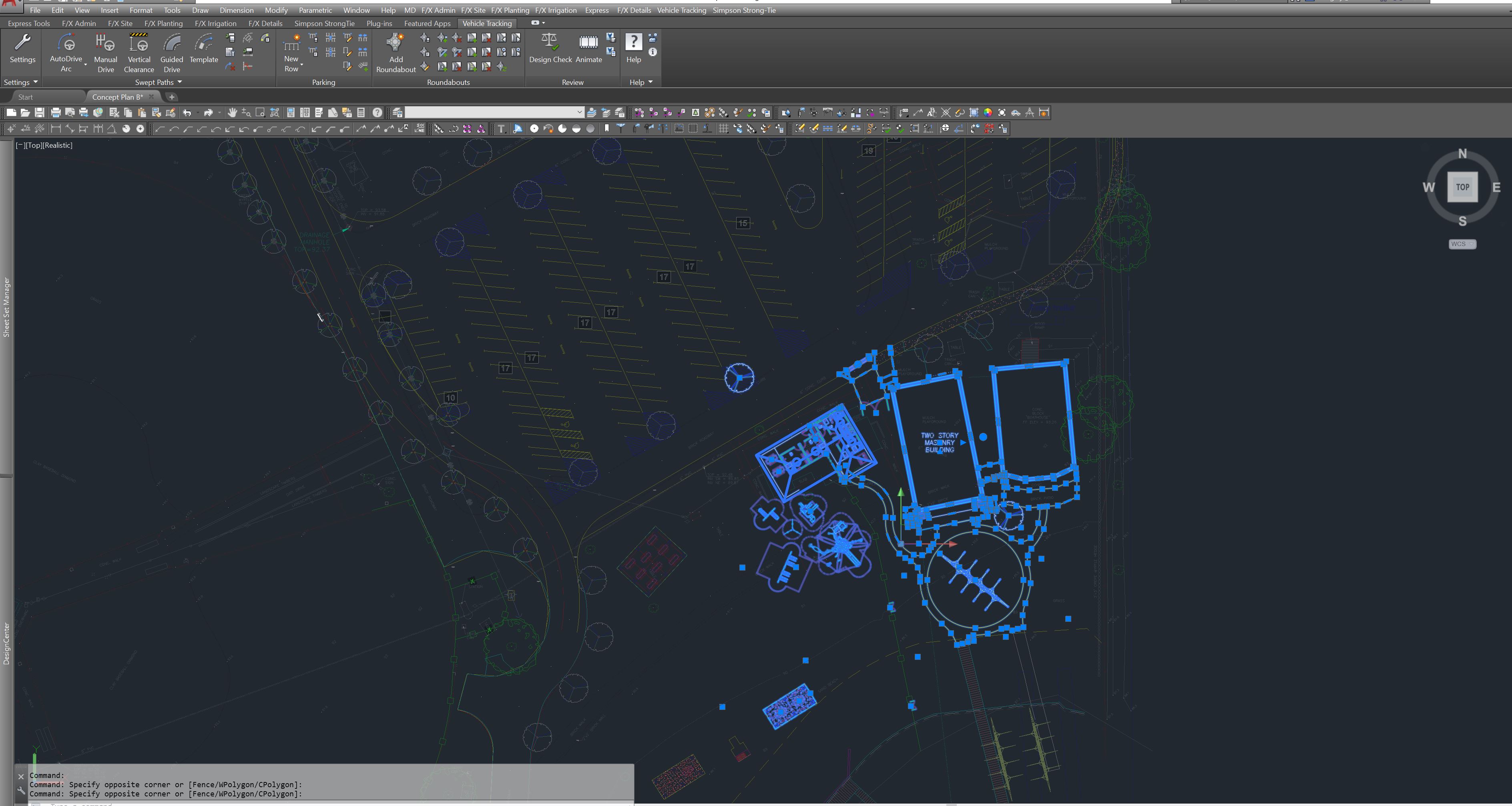
there seems to be an issue with my model space.

whenever I'm on it my screen becomes dark and faded.

my layouts work fine and so does the rest of my PC.

any suggestions?

thanks in advance!

0 Likes
Accepted solutions (1)
20,789 Views
24 Replies
Replies (24)
Message 2 of 25

steven-g
Mentor
Mentor

The first question would be, is this a new install or something that has changed recently.

If new then do you realize that Autocad uses different color schemes between layouts and model space and these can be changed in the options.

If it is a change to normal then what else may have changed or is it only in certain drawings.

Message 3 of 25

Anonymous
Not applicable
thanks so much for your help. this is a new issue. it doesn't seem to be something I can change in the options window. it happens in all my files. the whole screen goes darker when I'm in the model space, not just my AutoCAD...and when I go to my layouts it brightens back as normal. really strange. the rest of the pc is completely normal so it must be something in my AutoCAD...
your help is very appreciated
0 Likes
Message 4 of 25

steven-g
Mentor
Mentor

I don't know if it will show us anything, but could you post a couple of screen captures of model space and a layout to see if that gives a clue

0 Likes
Message 5 of 25

Anonymous
Not applicable

i dont think you can tell the difference in my snapshots...

my screen simly goes dark when im in the model 

LAYOUT.pngmodel.png

0 Likes
Message 6 of 25

cadffm
Consultant
Consultant


The Menu/ribbon looks identical.

You are using plotstyletables which are change the nativeobject properties on display

and you are using different background color for 2D Modelspace an Paperspace.


I dont know what you talk about.


If you wish to use another backgroundcolor: OPTIONS / DISPLAY / COLORS

Modelspace 2D background vs Paperspace background.


If you have understanding problem with your pagesetups, compate them:

Command: _PAGESETUP

(for each: Modeltab and your Layout / Upper right corner - plotstyletable and the checkbox for displaying)


Sorry that your problem is not yet clear.


Sebastian

Message 7 of 25

Anonymous
Not applicable

my whole windows screen goes dark when im in the model of my autocad...

0 Likes
Message 8 of 25

steven-g
Mentor
Mentor

I also can't see a problem, your screen shots look normal to me, at least they look how I would expect them too between model and layout. So for you do the Ribbon and command line actually "dim" and look different

0 Likes
Message 9 of 25

pendean
Community Legend
Community Legend
Do you just mean the background is colored BLACK in modelspace instead of a shade of gray like in paperspace?
0 Likes
Message 10 of 25

Anonymous
Not applicable

no, what I mean is that my whole screen dims whenever I'm in the model space of my AutoCAD. i nowhere else does that happen. it's not something I can fix in the options window. its not the background color or anything like that. interestingly enough I took a snapshot of my screen while in the model space and when I open the picture, my screen goes dark again. it's really strange. seems to be some strange bug or something. thanks everyone for your suggestions. and id happily accept more suggestions. I've been working basically only from my layouts for the past few days...

0 Likes
Message 11 of 25

pendean
Community Legend
Community Legend
Are your layers locked, or are those entities an XREF, and you have fading displays set to locked and xrefed layers turned on and low?
0 Likes
Message 12 of 25

steven-g
Mentor
Mentor

Have you recently had a windows update, it sounds like it could be a graphics issue.

0 Likes
Message 13 of 25

Anonymous
Not applicable

I've recently come across this problem as well.  It's like when you're editing a block in-place; everything outside of the block is muted.  I started out with line drawings and it wasn't until I imported 3d items into my drawing to render that I noticed the dimming of the drawing, but only in views where the 3d items are visible. In paperspace, the line drawings look fine, but anything with a 3d item is muted.


PaperspacePaperspaceModelspaceModelspace

0 Likes
Message 14 of 25

Anonymous
Not applicable

Try opening Visual Styles Manager, select the visual style you have problem with (e.g. 2D Wireframe), right click on it, then choose "Reset to default" option in the drop down menu.

Message 15 of 25

rmagley
Explorer
Explorer

I'm having the same problem and visual styles reset didn't work.  The lines of the xref's are faded as before but the lines in model space are also faded.  And to the point where I can't see them and it is inhibiting my work efforts.  See below what I see what I need to see.

0 Likes
Message 16 of 25

pendean
Community Legend
Community Legend
Are those locked or XREF layers by chance? Your me-too post is light on details, pictures only show the symptom but no additional information.


0 Likes
Message 17 of 25

rmagley
Explorer
Explorer
Accepted solution

I did some digging and found the issue to be my monitors, or rather the setting of them.  They are fantastic monitors but one of them was set to 'Racing' mode.  Changing that to 'Scenery' corrected my problem, though I'm not sure how it ever changed.  Thank you for your time.

0 Likes
Message 18 of 25

pendean
Community Legend
Community Legend
Thanks for sharing your solution with us.

0 Likes
Message 19 of 25

Anonymous
Not applicable

Hi, I know this is old and you've probably fixed it by now but if not here's an option.  Mine was doing the exact same thing.  Pspace is bright, mspace dim.  I found this on  another thread and it worked like a charm - try command XDWGFADECTRL = 0 (if its like mine its set to 50)

Message 20 of 25

Anonymous
Not applicable

I realize that this is an old thread but I just came across this problem too.  For some reason, my transparency in my properties was set on 50 and it wouldn't let me modify it.  The solution that I found that worked for me was to type in CETRANSPARENCY at the command line.  Again, mine was set to 50.  I changed it to ByLayer.  Then I was able to select everything in my model and change the transparency in properties to ByLayer.  This worked for me.  Good luck!!