Hi Douglas, I greatly appreciate your detailed reply. It appears to be generalized for use by any user, so let me address several points that are specific to my system. Most of this information was covered earlier in the thread, though I understand that if you read the entire thread, you'd have less time to help others.
HP 8740w Win7x64 Pro
1920x1200 DreamColor (currently not using any external monitors)
i7-740qm quadcore CPU
Nvidia Quadro FX5000M GPU with 2GB GDDR5 memory
8 GB RAM
500 GB HDD (currently 358 GB free)
I believe you will agree that my system exceeds minimum recommendations.
Regarding the Compatibility tab (addressed earlier in this thread) I am unable to check the 1st two recommended boxes. These options are only available in the FULL version of AutoCAD 2011. They are impossible to select in LT, they are "grayed out". I took a screen shot which you can see below.
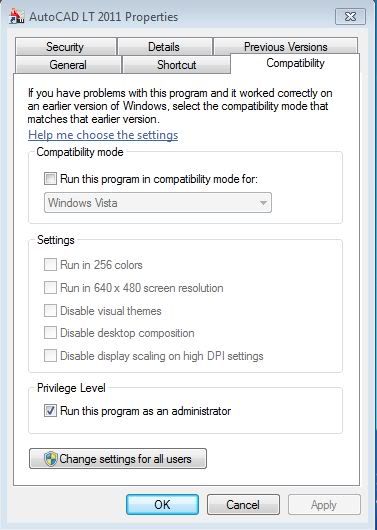
Unable to select those boxes, I proceeded to your next recommendations. Changing DPI scaling had no effect. Reverting to Win7 Basic does resolve the performance issues. However, there are many flaws with this "solution".
You state correctly that Aero is a drain on system resources. However, my system has plenty of resources to spare. I have interacted with users of AutoCAD 2011 Full version (another 8740w owner in fact) who did NOT have to neuter Windows 7. He did not experience any of my issues. So clearly my system is capable of running AutoCAD 2011 full version with no problems...so why is LT running so crappy with Aero enabled? One would assume the "lite" version of a program would be less demanding and actually perform its limited tasks more efficiently than the full version.
I refuse to accept running my system in Win7 Basic as the permanent solution. If I had an older system, I'd understand making the compromise. But clearly the problem is with AutoCAD LT, when AutoCAD Full can be run on a nearly identical system without need for such measures. The first thing AutoDesk must do is to unlock the Compatibility settings (again, I know that these options are not locked in the Full version). That would be an acceptable temporary solution. After this, AutoDesk needs to figure out which "off switches" they yanked to create LT that are causing problems with Window 7 x64 Professional....specifically Aero.





