Lines not connecting in Autocad?

Lines not connecting in Autocad?

Anonymous
Not applicable
15,151 Views
16 Replies
Message 1 of 17

Lines not connecting in Autocad?

Anonymous
Not applicable

Hello,


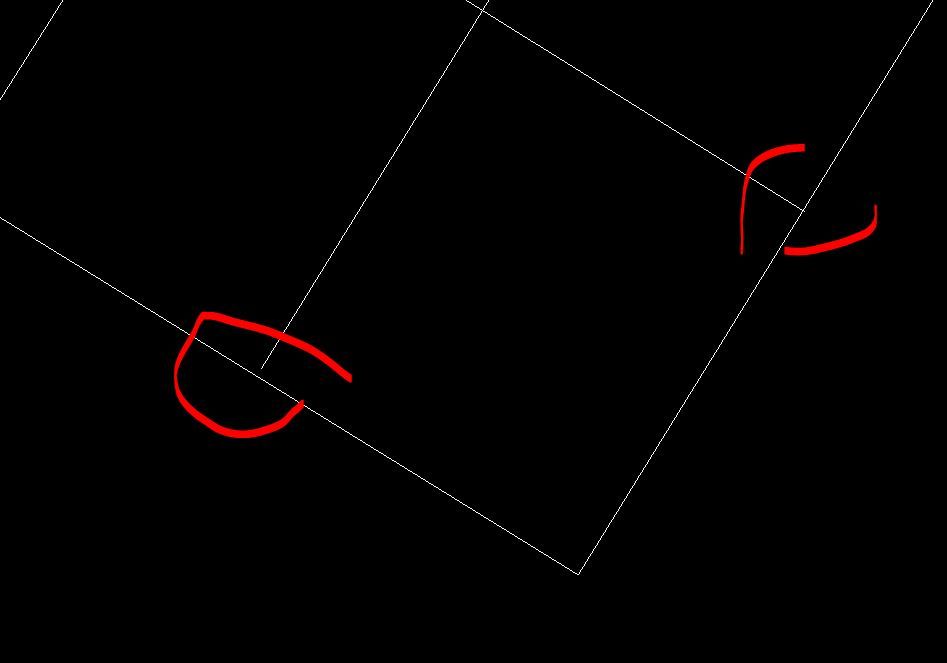
All week I've been drawing site maps with no issue but today every line I make doesn't connect. What I mean is that normally I can connect two lines with polyline and have the option to join them together with one click, but now they just seem to overlap. This is making it very difficult to do anything, and impossible to do some things such as hashing.


Please help!  

0 Likes
Accepted solutions (1)
15,152 Views
16 Replies
Replies (16)
Message 2 of 17

devitg
Advisor
Advisor

@Anonymous For better understanding, and maybe get further help, please upload such sample.dwg

0 Likes
Message 3 of 17

Anonymous
Not applicable

Here is the file. I can't connect any lines, but I also tried opening another file that I worked on previously and couldn't do that either, so I believe it is some sort of setting I accidently switched on/off

0 Likes
Message 4 of 17

Patchy
Mentor
Mentor
0 Likes
Message 5 of 17

Anonymous
Not applicable

I am not, I am just using the basic AutoCAD LT 2021 for site maps and SLDs

0 Likes
Message 6 of 17

Patchy
Mentor
Mentor

Use osnap, it's a good practice.

That's the reason you can't use HATCH.

use snap.JPG

0 Likes
Message 7 of 17

imadHabash
Mentor
Mentor

HI,

This procedure complete when you add lines, arcs, or polylines to the end of an open polyline . in your attached CAD dwg you have single polylines with closed polyline .


Imad Habash

EESignature

0 Likes
Message 8 of 17

pendean
Community Legend
Community Legend
Q: how did you previously "connect" these lines exactly, that it does not work today? Explain, looking at your file it simply shows to us (no offense meant) you simply missed while drafting.

If you are not sure, please explain if you are new to AutoCAD as a drafter or not so answers are better tailored for your needs.

TIA
0 Likes
Message 9 of 17

devitg
Advisor
Advisor

@pendean , It was , among others, my first error when I start drawing about 30 years back. 

Not know  about: extend, fillet, osnaps, and so on.

There is always a first time.........


0 Likes
Message 10 of 17

Anonymous
Not applicable

Yes, I have only been using AutoCAD for about a month now so I am pretty new.


I may not be explaining it properly, but basically before when I tried to connect a polyline back together, it would "snap" together with a little green box on my cursor, all I had to do was click on it. Now I do not have this option, and instead the only way to connect them is to get them close, then zoom in and manually connect each end point. 


Everything worked fine before, but today when I got to work I am now unable to do this. I fear I may have simply hit a command or hotkey which is causing this issue, but no amount of googling has given me an answer

0 Likes
Message 11 of 17

pendean
Community Legend
Community Legend
What part of your posted DWG file was a "before" when it all worked as you think it did?
Explain your dilemma, show us what you are taking about exactly.

If you don't know how to do screenshots in Windows, here is a quick overview of the free tool that's ben around for 10+years to help https://support.microsoft.com/en-us/help/13776/windows-use-snipping-tool-to-capture-screenshots

And consider taking some classes (with an instructor) to get you over these basic drafting tools/needs soon, you'll benefit from it all.

0 Likes
Message 12 of 17

steven-g
Mentor
Mentor
Accepted solution

@Anonymous wrote:

basically before when I tried to connect a polyline back together, it would "snap" together with a little green box on my cursor, all I had to do was click on it. Now I do not have this option


It sounds like you might just have turned osnaps off (F3) will get that back. Or you may have changed which osnaps are active for that you need to check your settings, type 'dsettings' and go to the 'object snap' tab I would make sure the 'perpendicular' is selected, don't turn them all on some of the settings would just add confussion.

Message 13 of 17

Anonymous
Not applicable

It is not an issue with my file, as all of my previous files do the same thing now, it is an issue with a setting in my autocad. There is no way for me to get a screenshot of it working.


Before I could easily snap a polyline together, now I can't.


Say I try to draw a square with polyline. I draw the whole shape and connect the final corner, and the lines should easily snap together with one click. Now I can't connect the lines and they just overlap instead, as if they are in a different Z value


I apologize for not being able to explain it better. 

0 Likes
Message 14 of 17

Anonymous
Not applicable

Oh man, that was it! I knew it had to be a simple setting that I messed up, I just couldn't figure out how to change it. I definitely just hit f3 on accident at some point.


Thank you so much! 

Message 15 of 17

pendean
Community Legend
Community Legend
Take a few classes @Anonymous , sooner rather than later my friend.
0 Likes
Message 16 of 17

Anonymous
Not applicable

Agreed, unfortunately that is entirely up to my employer at the moment. 

0 Likes
Message 17 of 17

jalvaroLAA3G
Community Visitor
Community Visitor

I had the same problem, all fixed now! Thank you so much for this solution!

0 Likes