Wipeout not working

Wipeout not working

rhoscadman
Advocate Advocate
95,884 Views
28 Replies
Message 1 of 29

Wipeout not working

rhoscadman
Advocate
Advocate

I am having issues in one particular drawing which I have inherited from a colleague.

I cannot seem to make my wipeout frames hide objects behind them. Any other drg, no problem. Just this one.

Is there a toggle or something that disables wipeout?


Yes, I have tried DRAWORDER, and it still doesn't work

Accepted solutions (3)
95,885 Views
28 Replies
Replies (28)
Message 2 of 29

Alfred.NESWADBA
Consultant
Consultant

Hi,


use copy & paste to copy the geometry into a new drawing. I guess that is faster than searching for the source of the problem.


- alfred -

------------------------------------------------------------------------------------

Alfred NESWADBA
ISH-Solutions GmbH / Ingenieur Studio HOLLAUS
www.ish-solutions.at ... blog.ish-solutions.at ... LinkedIn ... CDay 2026
------------------------------------------------------------------------------------

(not an Autodesk consultant)
0 Likes
Message 3 of 29

rhoscadman
Advocate
Advocate

no, I'm afraid that is not a viable solution. too much information on drawing.

0 Likes
Message 4 of 29

Alfred.NESWADBA
Consultant
Consultant

Hi,


>> too much information on drawing.

What will you miss when running copy & paste (and using design center to copy the layouts if necessary)?


What you can do too: run command _AUDIT 😉


- alfred -

------------------------------------------------------------------------------------
Alfred NESWADBA
ISH-Solutions GmbH / Ingenieur Studio HOLLAUS
www.ish-solutions.at ... blog.ish-solutions.at ... LinkedIn ... CDay 2026
------------------------------------------------------------------------------------

(not an Autodesk consultant)
0 Likes
Message 5 of 29

john.vellek
Alumni
Alumni

Hi @rhoscadman,


I see that you are having WIPEOUT problems. I concur with @Alfred.NESWADBA that the fastest and easiest way to remedy the problem is to simply move the geometry into a new drawing. They can be a real headache to cure when they are not working properly.


If you need any help with the steps Alfred mentions let me know and I would be happy to get you additional information as quickly as possible so you can move on.


John Vellek


Join the Autodesk Customer Council - Interact with developers, provide feedback on current and future software releases, and beta test the latest software!

Autodesk Knowledge Network | Autodesk Account | Product Feedback
0 Likes
Message 6 of 29

elshawadfy
Collaborator
Collaborator

Hello rhoscadman..


Most likely "VSBackgrounds" is set to 0, try setting it to 1..


Hope that helps..

Message 7 of 29

rhoscadman
Advocate
Advocate
Accepted solution

Thanks for all the replies, guys.

I did another search on this site and finally found the solution:


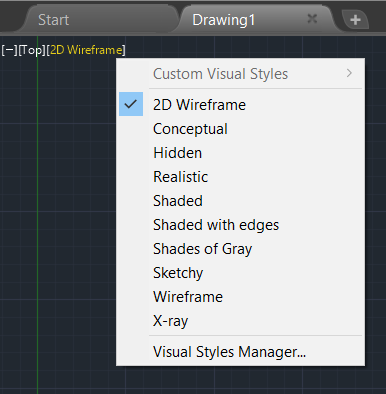
My screeview was set to "Conceptual" so I altered that to "2DWireview" and heypresto! Problem solved.


Sorry for leading the ppl that repied to my cry for help on a wild goose chase, but the initial searches did not reveal a viable solution. Nor did the Autocad Help. Out of desperation I did a search for "Wipeout Problems" here and spent some time scouring through the solutions and replies and eventually found the fix on about the 4th or 5th page.


It seems that the precise wording to your search is crucial: If you enter "My wipeout won't hide stuff in the model space but it does in Paper space", that won't offer you a fix at all. But If you enter "Wipeout Problem", that will eventually lead to the fix but it means pouring through pages and pages of unrequired replies.


Thanks

Message 8 of 29

elshawadfy
Collaborator
Collaborator

Glad you solved your problem 🙂

 The system Variable I gave you creates a temporary visual style with the backgrounds on, which shaws the viewport background.. (ie it switches the visual stile to at emporary one that shaws the wipeouts) - your approach switches to the actual style with that turned on..


Good luck 🙂

0 Likes
Message 9 of 29

Anonymous
Not applicable

it would have been nice to get the actual answer....

Message 10 of 29

rhoscadman
Advocate
Advocate

you having a laugh??

0 Likes
Message 11 of 29

dabramsky
Participant
Participant

How do I change screenview from 'conceptual' to '2DWireframe' ?

I'm having the same problem with wipeout.

Message 12 of 29

john.vellek
Alumni
Alumni
Accepted solution

Hi @dabramsky,


There are several ways to do this but perhaps the easiest is to select the style right in the graphics window. Look to the top left and you will see the current visual style. click that and a drop-down menu opens that shows the available visual styles.


Capture.PNG


Please select the Accept as Solution button if my post solves your issue or answers your question.


John Vellek


Join the Autodesk Customer Council - Interact with developers, provide feedback on current and future software releases, and beta test the latest software!

Autodesk Knowledge Network | Autodesk Account | Product Feedback
Message 13 of 29

dabramsky
Participant
Participant
Accepted solution

False alarm.  I've solved my problem.  my wipeout polyline was on defpoints layer.  Thanks anyway to any and all.

Message 14 of 29

dabramsky
Participant
Participant

Thanks for your quick reply, John.  Anyway, good to know how to manipulate current visual style also.  

Message 15 of 29

arseal
Contributor
Contributor

Hello,


The solution to this problem is in the tab Page setup. Make sure to check the box "plot paper space last" in the plot options. 


This setting is not just for plotting it also modifies the performance in your screen.


Elber Ortiz


CAD Lead Coordinator  

Message 16 of 29

Anonymous
Not applicable

Thank you sir 

0 Likes
Message 17 of 29

R4sso
Enthusiast
Enthusiast

Sorry but I think no solution to this has been submitted. I have the same problem and I've tried all the "solutions" without without achieving it. Also, I use to  attach pdf's to my drawings and i'm not able to see the contents but just the border of the pages.

Message 18 of 29

Alfred.NESWADBA
Consultant
Consultant

Hi,


>> I think no solution to this has been submitted

At least for others these marked solutions were valid solutions, otherwise they would not have been marked.


>> I have the same problem

Please upload a dwg-file that has these issues (describe were in the dwg-file you see the conflict, that the wipeout is not working).

Also please start command _ABOUT so we can see the exact type/version/update of your AutoCAD.


>> Also, I use to attach pdf's to my drawings and i'm not able to see the contents

Different thing, please create a new thread for this.

But as you seem to have 2 issues with your display, maybe your graphic card is the culprit?

Try to start command _GRAPHICSCONFIG and turn off hardware acceleration ... better?


- alfred -

------------------------------------------------------------------------------------
Alfred NESWADBA
ISH-Solutions GmbH / Ingenieur Studio HOLLAUS
www.ish-solutions.at ... blog.ish-solutions.at ... LinkedIn ... CDay 2026
------------------------------------------------------------------------------------

(not an Autodesk consultant)
Message 19 of 29

j.palmeL29YX
Mentor
Mentor

@R4sso wrote:

Sorry but I think no solution to this has been submitted. I have the same problem 


Post an example .dwg please. 


Jürgen Palme
Did you find this post helpful? Feel free to Like this post.
Did your question get successfully answered? Then click on the ACCEPT SOLUTION button.

EESignature

0 Likes
Message 20 of 29

R4sso
Enthusiast
Enthusiast

Alfred, you are right on all cases.

All my issues were resolved with the command _GRAPHICSCONFIG as you advised me.


Thank you!

0 Likes