Sheet Set Manager for Web Publish to PDF Doesn't Always Work

Sheet Set Manager for Web Publish to PDF Doesn't Always Work

-Just-In-Time-
Contributor Contributor
3,719 Views
4 Replies
Message 1 of 5

Sheet Set Manager for Web Publish to PDF Doesn't Always Work

-Just-In-Time-
Contributor
Contributor

Hello,


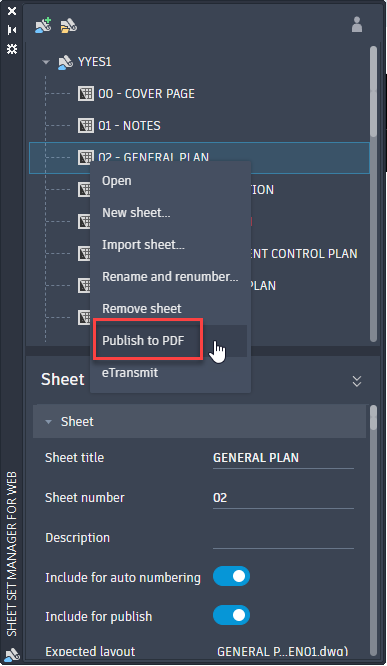
Our organization uses the Autodesk Construction Cloud (ACC) for our projects hence AutoCAD/Civil 3D defaults to the Sheet Set Manager for Web (opposed to the traditional Sheet Set Manager) when our project .dst files are saved on the cloud.  For our current project, when we try to Publish to PDF for an entire drawing set, the publish operation fails.  If I take that same Sheet Set .dst file and save it locally or to an office server (i.e. off the cloud), repath the layouts to either local or office server paths, and then run Publish to PDF using the traditional Sheet Set Manager, the drawing set plots just fine.  With the cloud-based Sheet Set Manager for Web, if I try Publish to PDF separately for each drawing (see attached screenshot), some drawings plot successfully while other plots fail.  I noticed that if the drawings are more simple (ex. they don't have any external references), they seem to publish just fine; if the drawings are somewhat complex (ex. they have two or more external references), the publish operation seems to take a very long time and fail.  If I open every drawing from ACC independently and try to plot from the drawing, everything plots just fine.


Just wondering if this is a known glitch within the Sheet Sets for Web or is there another reason why the Publish to PDF operation is consistently failing.


Thanks,
Jay

0 Likes
3,720 Views
4 Replies
Replies (4)
Message 2 of 5

VincentSheehan
Advisor
Advisor

I could be wrong but I feel the errors are due to how the plot settings are setup for that sheet tab. It's a few extra clicks but I use Publish Dialog Box in SSM.


SSM Publish.png


Vincent Sheehan

Sr. Civil Designer
Poly In 3D Blog

0 Likes
Message 3 of 5

SteveLDucharme
Participant
Participant

Sadly Autocad kind of stuck it to us on this one.  Sheet Set Manager for web does NOT offer an option to use Publish Dialog Box.  Only Publish to PDF.  This causes a LOT of issues if you are a client working in someone elses database wanting to publish a PDF set to your desktop.  You have to plot one CAD file at a time by the tabs.  It's REALLY annoying and classic Autodesk.

0 Likes
Message 4 of 5

jed_freeman
Advocate
Advocate

we are experiencing the same exact issues with plotting/publish. Autodesk needs to put some effort into cleaning up the Sheet Sets for Web...please!!!

0 Likes
Message 5 of 5

pendean
Community Legend
Community Legend

@jed_freeman wrote:

...Autodesk needs to put some effort into cleaning up the Sheet Sets for Web...please!!!


You alone have to tell them to do so: and the more colleagues and AutoCAD users that you can convince to ask for this exact need as you do the more likely it will get noticed. Here is where they look for your type of feedback and reporting


https://www.autodesk.com/support/technical/article/caas/sfdcarticles/sfdcarticles/Feedback-to-Autode...

Best wishes.

0 Likes