Curved Dimension Leader Line

Curved Dimension Leader Line

Anonymous
Not applicable
14,274 Views
16 Replies
Message 1 of 17

Curved Dimension Leader Line

Anonymous
Not applicable

Is it possible to make the leader for the dimension text, curved?


I, ultimately, would like my dimensions with leaders to look like the bottom red dimension in the picture.
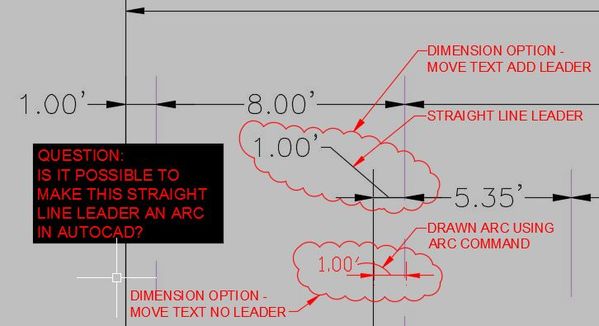
 

CAD Forum.JPG

0 Likes
Accepted solutions (1)
14,275 Views
16 Replies
Replies (16)
Message 2 of 17

Patchy
Mentor
Mentor

No, but QLEADER can.


Capture.JPG

0 Likes
Message 3 of 17

Anonymous
Not applicable

I knew that was an option, but I was trying to create it in AutoCAD so they would not be separated...


Thanks for the reply.


0 Likes
Message 4 of 17

pendean
Community Legend
Community Legend
Accepted solution

DIMSTYLE offers no such feature through R2017: QLEADER does as noted above, and MLEADERSTYLE offers a SPLINE option too, but it's not an arc either. You decide what looks best for your needs then pay the price for it.


Capture.PNG

Message 5 of 17

ccarva2
Participant
Participant

It doesn't seem like this problem was solved here in the forum... has anyone figured this out? 

ccarva2_0-1593136257998.png


Message 6 of 17

fkellogg
Advocate
Advocate

I agree, the issue is not solved. MLeaders are NOT dimensions.
I have a cad file from another company, where there are ellipse-looking leaders to dimensions.
Click on it and move the text, and the curve immediately changes to straight with landing.
Could be these dimensions were generated in Revit.

Message 7 of 17

asumnerBFGHV
Contributor
Contributor

I believe it's from a Revit Export. I ran a quick test, and in the screenshot there are 4 steps.

1st drawing as shown in Revit.

2nd drawing exported from Revit and opened in AutoCAD

3rd dimension selected in AutoCAD (note it's not exploded)

4th once the annotation is gripped the curved leader changes to a lineRevit Arc Leader.jpg

Message 8 of 17

jse.avkbimtech11
Observer
Observer

how

0 Likes
Message 9 of 17

jse.avkbimtech11
Observer
Observer

how  please reply bro

0 Likes
Message 10 of 17

jse.avkbimtech11
Observer
Observer

how can i do in auto cad (Curved Dimension Leader Line)

0 Likes
Message 11 of 17

Kent1Cooper
Consultant
Consultant

I don't think anything has changed in three years.  Unfortunately, you can't, in an actual Dimension, but only by faking it as already described.

Kent Cooper, AIA
0 Likes
Message 12 of 17

BillAllenSE
Collaborator
Collaborator

☹️

0 Likes
Message 13 of 17

hectorA65K5
Community Visitor
Community Visitor

That option does not work with DIMENSIONS. Only with QLEADER and MULTILEADER.

0 Likes
Message 14 of 17

ChristiandN8VYB
Community Visitor
Community Visitor

Thank you for posting this, wondering if it was possible as well.

0 Likes
Message 15 of 17

agiii002
Explorer
Explorer

I am also looking for a solution. It would be a dream come true. It's gonna be 10 years since the original post...

0 Likes
Message 16 of 17

pendean
Community Legend
Community Legend

@agiii002 wrote:

I am also looking for a solution. It would be a dream come true. It's gonna be 10 years since the original post...


Nope, if it was, you would have found it and be using it already.

0 Likes
Message 17 of 17

enrique_diaz9YMQA
Observer
Observer

Totally not solved.. best thing we are going to get is to request the feature.  New Idea - Autodesk Community