Cursor jumps around after block editing

Cursor jumps around after block editing

DaveBarlowSmith
Enthusiast Enthusiast
3,732 Views
21 Replies
Message 1 of 22

Cursor jumps around after block editing

DaveBarlowSmith
Enthusiast
Enthusiast

After editing a block in any drawing the cursor will jump around once any operation (i.e. move, copy) has been selected. With no operation selected the cursor moves around smoothly. This will happen until the drawing is closed and re opened.


Ive updated the drivers, my graphics card is certified and I am only working in 2D and using the same blocks which I have been using for the last few iterations of AutoCAD.


Any help would be appreciated.


Thanks


Dave

0 Likes
3,733 Views
21 Replies
Replies (21)
Message 2 of 22

Alfred.NESWADBA
Consultant
Consultant

Hi,


does key <F9> (SNAP) help?


- alfred -

------------------------------------------------------------------------------------
Alfred NESWADBA
ISH-Solutions GmbH / Ingenieur Studio HOLLAUS
www.ish-solutions.at ... blog.ish-solutions.at ... LinkedIn ... CDay 2026
------------------------------------------------------------------------------------

(not an Autodesk consultant)
Message 3 of 22

oswaldodcb
Advisor
Advisor

Hello @DaveBarlowSmith


Try turning off SNAPMODE (F9), which makes the cursor to AutoCAD Grid,


It may be your problem,


Oswaldo Caballero

ATC


Oswaldo Caballero
Project Engineer / Autodesk Certified Instructor / Autodesk AutoCAD Certified User and Professional
Maracaibo, Venezuela
LinkedIn


Da un Me Gusta si la publicación ha sido de utilidad y si ha resuelto tu duda presiona ACEPTAR SOLUCIÓN

Message 4 of 22

DaveBarlowSmith
Enthusiast
Enthusiast

Thanks for both replies.

I very rarely use the F9 snap.

The snap / jump is random and doesnt seem to be snapping to any sort of grid.

0 Likes
Message 5 of 22

oswaldodcb
Advisor
Advisor

Your welcome @DaveBarlowSmith


Any other question, just ask!


Oswaldo Caballero

ATC


Oswaldo Caballero
Project Engineer / Autodesk Certified Instructor / Autodesk AutoCAD Certified User and Professional
Maracaibo, Venezuela
LinkedIn


Da un Me Gusta si la publicación ha sido de utilidad y si ha resuelto tu duda presiona ACEPTAR SOLUCIÓN

0 Likes
Message 6 of 22

Alfred.NESWADBA
Consultant
Consultant

Hi,


>> The snap / jump is random and doesnt seem to be snapping to any sort of grid.

Some questions/ideas then:

  • Does that happen only in one drawing or in every (also new) drawing?
  • Had you turned off OSNAP for a test?
  • Had you already restarted your workstation?


- alfred -

------------------------------------------------------------------------------------
Alfred NESWADBA
ISH-Solutions GmbH / Ingenieur Studio HOLLAUS
www.ish-solutions.at ... blog.ish-solutions.at ... LinkedIn ... CDay 2026
------------------------------------------------------------------------------------

(not an Autodesk consultant)
0 Likes
Message 7 of 22

oswaldodcb
Advisor
Advisor

As @Alfred.NESWADBA comments, he checks if the problem is in only one file or at all,


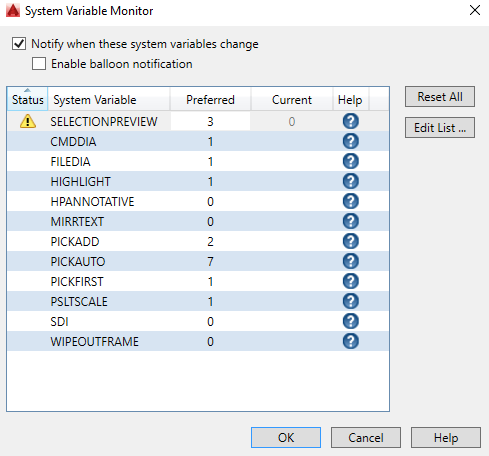
You can also activate the SYSVARMONITOR and verify that no system variable is modified,


2.PNG1.PNG


Oswaldo Caballero

ATC


Oswaldo Caballero
Project Engineer / Autodesk Certified Instructor / Autodesk AutoCAD Certified User and Professional
Maracaibo, Venezuela
LinkedIn


Da un Me Gusta si la publicación ha sido de utilidad y si ha resuelto tu duda presiona ACEPTAR SOLUCIÓN

0 Likes
Message 8 of 22

DaveBarlowSmith
Enthusiast
Enthusiast

Alfred,


Only happens in the drawing I have adjusted a block in. All other open drawings behave normally. But I have had this happen in different drawings of differing file sizes and bloks.


Turning Osnap on has no change.

I havent restarted my workstation or AutoCAD as yet.


I only have smooth line display switched on in hardware acceleration. Switching hardware acceleration off has no change.


Funnily enough just after you replied it behaved for 2 or 3 minutes then went back to jumping around.


Dave

0 Likes
Message 9 of 22

DaveBarlowSmith
Enthusiast
Enthusiast

Oswaldo,


It only shows FILEDIA & PICKFIRST both set to 1

0 Likes
Message 10 of 22

Alfred.NESWADBA
Consultant
Consultant

Hi,


>> Turning Osnap on has no change.

Not ON, please turn it OFF (for a test)


>> I havent restarted my workstation or AutoCAD as yet.

Please do so, it makes sense!

(otherwise we might discuss all the day what could be solved with just a restart)


>> Funnily enough just after you replied it behaved for 2 or 3 minutes then went back to jumping around.

That gives you another possibility: energy saving settings for some of your hardware (harddisk, USB-devices, graphic card).

Disable their energy saving options and try again.


- alfred -


------------------------------------------------------------------------------------
Alfred NESWADBA
ISH-Solutions GmbH / Ingenieur Studio HOLLAUS
www.ish-solutions.at ... blog.ish-solutions.at ... LinkedIn ... CDay 2026
------------------------------------------------------------------------------------

(not an Autodesk consultant)
0 Likes
Message 11 of 22

DaveBarlowSmith
Enthusiast
Enthusiast

A complete restart fixes the jumping until you edit a block, can be as simple as ofsetting the outline of a block.

0 Likes
Message 12 of 22

DaveBarlowSmith
Enthusiast
Enthusiast

Workstation was switched off last night and back on this morning. AutoCAD was fine up until I opened a block and offset a circle and saved the block. Now back to jumping around. Until I get this fixed I will have to hold off updating 7 workstations. Its not good considering how much Autodesk software costs.

0 Likes
Message 13 of 22

Alfred.NESWADBA
Consultant
Consultant

Hi,


when you login with a new Windows user account, does AutoCAD show the same behavior?


- alfred -

------------------------------------------------------------------------------------
Alfred NESWADBA
ISH-Solutions GmbH / Ingenieur Studio HOLLAUS
www.ish-solutions.at ... blog.ish-solutions.at ... LinkedIn ... CDay 2026
------------------------------------------------------------------------------------

(not an Autodesk consultant)
0 Likes
Message 14 of 22

DaveBarlowSmith
Enthusiast
Enthusiast

Alfred,


Just tested this.

I am currently working on a drawing logged in as myself. The cursor is fine and moves smoothly around the screen. I edit a block, not a large amount of editing and close and save the block. Cursor moves around the screen smoothly. I then select the match properties function. Now the cursor jumps around. I select the block with the property I require cursor still jumps around the screen.


I log off and log back in as another profile, and change the graphics config to match my settings.

On the same drawing the cursor moves smoothly around the screen. I edit a block and it jumps around. However, this time when I select match properties the cursor jumps around until I have selected the block with the properties I require then it moves around smoothly.


I use a classic layout on a white background, the other profile was set up on a ribbon layout with the standard dark grey background.

Switching to a ribbon layout on my profile had no difference, although switching back to my classic profile cleared the fault until I edited a block again. 

0 Likes
Message 15 of 22

oswaldodcb
Advisor
Advisor

Hello @DaveBarlowSmith,


Is it possible to upload the file that gives you trouble? So we could help you a lot more,


Oswaldo Caballero

Instructor ATC

Autodesk AutoCAD Certified User


Oswaldo Caballero
Project Engineer / Autodesk Certified Instructor / Autodesk AutoCAD Certified User and Professional
Maracaibo, Venezuela
LinkedIn


Da un Me Gusta si la publicación ha sido de utilidad y si ha resuelto tu duda presiona ACEPTAR SOLUCIÓN

Message 16 of 22

Alfred.NESWADBA
Consultant
Consultant

Hi,


>> Just tested this.

Well, so we had tested a new user account which means you can see the same behavior with a fresh AutoCAD profile.

We have also tested hardware acceleration off.

It seems to be independent from drawings as this issue comes up with more different drawings.


So my conclusion at this moment:

As long as there are no tools or addon's installed on top of your AutoCAD, your AutoCAD is up-to-date with service packs, I see only a few chances left:

  • turn off ROLLOVERTIPS , SELECTIONPREVIEW, PRESELECTIONEFFECT as well as SELECTIONCYCLING
  • repair AutoCAD
  • uninstall and reinstall AutoCAD

... I know that this should be the last option, but I don't have more ideas on that. Maybe others have ideas for that case.


Sorry, - alfred -

------------------------------------------------------------------------------------
Alfred NESWADBA
ISH-Solutions GmbH / Ingenieur Studio HOLLAUS
www.ish-solutions.at ... blog.ish-solutions.at ... LinkedIn ... CDay 2026
------------------------------------------------------------------------------------

(not an Autodesk consultant)
Message 17 of 22

DaveBarlowSmith
Enthusiast
Enthusiast

Alfred / Oswaldo,


It isnt any 1 file that has the problem, its any file where I adjust or create a 2D block.


As far as I know, and can see, all updates are installed, Nvidia drivers are up to date. Rollovertips etc are switched to off.

I've just ran a repair and I still have the problem.


Time for a re-install


Thank you for your advice and help.


Kind regards


Dave

0 Likes
Message 18 of 22

Alfred.NESWADBA
Consultant
Consultant

Hi,


please find >>>this article<<< which describes the steps to do a really clean uninstall, just to avoid to have then the same config back 😉


Good luck, - alfred -

------------------------------------------------------------------------------------
Alfred NESWADBA
ISH-Solutions GmbH / Ingenieur Studio HOLLAUS
www.ish-solutions.at ... blog.ish-solutions.at ... LinkedIn ... CDay 2026
------------------------------------------------------------------------------------

(not an Autodesk consultant)
Message 19 of 22

DaveBarlowSmith
Enthusiast
Enthusiast

Thanks again.


Dave

0 Likes
Message 20 of 22

SismaticoUKLtd
Contributor
Contributor

I also have this problem, I've found that doing a zoom extents  after exiting block editor seems to cure it.