


Message 1 of 16

Not applicable
03-24-2021
01:19 AM
- Mark as New
- Bookmark
- Subscribe
- Mute
- Subscribe to RSS Feed
- Permalink
- Report
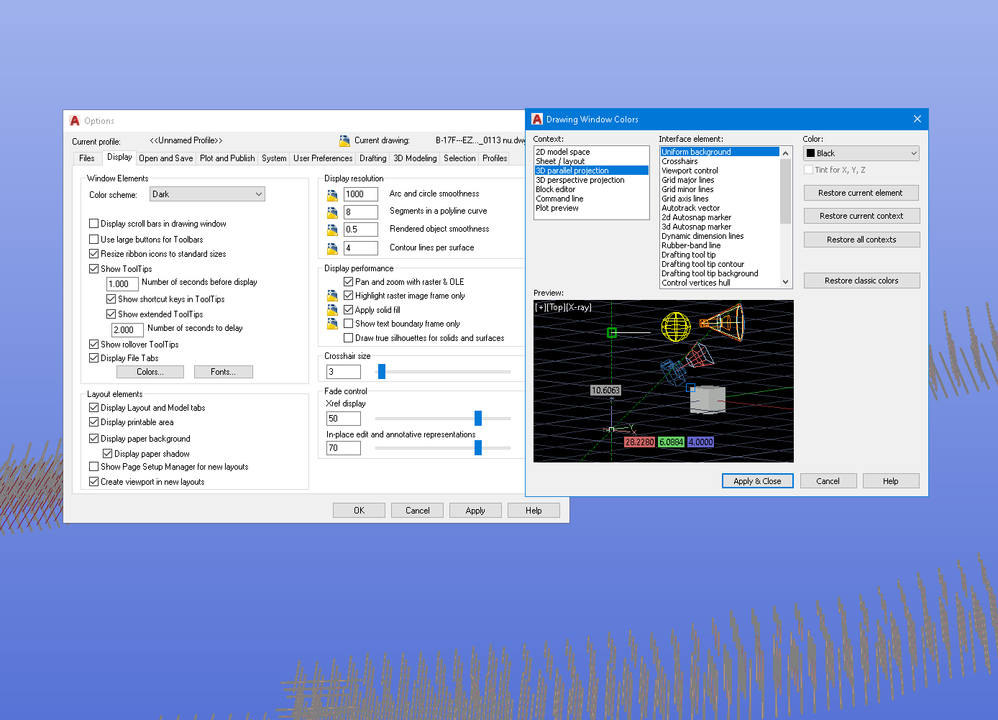
Hej! I am looking for a solution to change the colour of my background in model space (conceptual) from this strange purple/blue to black. Relevent search for solutions have been done in google but I have no any idea so far.
I guess what I have to do is go to Options/Display/Colors/3d parallel projection/Uniform background and change it to black. But nothing happened and I really don't know why.
I have also briefly checked in the 3d perspective projection, block editor, and there is no way I can see these strange colours. Anyone with any ideas?
P.S. Hej is what we say hi in Sweden.
Here is my screen captures. I am using AutoCAD 2019 English (2019.1.2).

Solved! Go to Solution.









