Apply Plot Style to Batch Plot pdf

Apply Plot Style to Batch Plot pdf

Anonymous
Not applicable
41,244 Views
24 Replies
Message 1 of 25

Apply Plot Style to Batch Plot pdf

Anonymous
Not applicable

I am trying to batch plot to a pdf with the monochrome plot style.

Unfortunately the best I can get is that the monochrome plot style is applied to the drawing that I have opened but not to all of the other drawings that I have added to the batch plot.


Here I have opened the first drawing of the drawings that I wish to batch plot
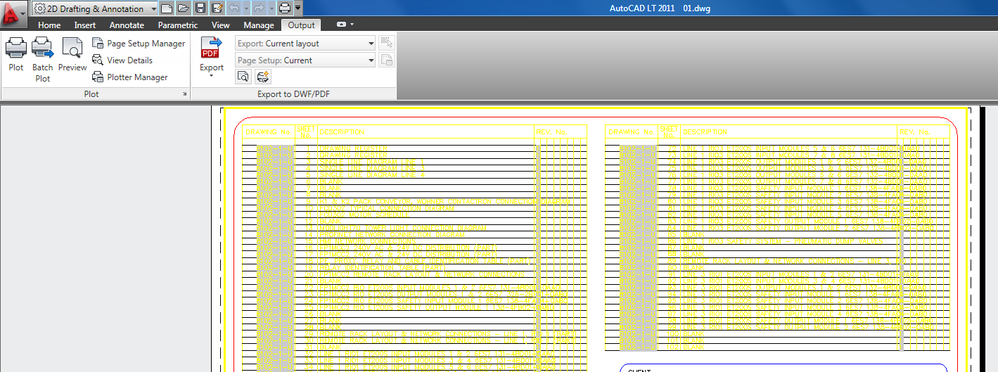
batch plot 1.PNG

Next,  I have modified the default page setup for the drawing to the monochrome plot style


batch plot 2.PNG


Next I have selected batch plot


batch plot 3.PNG


Next I have added the required drawings to the batch plot
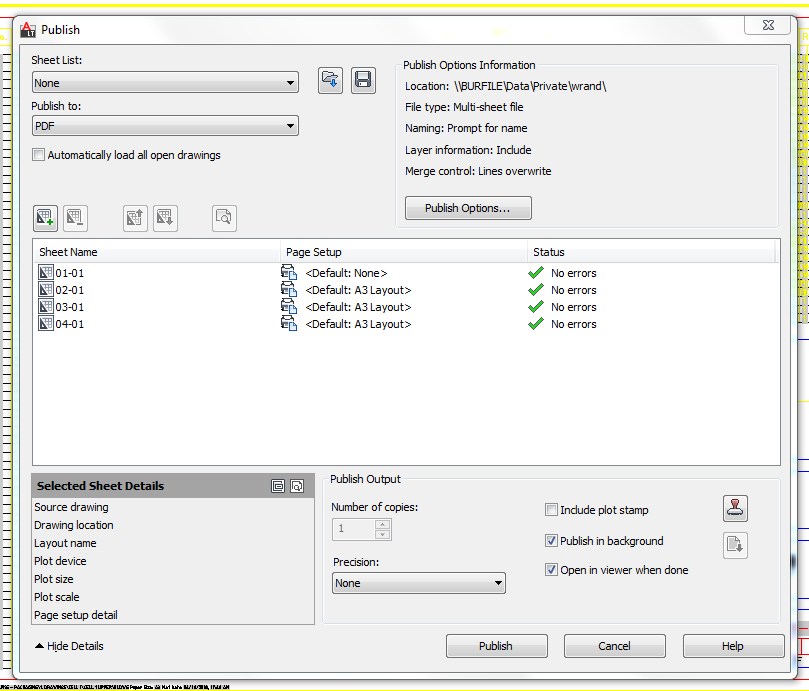
 

batch plot 4.PNG


Next I have applied the default page setup of the original drawing that I opened to all of the other drawings in the batch plot.


batch plot 5.PNG


Next I publish the pdf.

In the resultant pdf,the monochrome plot style is only applied to the orginal drawing that i opened (01) and not the others (02,03&04).

Any information that would assist me in resolving this issue would be most appreciated.


thanks.


0 Likes
Accepted solutions (2)
41,245 Views
24 Replies
Replies (24)
Message 2 of 25

maratovich
Advisor
Advisor

You need to change the new settings for printing monochrome in all layouts.
If there are many of them use Lisp or additional programs.

---------------------------------------------------------------------
Software development
Automatic creation layouts and viewport. Batch printing drawings from model.
www.kdmsoft.net
0 Likes
Message 3 of 25

Alfred.NESWADBA
Consultant
Consultant

Hi,


as long as all sheets/layouts in these drawings do have the same format you can create a new (named) page setup, that has monochrome.ctb assigned.


In the PUBLISH-dialog you can then assign this page setup to all your sheets.


20180904_093315.png


- alfred -

------------------------------------------------------------------------------------
Alfred NESWADBA
ISH-Solutions GmbH / Ingenieur Studio HOLLAUS
www.ish-solutions.at ... blog.ish-solutions.at ... LinkedIn ... CDay 2026
------------------------------------------------------------------------------------

(not an Autodesk consultant)
0 Likes
Message 4 of 25

pendean
Community Legend
Community Legend

Select each sheet then read the DETAILS section below,are they a 100% match?


Capture.PNG 


0 Likes
Message 5 of 25

john.vellek
Alumni
Alumni

Hi @Anonymous,


I see that you are visiting as a new member to the AutoCAD forum. Welcome to the Autodesk Community!


 When you execute PUBLISH, select the "Plotter named in page setup" option.  Then you can use a named page setup you create in any of the files or even a template  to be used using the import function to apply it to the drawings.

Capture.PNG


Please select the Accept as Solution button if my post solves your issue or answers your question.


John Vellek


Join the Autodesk Customer Council - Interact with developers, provide feedback on current and future software releases, and beta test the latest software!

Autodesk Knowledge Network | Autodesk Account | Product Feedback
Message 6 of 25

RobDraw
Mentor
Mentor
Accepted solution

The key here is you need a NAMED plot style, not the default one. You really only need it in the top file in order to apply it to the others in the plot list.


Rob

Drafting is a breeze and Revit doesn't always work the way you think it should.
0 Likes
Message 7 of 25

Llam.Tech
Advocate
Advocate

@Anonymous,

You missed one thing on the procedure. You should set and save a page setup.

Or you can watch my videos if you have time.

https://www.youtube.com/watch?v=77PnLzWKO60

https://www.youtube.com/watch?v=sDMvyrOicBM


0 Likes
Message 8 of 25

john.vellek
Alumni
Alumni

Hi @Anonymous,


I am coming back to your thread to see if the issue or question you posed has been resolved.  If so, please mark the post or posts as Solution(s) to help others find the answer quickly. If your issue persists, please give me a bit more detail on this issue so we can continue to work towards getting this solved.


John Vellek


Join the Autodesk Customer Council - Interact with developers, provide feedback on current and future software releases, and beta test the latest software!

Autodesk Knowledge Network | Autodesk Account | Product Feedback
0 Likes
Message 9 of 25

Anonymous
Not applicable

Thankyou  llamtech. I have tried repeatedly with autocad 2011 and trueview 2018 but with no success. I did manage to plot  to pdf once with 50 sheets but I wish to batch plot 194 sheets to 1 pdf with monochrome plot style. Now since plotting the 50 dwgs, I cannot even get that far. I hit publish but it gets part way through and there is no resultant file. When I tried batch plotting 194 sheets it got part way through then stopped. Don't know what next to try. If you need more info let me know. Thanks for your time.

0 Likes
Message 10 of 25

maratovich
Advisor
Advisor

Attach your file .dwg

---------------------------------------------------------------------
Software development
Automatic creation layouts and viewport. Batch printing drawings from model.
www.kdmsoft.net
0 Likes
Message 11 of 25

john.vellek
Alumni
Alumni

Hi @Anonymous,


is it possible to ZIP a set of drawings so I can take a look?  I suspect that you might have some drawing corruption that could possibly be corrected using AUDIT or RECOVER.


I would also like to see how you have your page setup configured so i can try to apply it to a PUBLISH job.


If your data needs to be private or confidential, please email it directly to me at john.vellek@autodesk.com and please include a link to this thread in your email.


Please select the Accept as Solution button if my post solves your issue or answers your question.


John Vellek


Join the Autodesk Customer Council - Interact with developers, provide feedback on current and future software releases, and beta test the latest software!

Autodesk Knowledge Network | Autodesk Account | Product Feedback
0 Likes
Message 12 of 25

Anonymous
Not applicable

Hi John. Thanks for the reply. I have sent you an email


Regards


Wayne

0 Likes
Message 13 of 25

john.vellek
Alumni
Alumni
Accepted solution

Hi @wayne.rand,


I finally received your files in my OneDrive folder. Sadly I did not have your CTB so I resorted to using the Monochrome.ctb.


I made a quick video that show how I set up my PUBLISH.  The resulting PDF completed successfully without errors and I added it to the OneDrive folder that we are sharing.


I hope this works on your side with the same settings and process.


Please select the Accept as Solution button if my post solves your issue or answers your question.


John Vellek


Join the Autodesk Customer Council - Interact with developers, provide feedback on current and future software releases, and beta test the latest software!

Autodesk Knowledge Network | Autodesk Account | Product Feedback
Message 14 of 25

john.vellek
Alumni
Alumni

Hi @Anonymous,


I am coming back to your thread to see if the issue or question you posed has been resolved.  If so, please mark the post or posts as Solution(s) to help others find the answer quickly. If your issue persists, please give me a bit more detail on this issue so we can continue to work towards getting this solved.


John Vellek


Join the Autodesk Customer Council - Interact with developers, provide feedback on current and future software releases, and beta test the latest software!

Autodesk Knowledge Network | Autodesk Account | Product Feedback
0 Likes
Message 15 of 25

Anonymous
Not applicable

Hi John

Thanks so much for your assistance. I watched your video repeated the procedure using Trueview 2018 but the monochrome plot style was only applied to the first sheet. repeated the procedure multiple times with no difference. Don't know why that was so.

So then I tried your procedure using Autocad LT 2011 and finally had success !

This will be very handy for our business moving forward.

Thanks again for your advice.


Message 16 of 25

irmawati
Explorer
Explorer


@john.vellek wrote:

Hi @wayne.rand,


I finally received your files in my OneDrive folder. Sadly I did not have your CTB so I resorted to using the Monochrome.ctb.


I made a quick video that show how I set up my PUBLISH.  The resulting PDF completed successfully without errors and I added it to the OneDrive folder that we are sharing.


I hope this works on your side with the same settings and process.


Please select the Accept as Solution button if my post solves your issue or answers your question.


Thanks for the solution! didnt work out at first because the batch drawings was wrongly added from different folder. after correctly add the drawings it worked like a charm!

0 Likes
Message 17 of 25

Anonymous
Not applicable

I propose to consider an application for AutoCAD for batch printing drawings.

https://apps.autodesk.com/ACAD_E/en/Detail/Index?id=8185864542756779092&appLang=en&os=Win64

The application automatically detects drawing formats in model or paper space and prints them according to pre-saved settings including PDF and raster formats.

Message 18 of 25

maratovich
Advisor
Advisor

@Anonymous wrote:

It has long been and a lot of features:
>> click <<
But most users only want one button.
They do not want fast printing.
They want a lot at once, but do nothing.
They are paid for the time of work, and not for the work done.
Fast printing is a small salary for the user.


---------------------------------------------------------------------
Software development
Automatic creation layouts and viewport. Batch printing drawings from model.
www.kdmsoft.net
0 Likes
Message 19 of 25

RobDraw
Mentor
Mentor

@maratovich wrote:


But most users only want one button.
They do not want fast printing.
They want a lot at once, but do nothing.
They are paid for the time of work, and not for the work done.
Fast printing is a small salary for the user.


That is a very negative, biased viewpoint and very far from the truth. I feel sorry for you if this is even close to describing the people around you. It must be hard living in your world.


Rob

Drafting is a breeze and Revit doesn't always work the way you think it should.
0 Likes
Message 20 of 25

Llam.Tech
Advocate
Advocate

@maratovich 

I usually set my batch printing in the evening. I will run it, then go home. I still charge time, offcourse. Or, I can do my business outside the office, like walking or breath some fresh air.


I this helps. c,")

0 Likes