Toggle Isoplane

Toggle Isoplane

Anonymous
Not applicable
8,835 Views
8 Replies
Message 1 of 9

Toggle Isoplane

Anonymous
Not applicable

Does anyone know of a shortcut to toggle through ISOPLANE when using isometric snap?

From memory I think it used to be Ctrl+R in the windows version.


I can't seem to get anthing to work other than actually typing in ISOPLANE and selecting either Top, Left or Right

0 Likes
Accepted solutions (1)
8,836 Views
8 Replies
Replies (8)
Message 2 of 9

khedeks
Alumni
Alumni
Accepted solution

Hi John,


You should be able to use F5 (or Fn+F5 depending on your settings) to toggle ISOPLANE.


Shekhar Khedekar

Autodesk, Inc.

0 Likes
Message 3 of 9

Anonymous
Not applicable

Thanks,

I had to actually go in and deactivate "spaces" from F5 with keyboard preferences to allow this to happen though

0 Likes
Message 4 of 9

khedeks
Alumni
Alumni

Fn+F5 should work if you have F5 set to spaces. In the Keyboard section of system preferences you can also use all F-keys as standard function keys, and use Fn+F5 for spaces.


Shekhar Khedekar

Autodesk, Inc.

0 Likes
Message 5 of 9

Anonymous
Not applicable

When spaces is activated it activates when both F5 or Fn+F5 are pressed........unless I am missing something else.

0 Likes
Message 6 of 9

Anonymous
Not applicable
I have a question. I'm using auto cad on my laptop. And I try to use f5 to toggle isoplane but it won't work for some reason. But it works on a regular computer at my school . Do u have any solution to this problem ?
0 Likes
Message 7 of 9

maxim_k
Consultant
Consultant

Welcome to the Autodesk Forums!


Do you enable "Use all F1, F2 etc. keys as standard function keys" in Keyboard pane of Mac OS System preferences?


Screen Shot 2014-04-04 at 8.58.32.png


Maxim


Do you find the posts helpful? "LIKE" these posts!
Have your question been answered successfully? Click 'ACCEPT SOLUTION' button.


Maxim Kanaev
Architect
MARSS

MacACAD | Linkedin

Etiquette and Ground Rules of Autodesk Community
0 Likes
Message 8 of 9

parthsinghal02
Community Visitor
Community Visitor

Is there any other way to toggle isoplane except for fn-F5  ?

0 Likes
Message 9 of 9

maxim_k
Consultant
Consultant

Welcome to Autodesk Forums!


Hi @parthsinghal02 ,


@parthsinghal02 wrote:

Is there any other way to toggle isoplane except for fn-F5  ?


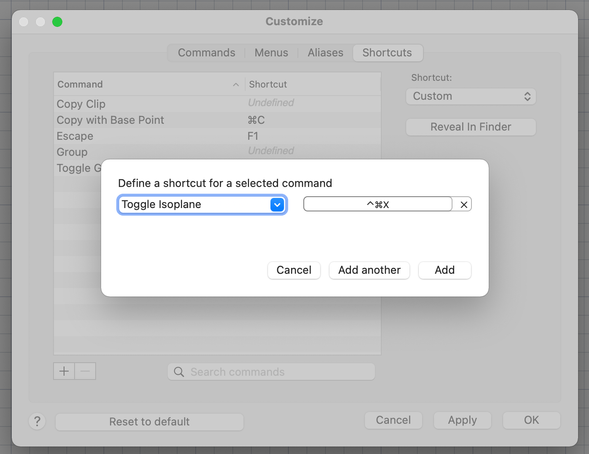
Yes, if you are using AutoCAD 2022, you can assign shortcut to "Toggle Isoplane" macro and then use it to toggle isoplane:


2022-01-11_10-12-14.png


Do you find the posts helpful? "LIKE" these posts!
Have your question been answered successfully? Click 'ACCEPT SOLUTION' button.


Maxim Kanaev
Architect
MARSS

MacACAD | Linkedin

Etiquette and Ground Rules of Autodesk Community
0 Likes