- Mark as New
- Bookmark
- Subscribe
- Mute
- Subscribe to RSS Feed
- Permalink
- Report
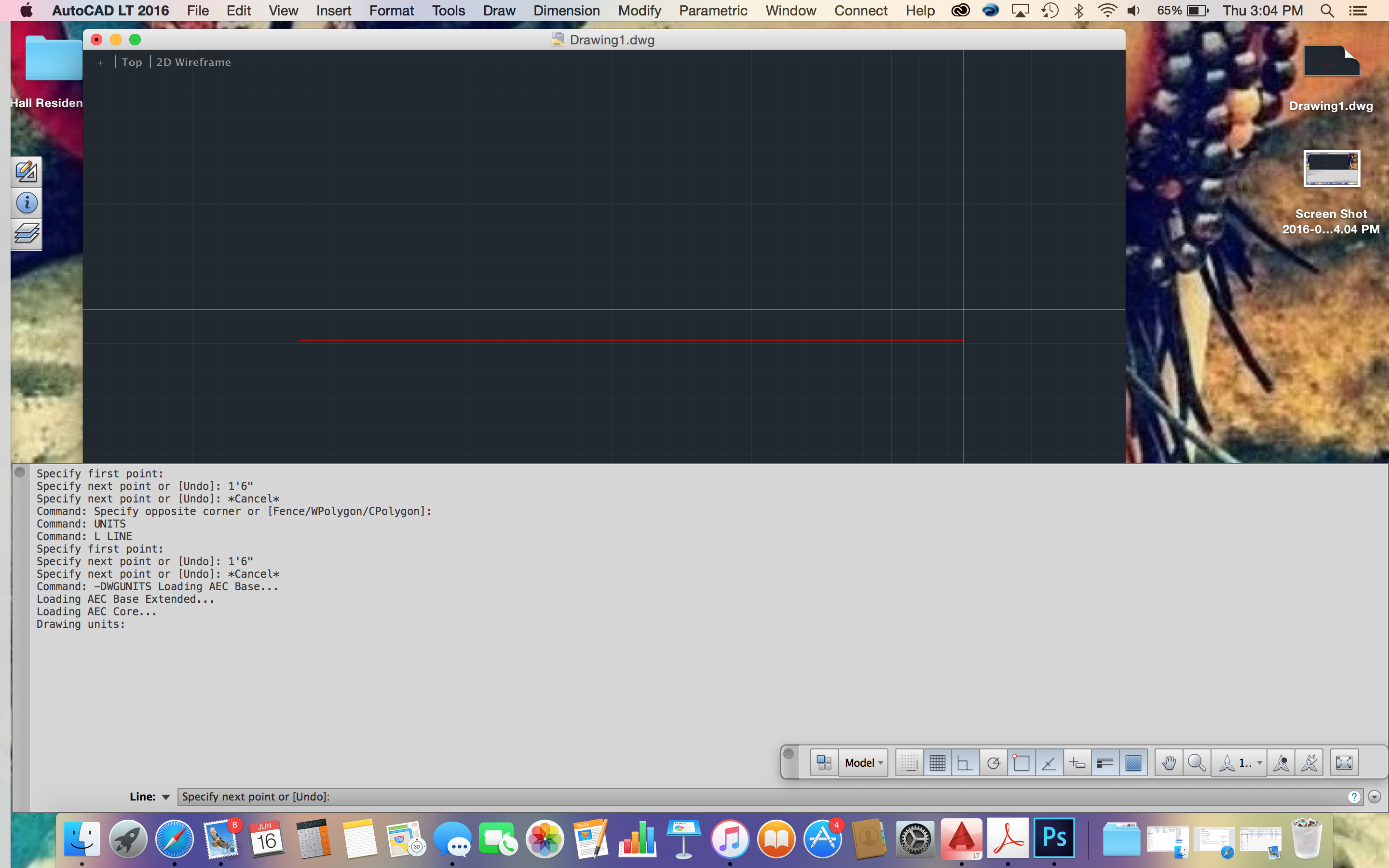
Using AutoCAD 2016 for Mac and having an issue drawing a line to scale in feet and inches. Well actually it won't recognize my entry in the command line AT ALL. It is acting as if I have NOT set-up the Units, BUT I have!
What I have done:
-The Units are set to Architectural
-Set-up the dimension style
-Selected scale of 1/4"
-Typed in L to draw my line
-entered the dimensions in feet and inches on command line
NOTHING HAPPENS!
Again, it is like the Units are not set-up but they are!!
I am an experienced AutoCAD user.....20 years of using the product, but this is my first time using it on a Mac. I have all tracking turned off.....hate that crap. Is this the issue? Can I no longer type the dimensions I need in the command line? Do I have to type it in the tracking area on the drawing now? Or is this a Mac thing and I am missing something??
Please Help!! I have no idea what to do or where to go from here, if I can't even draw a **** line!!! Thank you in advance!!
Solved! Go to Solution.