AutoCAD 2016 for Mac won't open

AutoCAD 2016 for Mac won't open

Anonymous
Not applicable
3,209 Views
16 Replies
Message 1 of 17

AutoCAD 2016 for Mac won't open

Anonymous
Not applicable

My 2013 version of auto cad expired so I downloaded the 2016 version & it installed successfully but when I click on the app, it will bounce & try to load but then it will stop. I then downloaded the 2015 & 2014 version & they all did the same. I tried troubleshooting with the "FLEXnet" folder twice & still no luck. Any suggestions?

0 Likes
Accepted solutions (2)
3,210 Views
16 Replies
Replies (16)
Message 2 of 17

wispoxy
Advisor
Advisor

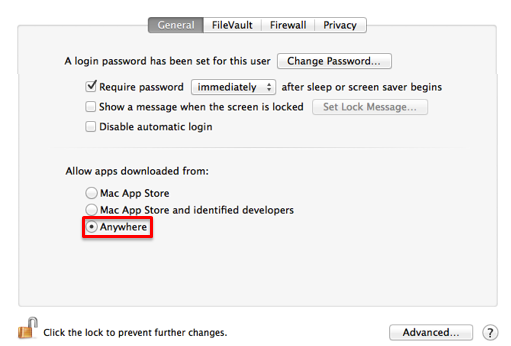
Just allow third party even though it's installed already, and try to reopen it.


Some applications are not signed by Apple and will not be able to be installed. If you trust the application and know you want to install it, follow these steps to allow third party apps to install.


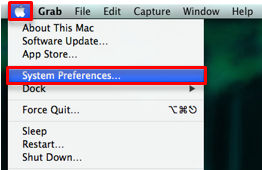
  1. Open "System Preferences" by clicking on the Apple icon and choosing that option.

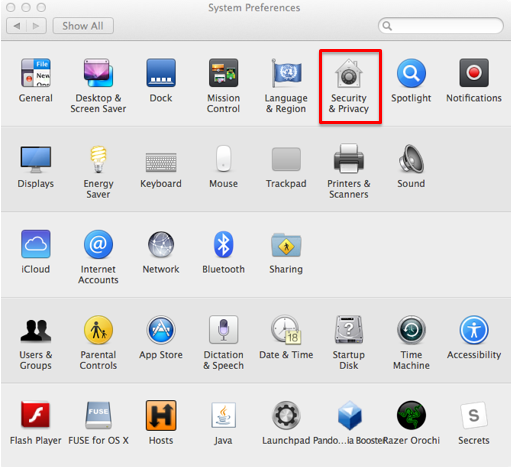
  2. Select "Security & Privacy" from the "System Preferences" window.

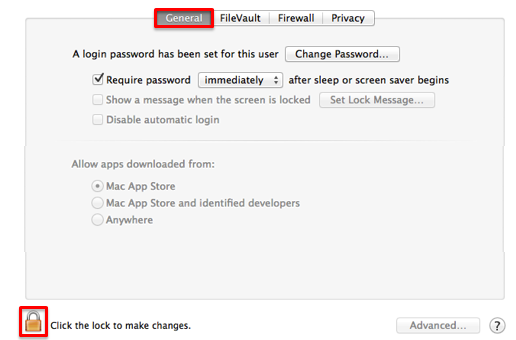
  3. Select the "General" tab, and select the lock in the lower left corner to allow changes. 

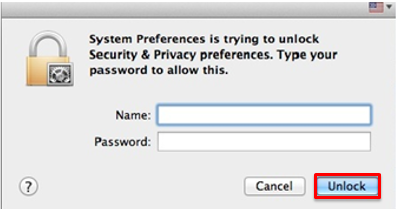
  4. Enter your computer username and password, then select "Unlock."

  5. In the "Allow apps downloaded from:" section, select the radio button to the left of "Anywhere."

  6. Close the window. You can now install unsigned applications that you trust. 
    • For security reasons, you may want to repeat this process checking "Mac App Store" on step five in order to turn this feature back off. 

http://it.nmu.edu/docs/allowing-third-party-applications-install-macbook

0 Likes
Message 3 of 17

wispoxy
Advisor
Advisor

Sounds like it's not seeing a valid source. Delete the desktop 'bouncy' icon. Go directly to the acad source, and replace back into quick access bar. 

0 Likes
Message 4 of 17

Anonymous
Not applicable

Deleting the bouncing icon doesn't work.

0 Likes
Message 5 of 17

Anonymous
Not applicable

Changing the third party settings doesn't work.

0 Likes
Message 6 of 17

maxim_k
Consultant
Consultant
Accepted solution
Hi,

I'd suggest you to try to use Clean Uninstall procedure:

https://knowledge.autodesk.com/support/autocad-for-mac/troubleshooting/caas/sfdcarticles/sfdcarticle...

Than you can try to install 2016 version again.

BTW: AutoCAD for Mac signed by Apple.

Maxim

Do you find the posts helpful? "LIKE" these posts!
Have your question been answered successfully? Click 'ACCEPT SOLUTION' button.


Maxim Kanaev
Architect
MARSS

MacACAD | Linkedin

Etiquette and Ground Rules of Autodesk Community
0 Likes
Message 7 of 17

wispoxy
Advisor
Advisor

@maxim_k I couldn't even download and install AutoCAD 2015 or Maya without putting it on 'Anywhere' or typing in my password. 


@Anonymous A clean install sounds good like @maxim_k mentioned. Re-download the installer, then re-install after completely removing all existing components. 

0 Likes
Message 8 of 17

maxim_k
Consultant
Consultant

@wispoxy


Here is Autodesk certificate:

2016-06-23_19-30-46.png


2016-06-23_19-29-14.png


I took screenshots from two installers.


Maxim


Do you find the posts helpful? "LIKE" these posts!
Have your question been answered successfully? Click 'ACCEPT SOLUTION' button.


Maxim Kanaev
Architect
MARSS

MacACAD | Linkedin

Etiquette and Ground Rules of Autodesk Community
Message 9 of 17

Anonymous
Not applicable

The clean uninstall seem to have worked some, but now I am getting an error message. I've attached a screenshot.

0 Likes
Message 10 of 17

maxim_k
Consultant
Consultant
Now try to create new user account on your Mac, just for test. Login to this account and try to launch AutoCAD.
If it will launch, than there are permission problems in your main account.

Maxim

Do you find the posts helpful? "LIKE" these posts!
Have your question been answered successfully? Click 'ACCEPT SOLUTION' button.


Maxim Kanaev
Architect
MARSS

MacACAD | Linkedin

Etiquette and Ground Rules of Autodesk Community
0 Likes
Message 11 of 17

Anonymous
Not applicable

Yes, it open and works on a guest profile. Thank you. How do I fix my permissions in my main account?

0 Likes
Message 12 of 17

maxim_k
Consultant
Consultant
I'm afraid, I cannot help you, because repairing permissions is not a trivial task. I cannot guaranty you success without the possibility to be near your Mac. Sorry.

Maybe somebody from Autodesk staff will post here?

Maxim

Do you find the posts helpful? "LIKE" these posts!
Have your question been answered successfully? Click 'ACCEPT SOLUTION' button.


Maxim Kanaev
Architect
MARSS

MacACAD | Linkedin

Etiquette and Ground Rules of Autodesk Community
0 Likes
Message 13 of 17

Anonymous
Not applicable

I understand. The app just crashed on the guest account & now it won't reopen. 

0 Likes
Message 14 of 17

maxim_k
Consultant
Consultant
Accepted solution
You can reset AutoCAD by holding down Shift key while clicking on the AutoCAD icon in the Dock. And if you are using Guest account you can log out and than login again - settings for all applications will be resented.

Maxim

Do you find the posts helpful? "LIKE" these posts!
Have your question been answered successfully? Click 'ACCEPT SOLUTION' button.


Maxim Kanaev
Architect
MARSS

MacACAD | Linkedin

Etiquette and Ground Rules of Autodesk Community
Message 15 of 17

Anonymous
Not applicable

Thank you. You've been of much help. Hopefully someone can help me with the permissions on my main account. 

0 Likes
Message 16 of 17

wispoxy
Advisor
Advisor

@maxim_k I agree with you, I just find it annoying we still have to type in our password. I'm going to verify the certificate as you showed in the image. Shared a kudos for your time, thanks for sharing.

0 Likes
Message 17 of 17

Anonymous
Not applicable

The clean uninstall & the reseting of AutoCad seemed to do the trick. I can't thank you enough for your help.

0 Likes