PLC DATABASE

PLC DATABASE

bSZCZEPANSKI
Explorer Explorer
5,974 Views
21 Replies
Message 1 of 22

PLC DATABASE

bSZCZEPANSKI
Explorer
Explorer

I have autocad electrical 2024 installed on my machine. It does not have the allen bradley 5069 modules available in the PLC Database file. However, I do have an old copy of the ACE_PLC database file from a previous version of autocad. is there an easy way to add the information from the old file to the new file or replace it with the old one so I don't have to add them all again?

0 Likes
Accepted solutions (1)
5,975 Views
21 Replies
Replies (21)
Message 2 of 22

rhesusminus
Mentor
Mentor

Use the Migration Utility:

https://help.autodesk.com/view/ACAD_E/2024/ENU/?guid=GUID-63EED56F-9EBA-470C-A6BE-079F26BB7119


You can merge the databases together there.


Trond Hasse Lie
EPLAN Expert and ex-AutoCAD Electrical user.
Autodesk Expert Elite Alumni
Ctrl Alt El
Please select "Accept Solution" if this post answers your question. 'Likes' won't hurt either. 😉
0 Likes
Message 3 of 22

bSZCZEPANSKI
Explorer
Explorer

When I try to use the migration utility I get the following error

migration utility error.png

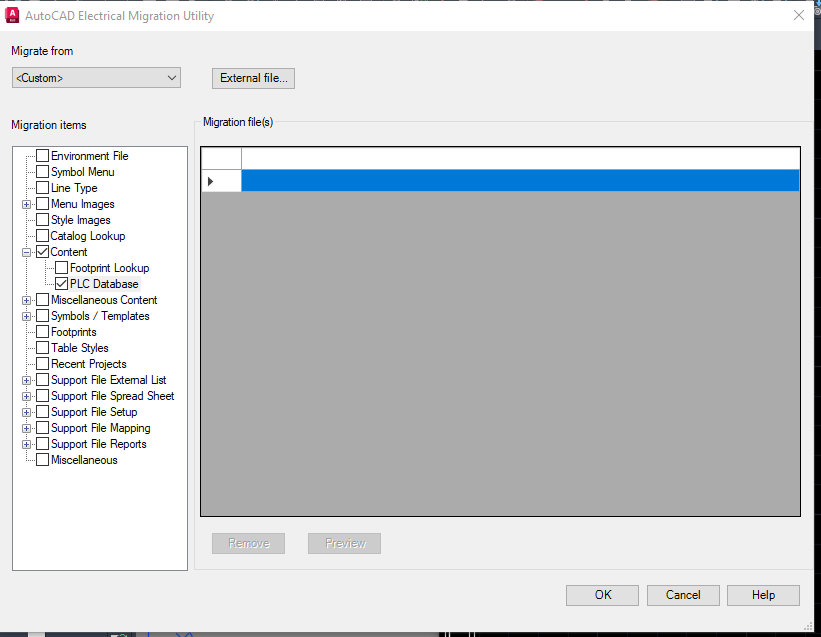
 I can then go to custom and select the pLC database but I am not seeing how to select the 2 files to combine.


plc database migration.png

0 Likes
Message 4 of 22

rhesusminus
Mentor
Mentor

There sure is something missing there 😂


I'll look into it when I'm in front of a computer... If not someone else makes it before me.


Trond Hasse Lie
EPLAN Expert and ex-AutoCAD Electrical user.
Autodesk Expert Elite Alumni
Ctrl Alt El
Please select "Accept Solution" if this post answers your question. 'Likes' won't hurt either. 😉
0 Likes
Message 5 of 22

rhesusminus
Mentor
Mentor

So, I see this:

rhesusminus_0-1696531878520.png


Are your aedata folder and wd.env located on a server or locally? That error message apparently creates some problem...


Trond Hasse Lie
EPLAN Expert and ex-AutoCAD Electrical user.
Autodesk Expert Elite Alumni
Ctrl Alt El
Please select "Accept Solution" if this post answers your question. 'Likes' won't hurt either. 😉
0 Likes
Message 6 of 22

bSZCZEPANSKI
Explorer
Explorer

Everything is local. I think part of the problem may be that I got the last controls designer's computer when I started and there are several duplicate wd.env and support files and IT does not have access set up for me to edit anything. I will provide an update when I sort through and can get some of the files deleted so I am working from the right directory.

0 Likes
Message 7 of 22

rhesusminus
Mentor
Mentor
That sounds like a really good plan!

Trond Hasse Lie
EPLAN Expert and ex-AutoCAD Electrical user.
Autodesk Expert Elite Alumni
Ctrl Alt El
Please select "Accept Solution" if this post answers your question. 'Likes' won't hurt either. 😉
0 Likes
Message 8 of 22

testsubject
Advisor
Advisor

As you mentioned, you need to have admin rights on the computer for AutoCAD Electrical to work correctly.


Bob Hanrahan
Ace User since 1998
Autodesk Expert Elite Alumni
If this answered your question, please click on "Accept Solution"
0 Likes
Message 9 of 22

robert_creel
Enthusiast
Enthusiast

I think I had this same problem a few years back...........................Is the database in its default location?

0 Likes
Message 10 of 22

bSZCZEPANSKI
Explorer
Explorer
Yes under c:program files\autodesk\autocad 2024\support\en-us\ The information is there in the file but nothing shows up in the insert plc from database utility. There are 2 tables for each module. The first one looks like it defines the module and the second one shows the terminals and attributes. Is there something else that may be missing?
0 Likes
Message 11 of 22

bSZCZEPANSKI
Explorer
Explorer

Here are the files for a input card

0 Likes
Message 12 of 22

bSZCZEPANSKI
Explorer
Explorer

I was able to get setup with administrative rights now so that shouldn't be an issue.

0 Likes
Message 13 of 22

rhesusminus
Mentor
Mentor

But.. That would be the wrong location.


Your files should be in "Documents\Acade 2024\AeData\en-US\Plc"


Do you have some strange folder redirection going on? So that your "Documents" folder isn't located in "C:\Users\[username]\Documents" ?


Trond Hasse Lie
EPLAN Expert and ex-AutoCAD Electrical user.
Autodesk Expert Elite Alumni
Ctrl Alt El
Please select "Accept Solution" if this post answers your question. 'Likes' won't hurt either. 😉
0 Likes
Message 14 of 22

bSZCZEPANSKI
Explorer
Explorer
The same tables appear in that location as well. perhaps the wd.env file needs to be update to hard code it to ignore other copies. do you know where I would add it in that file? I am a bit rusty changing things. we have been using a network file at the previous employer and where I am now has been a copy and paste operation. I am trying to convert everything over to Autocad electrical
0 Likes
Message 15 of 22

bSZCZEPANSKI
Explorer
Explorer

If the 5069 don't show up under the catalog database file at location C:\Users\bszczepanski.INDENG\Documents\Acade 2024\AeData\en-US\Catalogs\plcio table,is that the problem or is that only for generating BOM information?


0 Likes
Message 16 of 22

rhesusminus
Mentor
Mentor

That would only be used for getting PLC data for the BOM, yes.


Trond Hasse Lie
EPLAN Expert and ex-AutoCAD Electrical user.
Autodesk Expert Elite Alumni
Ctrl Alt El
Please select "Accept Solution" if this post answers your question. 'Likes' won't hurt either. 😉
0 Likes
Message 17 of 22

bSZCZEPANSKI
Explorer
Explorer

Is autocad still using a PLC_MSG file on 2023? If so, that is the problem I don't appear to have it

0 Likes
Message 18 of 22

rhesusminus
Mentor
Mentor

haven't heard of PLC_MSG... Do you mean ACE_PLC.mdb ? 
It should be located in "Documents\Acade 2024\AeData\en-US\Plc"


Again:

Do you have some strange folder redirection going on? So that your "Documents" folder isn't located in "C:\Users\[username]\Documents" ?


Trond Hasse Lie
EPLAN Expert and ex-AutoCAD Electrical user.
Autodesk Expert Elite Alumni
Ctrl Alt El
Please select "Accept Solution" if this post answers your question. 'Likes' won't hurt either. 😉
0 Likes
Message 19 of 22

bSZCZEPANSKI
Explorer
Explorer

No it is listed in the Autocad electrical 2022 release.  I haven't heard of it either but when I do a search, nothing comes up on my C; Drive

0 Likes
Message 20 of 22

rhesusminus
Mentor
Mentor
Accepted solution

PLC_MSG is not a file. It's a table within the ACE_PLC.MDB file.


And again, and again:

Do you have some strange folder redirection going on? So that your "Documents" folder isn't located in "C:\Users\[username]\Documents" ?


Trond Hasse Lie
EPLAN Expert and ex-AutoCAD Electrical user.
Autodesk Expert Elite Alumni
Ctrl Alt El
Please select "Accept Solution" if this post answers your question. 'Likes' won't hurt either. 😉
0 Likes