Making it able to click objects in PDF.

Making it able to click objects in PDF.

Anonymous
Not applicable
4,787 Views
10 Replies
Message 1 of 11

Making it able to click objects in PDF.

Anonymous
Not applicable

I would like to know how to make a link(?) or reference(?) in that way that when I extract the scheme into a PDF to be able to browse thru the sheets by clicking on the icons?
I am not sure if the question is actually right. I can clarify if somebody has questions.
Sorry for the poor phrasing. I am kind of new to AutoCAD and I have no idea how the browsing thru PDF by clicking on objects can work.
Also let the answer be for dummies. 🙂
Thanks in advance.

0 Likes
Accepted solutions (1)
4,788 Views
10 Replies
Replies (10)
Message 2 of 11

dougmcalexander
Mentor
Mentor

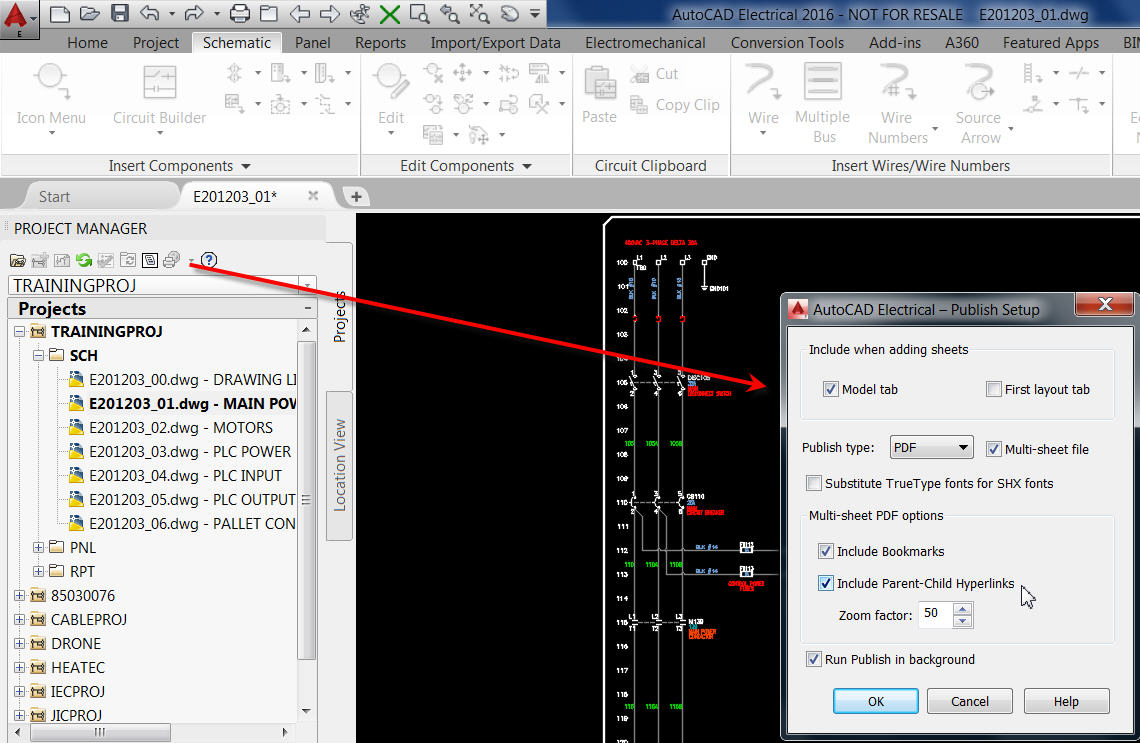
Release 2015 introduced hyperlinked crossreferences.  Of course 2016 includes the option as well.  When you publish the project, select the option to publish as PDF/DWF/DWFx (see screen capture 1).  Next select the drawings to include in the PDF.  Finally, be sure that the option is selected that reads "Include Parent-Child Hyperlinks" (see screen capture 2).

Doug McAlexander
Design Engineer/Consultant/Instructor/Mentor
Specializing in AutoCAD Electrical Implementation Support
Phone: (770) 841-8009
www.linkedin.com/in/doug-mcalexander-1a77623

Did you find this post helpful? Feel free to Like this post.
Did your question get successfully answered? Then click on the ACCEPT SOLUTION button.

EESignature

Message 3 of 11

Anonymous
Not applicable
Hello. I am asking how I can make these refferences IN THE drawing so that they can appear as links IN THE PDF. I don't know how to make linked objects in AutoCAD Electrical at all. That is what I am asking, sir. Greetings, Peter.
0 Likes
Message 4 of 11

dougmcalexander
Mentor
Mentor
Accepted solution

Insert a relay coil. Now insert a contact. Click the Project button below the tag field and select the relay coil you previously inserted. Once you click the final OK to exit the Insert/Edit dialog you see cross-reference data next to the coil in whichever format you defined in Drawing Properties.

Source and destination arrows work in a similar fashion. You just be sure to use the same code for both.

When you insert a panel footprint from the Schematic list the panel footprint becomes linked to its related Schematic Symbol.

Once exported as PDF you click on cross-references to surf from one contact to another. Click on tags to surf between panel footprint and Schematic Symbol.

Doug McAlexander
Design Engineer/Consultant/Instructor/Mentor
Specializing in AutoCAD Electrical Implementation Support
Phone: (770) 841-8009
www.linkedin.com/in/doug-mcalexander-1a77623

Did you find this post helpful? Feel free to Like this post.
Did your question get successfully answered? Then click on the ACCEPT SOLUTION button.

EESignature

Message 5 of 11

selijerome
Contributor
Contributor

i know it's been 8 years since this post has been published. BUT i am in a similar situation here. I am an Electrical Designer and Building a new Library for my Company. There are no settings in the software right now. 

My question is, I am creating Panel Layout from Schematic List. So while making a PDF, it should create a Hyperlinked Intelligent PDF that would allow you to click on a Panel footprint and direct you to the Schematic drawing. But for some reason, AutoCAD is not generating such PDFs right now. 

Please help me guys to set up the correct settings in AutoCAD. 


0 Likes
Message 6 of 11

dougmcalexander
Mentor
Mentor

When you publish your project to PDF be sure to select AcadE to PDF.  Also make sure that the option to create hyperlinks is selected. 

Doug McAlexander
Design Engineer/Consultant/Instructor/Mentor
Specializing in AutoCAD Electrical Implementation Support
Phone: (770) 841-8009
www.linkedin.com/in/doug-mcalexander-1a77623

Did you find this post helpful? Feel free to Like this post.
Did your question get successfully answered? Then click on the ACCEPT SOLUTION button.

EESignature

0 Likes
Message 7 of 11

selijerome
Contributor
Contributor

Hey Thank you for your reply. 
i did the same thing but still no luck. Any idea what is the cause?

0 Likes
Message 8 of 11

dougmcalexander
Mentor
Mentor

Are you hovering over the cross references and tags until you see the hand with the pointing finger?   Once you see the pointing finger, you left-click your mouse.  For panel footprints, you hover over the footprint graphic snd click the mouse.  


Be aware that certain PDF readers might not play well with the hyperlinks.

Doug McAlexander
Design Engineer/Consultant/Instructor/Mentor
Specializing in AutoCAD Electrical Implementation Support
Phone: (770) 841-8009
www.linkedin.com/in/doug-mcalexander-1a77623

Did you find this post helpful? Feel free to Like this post.
Did your question get successfully answered? Then click on the ACCEPT SOLUTION button.

EESignature

0 Likes
Message 9 of 11

selijerome
Contributor
Contributor

hey thanks again for the reply. 


I know how to navigate through the hyperlinked PDF, i have been working with them before. I have recently moved to another company where they do not have any particular AutoCAD Electrical settings in the system. 

Also, I have some other OLD PDFs from previous projects where it was working really well. But i am struggling this time. 

Note that Source/Destinations are working correctly. Just the Panel Footprint thing is not working. 

0 Likes
Message 10 of 11

dougmcalexander
Mentor
Mentor

Remember that you do not click the tag on the footprint to hyperlink back to the schematic parent. You click the footprint graphics.  But if the footprint was never linked to the schematic in AutoCAD Electrical, it won’t be linked in the PDF.  Check to see if you can surf from schematic parent to footprint within the AutoCAD Electrical project.  If not, the footprint is not linked to a schematic parent.

Doug McAlexander
Design Engineer/Consultant/Instructor/Mentor
Specializing in AutoCAD Electrical Implementation Support
Phone: (770) 841-8009
www.linkedin.com/in/doug-mcalexander-1a77623

Did you find this post helpful? Feel free to Like this post.
Did your question get successfully answered? Then click on the ACCEPT SOLUTION button.

EESignature

0 Likes
Message 11 of 11

selijerome
Contributor
Contributor

Hello again,


I got your point. I have been creating new panel and schematic footprints so issue comes from there. It's not properly linked to each other. 


Thank you once again !!

0 Likes