All terminal footprints and associated hardware must have a common base point, which is usually the point of the footprint where it is centered over the DIN rail. The base point should be at the top of the footprint graphics, as shown below in the footprint block for an AB 1492-L3Q.
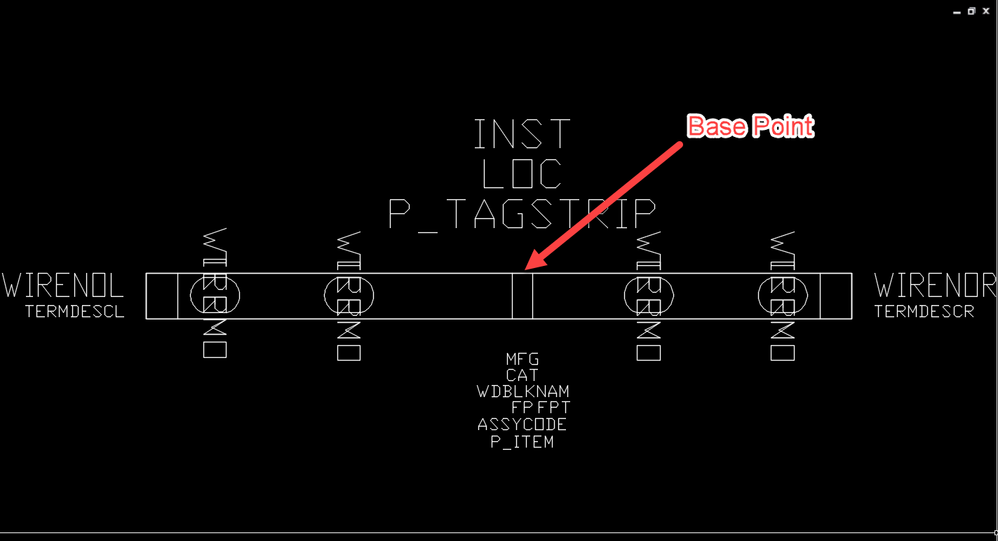
Just be sure that the base point of all your hardware devices cause them to insert in such a way that they line up the way they should. You could insert all blocks into a drawing and arrange them the way you wish to see them. Then block them out again one at a time, using a common base point for each. If you know where the common base point should be for each footprint, you can open the block file for editing, type BASE at the command line, press Enter, and use your mouse to click on the point of the block that should be the base point. I like the base point of my blocks to be at 0,0,0 so I move the graphics around until I have the base point of the block at 0,0,0 before I save the block.
Doug McAlexander
Design Engineer/Consultant/Instructor/Mentor
Specializing in AutoCAD Electrical Implementation Support
Phone: (770) 841-8009
www.linkedin.com/in/doug-mcalexander-1a77623
Did you find this post helpful? Feel free to Like this post.
Did your question get successfully answered? Then click on the ACCEPT SOLUTION button.




