Volume rendering with GPU vs CPU

Volume rendering with GPU vs CPU

Steve_Watts_Kennedy
Not applicable
2,974 Views
7 Replies
Message 1 of 8

Volume rendering with GPU vs CPU

Steve_Watts_Kennedy
Not applicable

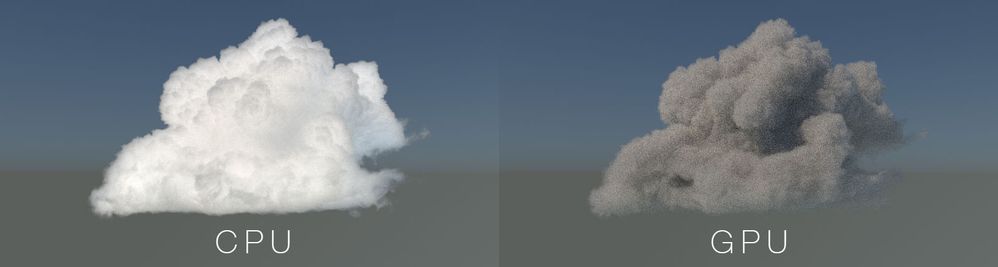
I'm testing out Arnold for a project which will require a lot of volume rendering. Ideally would like to be able to do it on GPU. I've created a test scene using the WDAS cloud, following https://docs.arnoldrenderer.com/x/2IaMB

I've rendered out a frame using CPU, and then GPU. The only difference between the two is the device.

The CPU frame looks great, the GPU one looks pretty bad:
5999-wdas-clouds-cpuvsgpu.jpg

Is this a limitation of Arnold GPU? Or is there some additional setup required for rendering volumes on the GPU?

0 Likes
Accepted solutions (1)
2,975 Views
7 Replies
Replies (7)
Message 2 of 8

Steve_Watts_Kennedy
Not applicable

No-one knows what’s going on here? Am I the only one trying to render volumes with Arnold GPU?

0 Likes
Message 3 of 8

madsd
Advisor
Advisor

I just downloaded the asset and tried in more recent build released ( earlier today )
In my case, the CPU is the dark and the GPU the bright.

So yes, this should get a ticket in some system somewhere, but I think it's already there, it just hasn't been executed.

0 Likes
Message 4 of 8

Stephen.Blair
Community Manager
Community Manager

We already have a ticket and it looks like a reasonably easy fix to make the GPU match the CPU.


// Stephen Blair
// Arnold Renderer Support
0 Likes
Message 5 of 8

James_Grimes
Not applicable

Are there plans to open up the samples settings (i.e., diffuse, specular, transmission, SSS, volume indirect) for Arnold GPU in the near future?

I am having a difficult time reducing noise levels in my GPU renderings to match those of my CPU renderings. I adjust my settings according to the Arnold documentation (i.e., increase camera (AA) and use adaptive sampling). However, the setting levels necessary to match the CPU render quality cause my GPU renders to take nearly as much time to render as the CPU. If we were able to target the source of the noise and adjust the appropriate sample setting (e.g., diffuse only), our GPU renders may be able to achieve CPU quality with faster rendering times.

0 Likes
Message 6 of 8

schwungsau
Enthusiast
Enthusiast

you should ask this question Nvidia, its not supported in optix yet.

0 Likes
Message 7 of 8

Anonymous
Not applicable

Yes, I also cannot get clean image with gpu. I think for now the only solution is to denoise it in After Effects... This time we got donkey in a bag from nVidia and Autodesk...

0 Likes
Message 8 of 8

Stephen.Blair
Community Manager
Community Manager
Accepted solution

This was fixed in Arnold 6.0.3
https://docs.arnoldrenderer.com/display/A5ARP/6.0.3.0

  • 7878 [GPU] Discrepancy in volume rendering when scatter_color components are large


// Stephen Blair
// Arnold Renderer Support
0 Likes