No AOV in EXR after Denoising

No AOV in EXR after Denoising

info9DDWD
Enthusiast Enthusiast
3,423 Views
8 Replies
Message 1 of 9

No AOV in EXR after Denoising

info9DDWD
Enthusiast
Enthusiast

Hello,

i have a Question about the EXR Denoising and AOVS.

You can see my Settings in the Picture and i think, it is ok.


So i Render, all Layers in the EXR File. AOVs and all in Photoshop and After Effects. Perfect-

So i Denoise in Arnold, only the Beauty Pass is in the EXR.


And other AOVS are ignore...


I hope you can help me.


Arnold exr2.jpg


Arnold exr.jpg


0 Likes
3,424 Views
8 Replies
Replies (8)
Message 2 of 9

Stephen.Blair
Community Manager
Community Manager

I don't see any AOVs listed in Light Group AOVs, except for that "background" aov.

Only the beauty is denoised, and only the denoised AOVs are output by the denoiser.

You have to add other AOVs to the "Light Group AOVs" list. They don't have to light group AOVs, they can be any AOV...like "diffuse"


// Stephen Blair
// Arnold Renderer Support
0 Likes
Message 3 of 9

info9DDWD
Enthusiast
Enthusiast

Hello,


thanks for the Answer.


So i push on "Read available AOVs" it doesn´t find any AOVs.

0 Likes
Message 4 of 9

peter.horvath6V6K3
Advisor
Advisor

The Arnold Denoiser writes out the denoised AOVs, which is only the beauty (RGBA) by default. To output additional AOVs, list them in the Light group AOVs field, for instance in your scene:

diffuse specular background object_mask1

If they can not be denoised (e.g. no variance layer exist for an AOV), then they are just copied to the output.

0 Likes
Message 5 of 9

peter.horvath6V6K3
Advisor
Advisor

Seems like something's broken with that Read button, I'll take a look.

0 Likes
Message 6 of 9

info9DDWD
Enthusiast
Enthusiast

Arnold exr3.jpgHello,


thank you!


So i wrote the diffuse in for the test. Then another error occurred and the disffuse is not included. It probably doesn't have a variance layer.

Error:

Will just copy AOV "diffuse", variance not found
Output file will be "E:\Test\Arnold exr\Test Neu2\Versuch\Test_denoised.exr"
Start denoising (patch radius 3, search radius 9, variance 0.5)
Denoising RGBA
Denoising diffuse
Could not find AOV with source diffuse and filter variance_filter
Could not find variance for AOV "diffuse", skipping denoise.


0 Likes
Message 7 of 9

peter.horvath6V6K3
Advisor
Advisor

According to the log: "Will just copy AOV "diffuse", variance not found" means that the diffuse AOV just copied over to the output without denoising. I made a quick test and it's there.

0 Likes
Message 8 of 9

osukas
Advocate
Advocate

I'm testing the Denoiser, but when I use it it only denoises my RGBA channel, I tried to also denoise the AOV exr file I made and tell me that can´t find the variance AOV, tried to add it but I can´t find it anywhere, I need to denoise my diffuse, specular and transmission layers for compositing.


0 Likes
Message 9 of 9

peter_horvath
Autodesk
Autodesk

@osukas wrote:

I'm testing the Denoiser, but when I use it it only denoises my RGBA channel, I tried to also denoise the AOV exr file I made and tell me that can´t find the variance AOV, tried to add it but I can´t find it anywhere, I need to denoise my diffuse, specular and transmission layers for compositing.


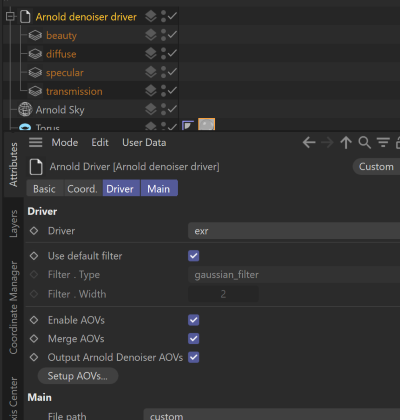
 Make sure the AOVs are added to the EXR driver and Output Arnold Denoiser AOVs checked.

peter_horvath_0-1665475622598.png

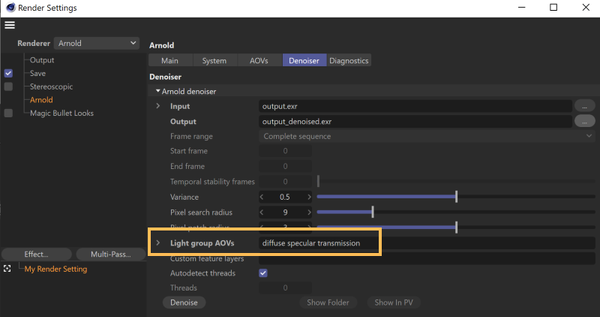
Render your scene. Then go to the Denoiser tab, select the exr and set the AOVs in the Light group AOVs field.

peter_horvath_1-1665475740455.png


// Peter Horvath
// C4DtoA developer
0 Likes