Tiling in Cutout channel has no effect

Tiling in Cutout channel has no effect

Anonymous
Not applicable
1,171 Views
4 Replies
Message 1 of 5

Tiling in Cutout channel has no effect

Anonymous
Not applicable

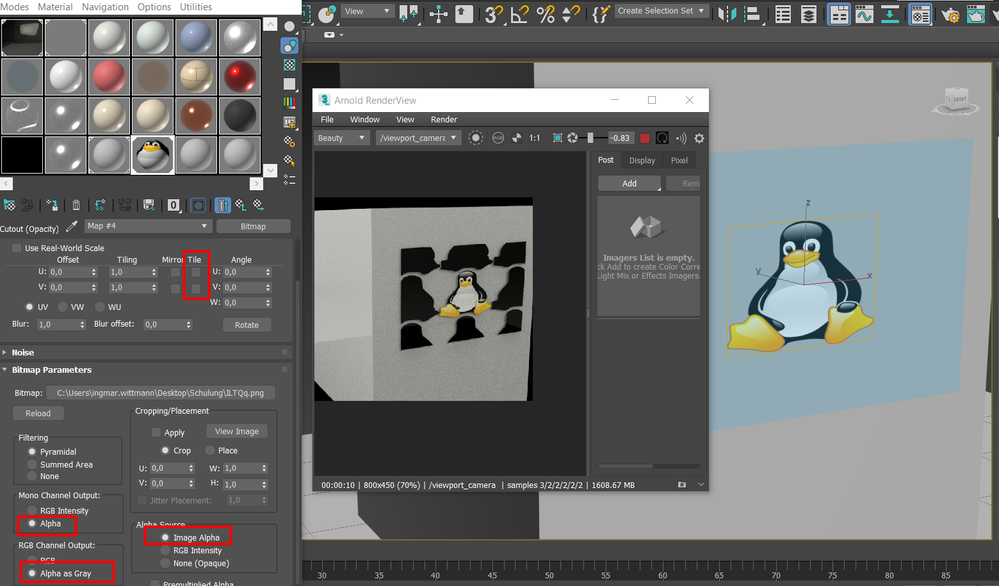
Turned off tiling in the cutout channel, but it is still visible in rendering.
Is it me or is it a bug?

1613555020919.png

0 Likes
1,172 Views
4 Replies
Replies (4)
Message 2 of 5

Anonymous
Not applicable

Ok, i tested the same material with ART Render and it just works fine.
What is the problem with Arnold?

0 Likes
Message 3 of 5

Stephen.Blair
Community Manager
Community Manager

As far as I can see in the code, MAXtoA is not sending the tile settings to Arnold.

If you use the Arnold Image map, you'll get the tiling in the render (but not in the viewport).


// Stephen Blair
// Arnold Renderer Support
0 Likes
Message 4 of 5

Anonymous
Not applicable

Ok the Arnold Image is working THX! But the lack of compatibility is annoying.

0 Likes
Message 5 of 5

madsd
Advisor
Advisor

You use the OSL bitmap node to make it universal and working with all engines in the application that works with OSL.
The map shows in the viewport in both standard and HQ mode, note that HQ mode is prefered due to increased performance when working with OSL, things runs procedurally real time, and wont be baked down to actual maps.

0 Likes
