HOLES NOT SHOWING IN SOME INSTANCES OF THE SAME PART IN AN ASSEMBLY DETAIL

HOLES NOT SHOWING IN SOME INSTANCES OF THE SAME PART IN AN ASSEMBLY DETAIL

CSarris
Enthusiast Enthusiast
1,243 Views
5 Replies
Message 1 of 6

HOLES NOT SHOWING IN SOME INSTANCES OF THE SAME PART IN AN ASSEMBLY DETAIL

CSarris
Enthusiast
Enthusiast

Hi everyone.


I have a drawing with a column and some plates welded on it.

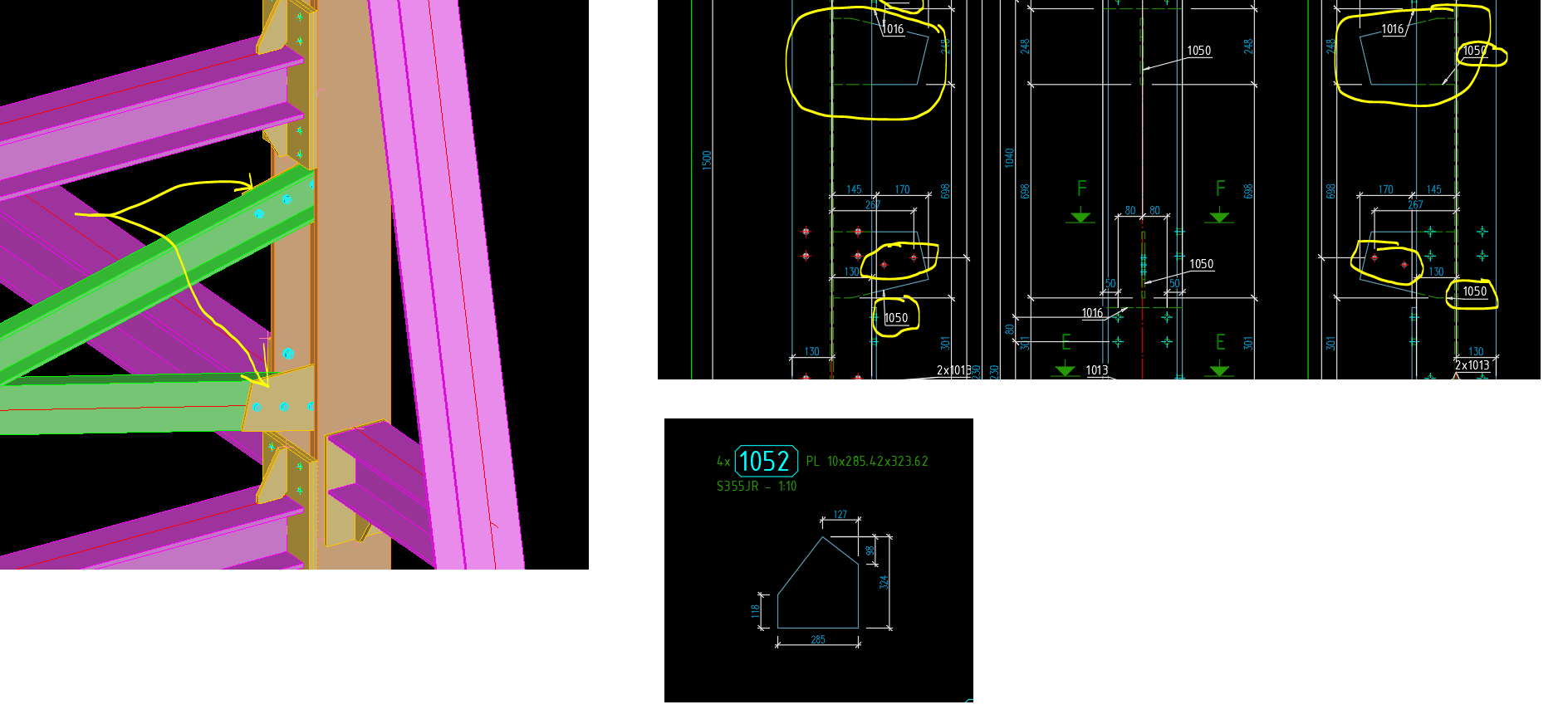
One of them is a plate with holes, where my trusses attach (plate no.52).

Plate no.1052 is welded 2 times in the height of the column.

In the assembly drawing, one of those instances shows the holes correctly and the other one does not show them at all.

In the part drawing of 1052, the holes are also missing.

I have checked numbering and "Holes in errection drawings" in advance tools, all is in order.

I have designed similar constructions many times in the past, and never had this problem.


Any ideas?

0 Likes
1,244 Views
5 Replies
Replies (5)
Message 2 of 6

Sebastian_Eiche
Mentor
Mentor

there will be no solution by just having a pic. Try to upload the model (maybe just a part).
Do the checkings: audit, model check


Sebastian Eiche
Application Engineer @Mensch und Maschine acadGraph

EESignature

If this information was helpful, please use the Accept as Solution function, this make it easier for other users

0 Likes
Message 3 of 6

s_hannemann
Advocate
Advocate

Hi,


its confusing because u show the single part 1052 but in the assembly the single part number 1050 is shown. looks like u added the holes later and now u need a new numbering.


In addition, i think the 3rd bolt of this connection cant be erected because of the flange of the column?


The model would be helpful.

0 Likes
Message 4 of 6

CSarris
Enthusiast
Enthusiast

Sorry for the confusion, I meant to upload a pic of detail 1050, (they are almost the same).

Here is a part of my model.


I found a walk-around but it is quite time-consuming.

I selected one by one all the bolt groups connecting the plates with the UPNs. Then I removed the plates from each connection, I saved and force updated my documents (Objects \ Connection objects \ delete objects from connection).

All holes from the plates were gone in the detail draings.

Then I added one by one all the plates in the corresponding bolted connection (Objects \ Connection objects \ Add objects to connection) and after saving I force-updated my documents again.

All holes are now showing in the detail drawings.


It is very strange, because while having the holes very clearly in my model (and after auditing and checking and saving etc.), the documents remained without holes and the document manager said they are up to date.

Even a force update did nothing to them (I also tried all cheap tricks such as restart Asteel, Restart computer, rename model file and produce new detail drawings, etc.).


0 Likes
Message 5 of 6

s_hannemann
Advocate
Advocate

Hi,


cant find a mistake in your model. Assembly drawing and main part drawing looking good and show every hole. Looks like a simple database issue.


1. backup

2. deregister the drawing

3. delete the database

4. register your drawing

5. update


shannemann_0-1642171585868.png


0 Likes
Message 6 of 6

johnjmbennett
Mentor
Mentor

Hi,


so this maybe some settings within the drawing style itself.  
if you upload a drawing file as well, people can check which style used etc.


also wonder which version (year) and country settings you are working with.


John Bennett
Did you find this post helpful? Feel free to Like this post.
Did your question get successfully answered? Then click on the ACCEPT SOLUTION button.

EESignature

0 Likes