- Mark as New
- Bookmark
- Subscribe
- Mute
- Subscribe to RSS Feed
- Permalink
- Report
Hello I have a script that will insert XYZ coordinates with yaw, pitch and roll.
The Script grabs the cell data and inserts a Point at a given Time, then with Animate On, it transform the point to the cells Data.
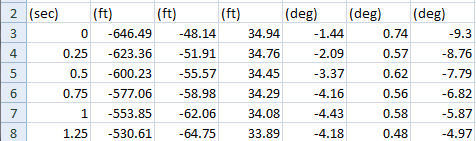
2 Issues i'm having with the Script.
1st I have fractions of a seconds increment that is needed. The Time is Multiplied by 30 FPS. the Results is a decimal frame in many cases, so I have it rounding down to the whole frame. Can you Code Time in Sub-Frame Format, like at Frame 22.75 have a keyframe. (I know I can display Frames:Ticks to scrub the timeline in subframes.) Can that be coded? if so please share.
The other Issue is that my X,Y, Z values are not landing on the exact number that's represented in the excel file, but the rotational values are fine.
For instance Row 7 xyz is returning -600.04, 56.888, 31.24. I'm wondering if Max retains variables in memory, and this causes a shift in the results.
WHy wouldn't the World XYZ values work? I have no shifting in the code.
THe xyz values are multiplied by 12 for Inch unit Scene.
theDummy.pos = [(BPrefixdStrings*12), (CPrefixdStrings*-12), (DPrefixdStrings*-12)]
THe excel and Script is attached. Please share solutions and suggestions.
Thanks
 -- Start an Excel OLE Object
  -- USE SCENE SET TO INCHES units. Open Listener for reported values.

  x = CreateOLEObject "Excel.Application"

  -- Create a new workbook in the new excel document
  ----x.Workbooks.Add

  x.Workbooks.Open("C:\Motion.xls")

 -- This makes Excel Visible
  --x.visible = true

	  --x.Rows.Count
	  --x.application.Cells("A1").Value

(x.application.Range("A1")).value

theDummy = Point showtrajectory:true --create a helper with trajectory on
	TheDummy.size = 400

counter = 3


while counter < 12 do
--while counter != "undefined" do
(

	counter = counter as String
	--print counter
--COLUMN A
	cellValueA = (x.Range("A" + counter )).value as String
		OldStringA = "d0"
		NewStringA = ""
		APrefixdStrings = replace cellValueA (findstring cellValueA OldStringA) OldStringA.count NewStringA

--COLUMN B
	cellValueB = (x.Range("B" + counter )).value as String
		OldStringB = "d0"
		NewStringB = ""
		BPrefixdStrings = replace cellValueB (findstring cellValueB OldStringB) OldStringB.count NewStringB

--COLUMN C
	cellValueC = (x.Range("C" + counter )).value as String
		OldStringC = "d0"
		NewStringC = ""
		CPrefixdStrings = replace cellValueC (findstring cellValueC OldStringC) OldStringC.count NewStringC

--COLUMN D
	cellValueD = (x.Range("D" + counter )).value as String
		OldStringD = "d0"
		NewStringD = ""
		DPrefixdStrings = replace cellValueD (findstring cellValueD OldStringD) OldStringD.count NewStringD

--COLUMN E
	cellValueE = (x.Range("E" + counter )).value as String
		OldStringE = "d0"
		NewStringE = ""
		EPrefixdStrings = replace cellValueE (findstring cellValueE OldStringE) OldStringE.count NewStringE

--COLUMN F
	cellValueF = (x.Range("F" + counter )).value as String
		OldStringF = "d0"
		NewStringF = ""
		FPrefixdStrings = replace cellValueF (findstring cellValueF OldStringF) OldStringF.count NewStringF

--COLUMN G
	cellValueG = (x.Range("G" + counter )).value as String
		OldStringG = "d0"
		NewStringG = ""
		GPrefixdStrings = replace cellValueG (findstring cellValueG OldStringG) OldStringG.count NewStringG

	--print APrefixdStrings
	print " -- "
		theTIME = APrefixdStrings as Float
		--theTIME = floor ((theTIME)*30 + 0.5)
		theTIME = floor ((theTIME)* 30)

		print counter
		print theTIME
	print BPrefixdStrings
	print CPrefixdStrings
	print DPrefixdStrings
		BPrefixdStrings = BPrefixdStrings as Float
	CPrefixdStrings = CPrefixdStrings as Float
	DPrefixdStrings = DPrefixdStrings as Float
	EPrefixdStrings = EPrefixdStrings as Float
	FPrefixdStrings = FPrefixdStrings as Float
	GPrefixdStrings = GPrefixdStrings as Float
print EPrefixdStrings
print FPrefixdStrings
print GPrefixdStrings

	with animate on --enable autokey animation context
	(
		at time theTIME  --set the current time for the following expression
				--for Scene set to "inches" units, multiple values by 12.
				theDummy.pos = [(BPrefixdStrings*12), (CPrefixdStrings*-12), (DPrefixdStrings*-12)] --place dummy at 1st coord.

		print theDummy.pos
		at time theTIME
		move theDummy [BPrefixdStrings, CPrefixdStrings, DPrefixdStrings]	--moves dummy subsequent values in excel.
		--Rotates the Dummy just fine
		at time theTIME
			theDummy.rotation.x_rotation = EPrefixdStrings
		at time theTIME
			theDummy.rotation.y_rotation = FPrefixdStrings
		at time theTIME
			theDummy.rotation.z_rotation = GPrefixdStrings

	)--End With

		--print APrefixdStrings
		--print trimValue
	counter = counter as Integer
	counter = counter + 1

)--End while
counter = counter as Integer
counter = counter - 1
print "Last Row  " + counter as String

 -- Change the color of A1:B1 to red
--(x.application.Range("A1:B1")).Interior.ColorIndex = 45

  -- Save the spreadsheet
  --x.application.ActiveWorkbook.SaveAs(excelFile)

  -- Close the spreadsheet
  x.application.ActiveWorkbook.Close

  -- quit excel
  x.quit()

  -- Release the OLE Object
  releaseOLEObject x

  -- Release ALL OLE Objects, just incase
  releaseAllOLEObjects()
Solved! Go to Solution.