Super annoying FreeForm Brushes LAG ! Please help fixing this.

Super annoying FreeForm Brushes LAG ! Please help fixing this.

AbouMay
Enthusiast Enthusiast
1,481 Views
7 Replies
Message 1 of 8

Super annoying FreeForm Brushes LAG ! Please help fixing this.

AbouMay
Enthusiast
Enthusiast

I have this now where, anytime I use all sort of brushes in the freeform modelling ribbon (or even paint weight brushes etc!), I get this bad lag where the cursor freezes every 2 seconds for several seconds! and catches up. Stroke has been recorded though.


I have win7 dual xeon 5650 and 1080ti with latest drivers. Everything hardware and software related seems ok.


Please help, it's really hurting the workflow now.


Thank you for helping.

 

0 Likes
1,482 Views
7 Replies
Replies (7)
Message 2 of 8

AbouMay
Enthusiast
Enthusiast

update:

Actually, it's even worse than described.

I just noticed that, when the cursor freezes after the 2 sec, it doesn't unfreeze until I release the left mouse button (?!).

0 Likes
Message 3 of 8

AbouMay
Enthusiast
Enthusiast

update:

I just tested the different display modes. Only legacy openGL doesn't suffer from this lag.

Direct3D, from legacy to the latest one, has this horrible lag.

I wonder what to do.

I have a ultrawide 100hz, with g-sync enabled, could these options be a cause? Or another direct3d setting?

Thanks.

0 Likes
Message 4 of 8

BenBisares
Autodesk Support
Autodesk Support

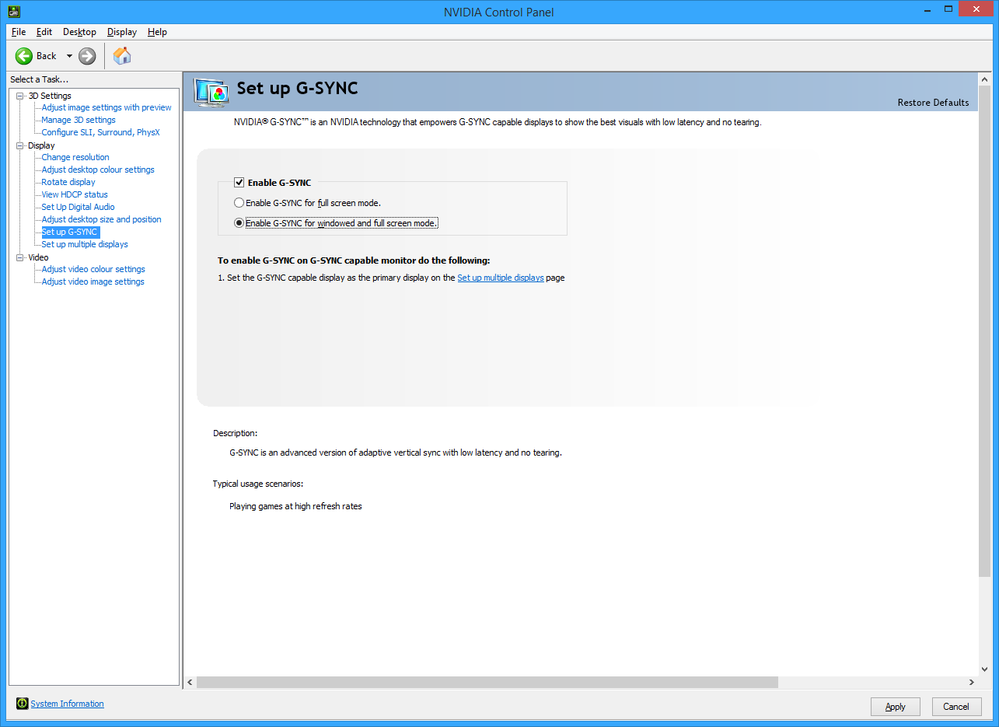
Do you have G-SYNC enabled for both windowed and full screen mode?


I have a similar setup (1080, Acer Predator Ultrawide set to 100hz) and when I tested that mode I saw similar lag to what you described.


If you do try setting it back to the default of just full screen mode or even disabling G-SYNC to see what happens.


gsyncsettings.png


Ben Bisares
0 Likes
Message 5 of 8

AbouMay
Enthusiast
Enthusiast

Thank you for taking the time to give this answer. Very good suggestion, I'll try that! 

0 Likes
Message 6 of 8

AbouMay
Enthusiast
Enthusiast

Ok, so I just tried tweaking g-sync, fullscreen mode only/disabled/etc, nothing worked, lag is still here.

I thought it was maybe related to the refresh rate, since 100hz is a little bit on the high side, so I tried several refresh rates, even disabling oc on the monitor, and reverting back to the stock 60hz = lag 😞

As I noticed, I think it's directx related, some setting to be tweaked in this regard, but which? I'll dig into the "manage 3D settings" of the nvidia control panel, and custom set parameters for 3dsmax.

0 Likes
Message 7 of 8

BenBisares
Autodesk Support
Autodesk Support

Ok let me dig a bit further into this. What is the version of 3ds Max you're using, including the update? (i.e. 2019.2, etc.)

Also do you mind providing a system information file just to know your system specs? If you don't want to share that publicly you can PM it to me.


Last, would it be possible for you to share an archive (File > Save As > Archive) of the scene you are working on or at least a stripped down version that shows the problem plus a simple list of reproduction steps? If it's simpler a Screencast video will do


Ben Bisares
0 Likes
Message 8 of 8

AbouMay
Enthusiast
Enthusiast

Sorry for late reply.

I ended up reinstalling windows altogether.

It's working now.

Thank you all again.

0 Likes