udeflector question

udeflector question

Anonymous
Not applicable
3,668 Views
22 Replies
Message 1 of 23

udeflector question

Anonymous
Not applicable

Brand new day brand new question. Why is it I can

  1. create a udeflector
  2. pick plane as the object
  3. bind space warp to the a pf Source

https://gyazo.com/9c04b7690a9c9ecb7ce2248d0baf2c77


and it works but when I

  1. create a udeflector
  2. pick a object I created
  3. bind space warp to the pf source

https://gyazo.com/bff686dc0cbbe90004c9e7cf44b90976


 it don’t work

0 Likes
Accepted solutions (2)
3,669 Views
22 Replies
Replies (22)
Message 2 of 23

Anonymous
Not applicable

Either inverse the normals of the collider or better, give the collider some thickness using the shell modifier.

The geometry of your collider is horrible btw, build a collision proxy with sufficient evenly spaced polygons.

0 Likes
Message 3 of 23

Anonymous
Not applicable

Example:


theTube.JPG

0 Likes
Message 4 of 23

Anonymous
Not applicable

Thanks first of all

when you say "The geometry of your collider is horrible btw" are you talking about the simple extruded arc or the loft below? 

If you are talking about the loft below, that is the shape of my hopper that must contain all of the particles.

https://gyazo.com/584616cb309976e8d9546a8c2bcda6e7


If i did not do  that I would need several planes to accomplish this.


I am only trying to deflect of the small arc at this point. I probable shouldn't have shown the hopper below but that will be coming up


0 Likes
Message 5 of 23

Anonymous
Not applicable

@Anonymous wrote:

Thanks first of all

when you say "The geometry of your collider is horrible btw" are you talking about the simple extruded arc or the loft below? 

If you are talking about the loft below, that is the shape of my hopper that must contain all of the particles.

https://gyazo.com/584616cb309976e8d9546a8c2bcda6e7


If i did not do  that I would need several planes to accomplish this.


I am only trying to deflect of the small arc at this point. I probable shouldn't have shown the hopper below but that will be coming up


I just thought that the feed-hopper has long,thin and huge polygons that 'might' cause some trouble as colliding geometry.

So maybe building a collision proxy similar to the geometry in the image that i posted would be a good idea.However if it works with your render-geometry then just go for it.


So does the collisions for the arc work now?


0 Likes
Message 6 of 23

Anonymous
Not applicable

Yes flipping the normal's worked! thank you very much!

Can you tell me why some get thru? I have even added shell and increased the thickness

Sometimes the particles go straight thru other times on after a bounce.

 check this out. After about 10 particles a couple go thru

https://gyazo.com/fc306b9ab7ed3dffbad62456884b97ba


0 Likes
Message 7 of 23

Anonymous
Not applicable

@Anonymous wrote:

Yes flipping the normal's worked! thank you very much!

Can you tell me why some get thru? I have even added shell and increased the thickness

Sometimes the particles go straight thru other times on after a bounce.

 check this out. After about 10 particles a couple go thru

https://gyazo.com/fc306b9ab7ed3dffbad62456884b97ba


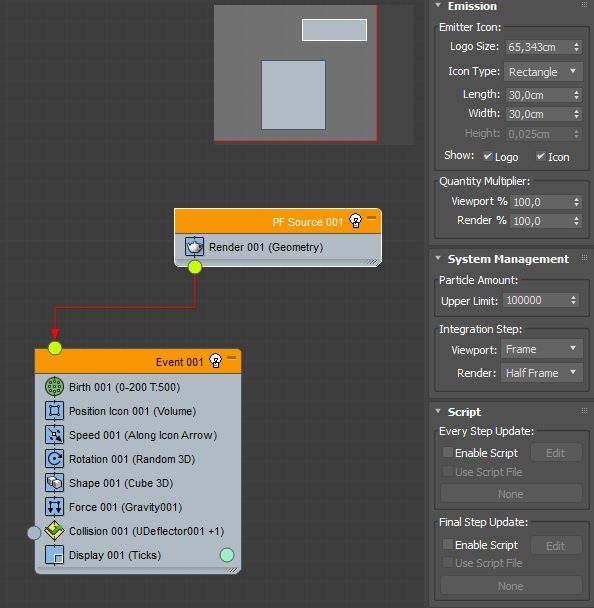
You probably need to change the Integration Steps (PF-Source->System Management->Integration Steps). Try set it to '1/4' or '1/8 frame' or even lower.


http://help.autodesk.com/view/3DSMAX/2018/ENU/?guid=GUID-89DA4474-E8F4-496F-9339-305D8C8E241E


0 Likes
Message 8 of 23

Anonymous
Not applicable

you rock can you tell me where the global event (title bar) is? I look at your autodesk page and im not finding it in the particle view. most likely it right under my nose


0 Likes
Message 9 of 23

Anonymous
Not applicable
Accepted solution

It`s in the commandpanel-rollout of the PFlow source.


pfPanel.JPG


And also in the ParticleFlow window: (Select the source)

pfSource.JPG

Message 10 of 23

Anonymous
Not applicable
0 Likes
Message 11 of 23

Anonymous
Not applicable


@Anonymous wrote:

It did work!

Thanks!

 https://gyazo.com/218caed5d6eed4fc860ceb62201ba31a


You're  welcome. Glad it worked.

0 Likes
Message 12 of 23

Anonymous
Not applicable

I have another question. What can I do about this? I have the intergration step set at 1/8 frame viewport and 1Tick render. the particles work fine here

https://gyazo.com/9b1a57987d156d9867b7c1f87517ee59

However when i move the deflector up closer it does not work well https://gyazo.com/4b7924a5e82af9f7d3c30b8ef6d72d90

I have come to the conclusion that they lose their collision after the first bounce. is there a place to change that and tell it that it can bounce as many times as needed?

thanks


0 Likes
Message 13 of 23

Anonymous
Not applicable

Can you post the scene?

0 Likes
Message 14 of 23

Anonymous
Not applicable

Things have changed since my last post but here is the current scene

I am trying to figure out why my curved deflector is not working.

0 Likes
Message 15 of 23

Anonymous
Not applicable

OK,just trying to get your setup:

1) You are emitting particles in the first event(green)

2) In the first event you also have a collision test that sends the partices to a second event( blue)

Note: WHEN the particles will be sent to the second event depends on the settings of the collision test in this event.


So did you have a collision-test in the secend event also? Because if not, the particles will not collide in the second event.

0 Likes
Message 16 of 23

Anonymous
Not applicable

sorry that sound like my old file. are you seeing this in this in the pv?

https://gyazo.com/22ee168fd5f60a245b3f34bfd40930a2


0 Likes
Message 17 of 23

Anonymous
Not applicable

Here is the latest

I have 5 coliders

1 to 2 to 3 to 4  (3 is not working)

0 Likes
Message 18 of 23

Anonymous
Not applicable

well its working now. All i did was re assign it.

Touchy i guess

Thanks for looking at it.


0 Likes
Message 19 of 23

Anonymous
Not applicable

@Anonymous wrote:

well its working now. All i did was re assign it.

Touchy i guess

Thanks for looking at it.


Still, i have made an update for your scene and saved it under 2016 version.I didn`t add the paddles as colliders, though.


1) I see you have multiple collision tests in a single event. You just need one test, you can add as many colliders as you want.

2) You have several bindings for you udeflectors. You don`t need them, just select the udeflectors in the collision-test and it works.

3) There`s no need for two Forces operators in one event. The Influence parameter in the force-operator is set to 1000% per default adding a lot of gravity. You might consider lowering this.

0 Likes
Message 20 of 23

Anonymous
Not applicable

Wow that cleans it up! Thank you very much for your persistent assistants on this! aon..

One last question hopefully. You see that I have the Integration step viewport 1/8 and render 1 tick yet i am still get a few bleed thru. Is there anything else i can do to prevent this? I duplicated the udeflector as a backup and it stopped it. It seems to me that you would not need to do that.

https://gyazo.com/9843402fef3cc7e4c1d33e94c640dee7


0 Likes