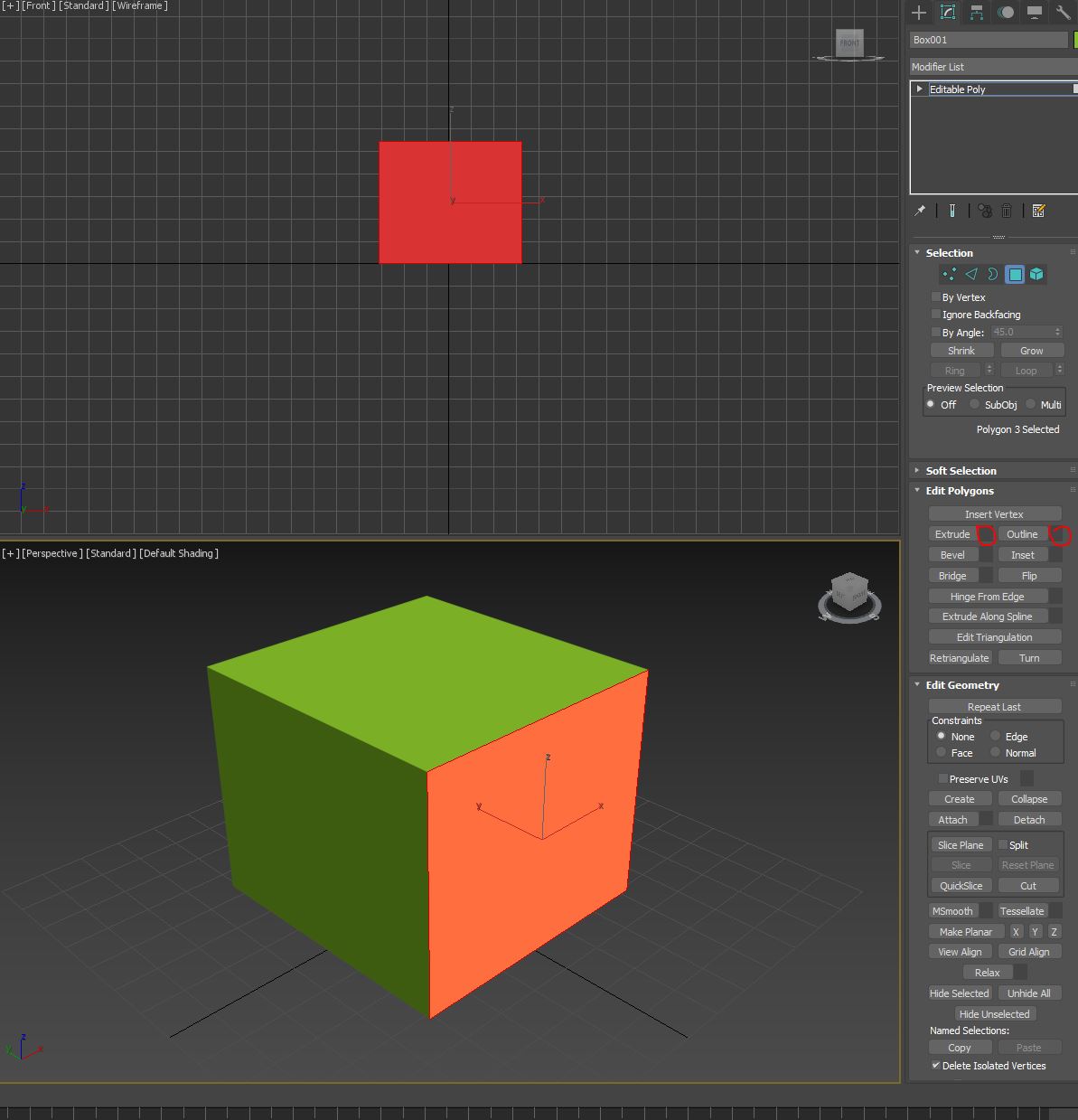
Missing the setting button in edit geometry

Missing the setting button in edit geometry

Anonymous
Not applicable
2,666 Views
7 Replies
Message 1 of 8

Missing the setting button in edit geometry

Anonymous
Not applicable

The setting button doesn't show and I can't click it...

The problem screen shot as attachment. Please help me, thank a lot.
I have updated the latest GPU driver and also opened 3ds max via DX9 and OpenGL mode. 
But the problem still exist... Please help me, thank a lot.

PS. This problem also happened in other computers in my company.  I had turn off the Antivirus software and Firewall before I installed.


0 Likes
Accepted solutions (1)
2,667 Views
7 Replies
Replies (7)
Message 2 of 8

DanielCantin
Autodesk
Autodesk
Accepted solution

Hi @Anonymous 


Thanks for reaching out with your issue, we would like more information to better understand the issue:


  1. Can you confirm if it is also happening with a Edit Poly modifier?
  2. Are the settings button of the Quad menu present and functional? (Right Mouse Click with object in sub-object mode)
  3. Is the Main Toolbar > Select and Manipulate Caddy working when you select a Editable Poly object in Vertex or Edge sub-object mode?
  4. does turning on or off the Preference Settings > General tab > UI Display section > Enable Caddy Controls change the behavior?
  5. Are you using 3ds Max on multiple monitor with different scaling values? If yes, does it happen when 3ds Max and it's dialog are only on one monitor

Sorry for the inconvenience, I hope you can help us finding what the issue is by giving more info, thanks!


Daniel Cantin
QA Manager, 3ds Max, Maya
Entertainment Creation Products, ECP
0 Likes
Message 3 of 8

Anonymous
Not applicable

I can use the second method to solve the problem. Thank you.

0 Likes
Message 4 of 8

DanielCantin
Autodesk
Autodesk

Hi @Anonymous 

I'm very happy to hear the Quad menu workflow work for you 🙂

A Developer had a look at the issue and didn't find anything unusual about the settings button and we have not been able to reproduce the issue either, if anybody else encounter this issue, please let us know.


Daniel Cantin
QA Manager, 3ds Max, Maya
Entertainment Creation Products, ECP
0 Likes
Message 5 of 8

Anonymous
Not applicable

Hello, Victor!

Could you tell me, please? How exactly have you solved your issue?
I have the same problem with missing the setting buttons in edit geometry.
Thanks.

0 Likes
Message 6 of 8

Anonymous
Not applicable

Actually, The problem still exists. The button still doesn't show so I use the alternative way which is edit poly in Quad menu. (right mouse click)

quad_mwnu.jpg

0 Likes
Message 7 of 8

Anonymous
Not applicable

I have the same problem with 2020. Having to use the Quad Menu as well.

0 Likes
Message 8 of 8

Anonymous
Not applicable

Hi, I still don't know how to fix this issue and still use the alternative method(use Quad menu).
In addition, this issue only happened in my company computers with the monitor system and my personal PC is working well without this tricky issue. Therefore, I guess there are something system applications that caused this issue(maybe antivirus or whatever).

0 Likes