Light Linked to object

Light Linked to object

Anonymous
Not applicable
2,826 Views
15 Replies
Message 1 of 16

Light Linked to object

Anonymous
Not applicable

Hi,

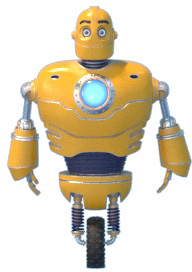
I have a problem. I've got light linked to my object, which is animated. In viewport everything works fine, but when i'm rendering image Light is rendering in the first frame, but in the second frame it doesn't follow the object, it just disappears. How can i fix this ? 


0 Likes
Accepted solutions (1)
2,827 Views
15 Replies
Replies (15)
Message 2 of 16

leeminardi
Mentor
Mentor

 When you say  you've got a "light linked to my object" be more specific.  What technique are you using to indicate that the light on the character's chest is illuminated and how is it keyframed?  Can you provide a max file of just the problem components?

lee.minardi
Message 3 of 16

Anonymous
Not applicable

It's a Vray Light - Disc is placed behind glass cover. It's linked to character rig. Light itself isn't animated, it follows main rig. I've tried Link, Link Constraint, Position Constraint and in viewport every option worked, but when i'm rendering I get same issue.

0 Likes
Message 4 of 16

leeminardi
Mentor
Mentor

Can you duplicate the problem in a file of just the vray light and the glass?  Can you post a file of just those two objects?

lee.minardi
Message 5 of 16

Anonymous
Not applicable

Here is uploaded file 

Message 6 of 16

leeminardi
Mentor
Mentor

I looked over the file.  I do not think I can help you.

lee.minardi
0 Likes
Message 7 of 16

Anonymous
Not applicable

you're barking up the wrong tree..


why would you say it's not working ? It clearly MOVES with its parent...YES IT DOES FOLLOW ITS PARENT.


Obviously, I can't test your scene 100% since I don't have your light texture, so I used any old image....works fine, it moves and the image/light

shows up. Maybe you've got network issues with your image.


Simply disable your Use Texture so it's just the blue light color, and you can then pin down where the error is.


EDIT: There used to be problems with DR and missing textures...so in System you have to tick Transfer Missing Assets...now you're not using DR but you are using RT....so dunno, could be related, just try not using RT and see what happens, even tho I tested with RT with a dummy image and it worked fine.

Message 8 of 16

Anonymous
Not applicable

When i rendered only light it worked fine, so I thought that when I render it with the whole model and it disappears that means that it doesn't follow the model corectly. I've tried using light without texture and nothing changes, still the light disappears in a second frame from render starting frame. 


EDIT 

I tried Vray Adv and it worked. So it could be RT issue...

0 Likes
Message 9 of 16

Anonymous
Not applicable

pretty sure you can rule out linking problem, parent/child move correctly. All points to texture issue to me, RT is not same as real production rendering, there are limitations, sure you can argue with latest advances with GPU rendering...but let's not go there...one thing, there's limit with GPU rendering due to limited VRAM. As said i tested with a dummy image, with RT, worked fine for me but you could have gigs and gigs of other textures that's chewed up all your VRAM and caused errors.........so don't use RT for production renders.

Message 10 of 16

Anonymous
Not applicable

I've tried removing all textures and used only Color Light and it didn't fix the issue. I have to use RT in this project, I need fast GPU rendering.

I'm using 2x GTX 980Ti so I don't think hardware is the issue here.

0 Likes
Message 11 of 16

Anonymous
Not applicable

what about disabling Denoiser ? i don't have that so can't test it myself...

0 Likes
Message 12 of 16

Anonymous
Not applicable

No, it's not becouse of Denoiser. It has to do with Vray Light. In uploaded file there is hidden mesh plane with VrayLightMtl with the same texture and it works fine. Unhide it and check.  It just doesn't work with vrayl ight, don't know why.

0 Likes
Message 13 of 16

Alfred.DeFlaminis
Alumni
Alumni
Accepted solution

Hello @Anonymous,


Love this character.  I wanted to post to confirm that I was also able to render it in Vray but in RT it didn't work for me.  I think this may be best directed toward the good folks at Chaosgroup.  For me, I don't get any render at all on Frame 0/1 in RT, but all work in standard Vray.  I wish I could have been more helpful, but I did want to confirm.


Best Regards,

0 Likes
Message 14 of 16

Anonymous
Not applicable

Thank you Alfred. When I finish animation I'll show it to you 🙂 

Message 15 of 16

Alfred.DeFlaminis
Alumni
Alumni

I can't wait to see it!  Such a beautiful scene.  Thanks for sharing that when the time comes!

Best Regards,

0 Likes
Message 16 of 16

Alfred.DeFlaminis
Alumni
Alumni

Hello @Anonymous,


Since we narrowed this down to a Vray issue, I'm going to go ahead and mark my previous post as the solution so that future users can find it more easily.  I just wanted to let you know the reason that I'm marking the solution.  Thank you very much!

Best Regards,