can't write mouse

can't write mouse

themaxxer
Enthusiast Enthusiast
3,697 Views
10 Replies
Message 1 of 11

can't write mouse

themaxxer
Enthusiast
Enthusiast

I use max 2020 (latest updates) and I get an error when I want to customize my user interface. if I click the red cross then I get an error from the mouse: "can't write mouse" yes/no, and when I restart max all changes a made before on customize UI are gone... I have tried to delete everything in C:\Users\"User"\AppData\Local\Autodesk\3dsMax\2020 - 64bit\ENU but it did not help...


any other ideas to get rid of this annoying "bug"


best regards

themaxxer

0 Likes
3,698 Views
10 Replies
Replies (10)
Message 2 of 11

jon.bell
Alumni
Alumni

Hi Pixel,


Thanks for your question!


What type of mouse are you using? Are you using a standard mouse, or do you have another input device, such as a trackball, Cintiq tablet, graphics tablet or 3D Connexion smartmouse attached as well?


I've not seen this particular type of error before, so I'd love to get some more information on this. (Also, do you have a custom template or workspace saved which points to a maxstart.max file? This may prevent additional customizations from "sticking," as described in this article.)


Please let us know, and we hope to hear from you soon!


Take care,


Jon A. Bell
Senior Technical Support Specialist, 3ds Max
0 Likes
Message 3 of 11

themaxxer
Enthusiast
Enthusiast

hello jon


thanks for reply...


well I am using a normal mouse "pro intellimouse" from microdsoft.

and that's besides of the keyboard the only input device.


yes I have a template pointing to a maxstart file.


best regards

manuel

0 Likes
Message 4 of 11

jon.bell
Alumni
Alumni

Hi Manuel,


Do you still have these issues if you reset your user preferences in 3ds Max and/or rename your maxstart.max file? You'll have to re-do your custom configurations, but I'm wondering if something in your Max settings/template/workspace has gotten corrupted or a setting is interfering with your mouse.


If possible, I would check to see if there are any updated drivers for your mouse available from the manufacturer (instead of just Windows default drivers). Can you please check on the above and let us know?


Thank you, and take care!


Jon A. Bell
Senior Technical Support Specialist, 3ds Max
0 Likes
Message 5 of 11

themaxxer
Enthusiast
Enthusiast

hello jon


thanks for your reply. I still have the issue with the mouse error... BUT I have made some experiences and have a workaround. I have uninstalled 3ds max 2020 with all service packs and stuff and reinstalled it from scratch. The issue was gone in 3ds max 2020 vanilla, without any updates, but came back after installing the latest updates... so, I am not 100% sure, but it seems there's something in the updates causing this. then I have uninstalled my mouse but that didn't helped, so I have uninstalled (driver) it and switched to another mouse and voila it worked. But after restarting max the issue was present again. so if I want to make any changes on my UI I have to unplug my mouse and re plug it and the error is gone for a moment. There seems to be no connection between 3ds max and the driver of the mouse...


best regards

manuel

0 Likes
Message 6 of 11

jonic.jo
Observer
Observer

Hello, I had such a problem due to the installed macro, on the mouse button

0 Likes
Message 7 of 11

danrod3d
Contributor
Contributor

I am experiencing the same issue. I use the Logitech G603 gaming mouse. I have updated my mouse and software and the issue still persists

0 Likes
Message 8 of 11

Anonymous
Not applicable

I have the same problem

0 Likes
Message 9 of 11

DanielCantin
Autodesk
Autodesk

There is a troubleshooting article about this issue mentioning a few causes and solutions that could help: 

"Can't write mouse" error when attempting to save UI customization files in 3ds Max


Daniel Cantin
QA Manager, 3ds Max, Maya
Entertainment Creation Products, ECP
Message 10 of 11

drakomalfoy
Explorer
Explorer

I also have this issue and would love a solution 

Message 11 of 11

danrod3d
Contributor
Contributor

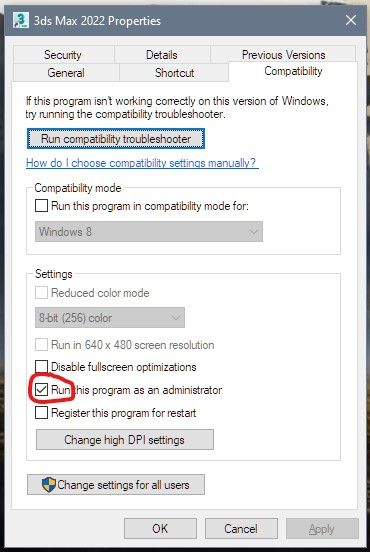
Hey drakomalfoy, Running max as admin worked for me just now. Incase you or anyone else isn't sure how to make that happen, just right click your 3dsMax shortcut and go to compatibility tab and check on run as admin. AdminCheckbox.jpg

0 Likes