3ds Max 2018 Educational Maximum Errors Crashing Max

3ds Max 2018 Educational Maximum Errors Crashing Max

Anonymous
Not applicable
1,824 Views
5 Replies
Message 1 of 6

3ds Max 2018 Educational Maximum Errors Crashing Max

Anonymous
Not applicable

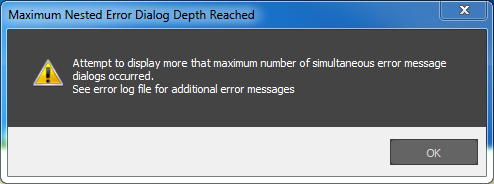
Please see (a sample of) attached errors below.

Then it prompts me to open .ini files, clicking cancel leads to a Substancemax.dlt error, clicking ok leads to a pop-up to open Substance files (.sbsar). After clicking ok, Max crashes.

I have tried repairing, uninstalling and reinstalling, uninstalling Substance, and reinstalling again.


Thanks for any help you can offer.

0 Likes
1,825 Views
5 Replies
Replies (5)
Message 2 of 6

Diffus3d
Advisor
Advisor

Hello @Anonymous,


Those errors seem to have nothing to do with substance.  What exactly are you doing to trigger them?  Need more info about what you're doing when this happens and what you are intending to do.  Thanks!

Best Regards,

0 Likes
Message 3 of 6

Anonymous
Not applicable
I'm just launching Max, then I get that flood of errors.
0 Likes
Message 4 of 6

Diffus3d
Advisor
Advisor

Weird.  Can you try to reset your user settings, please?   Also, make sure you are running Max as admin.   Which OS are you on?  


Best Regards,

0 Likes
Message 5 of 6

Anonymous
Not applicable

Running as Admin, Win 7, removed .ini file, renamed enu folder, uninstalled; reinstalled.

Same errors.

0 Likes
Message 6 of 6

Anonymous
Not applicable

So I went in and deleted the flight studio folder, substance plugin folder, and the Photometric Light settings folder.... It at least starts up now.

0 Likes